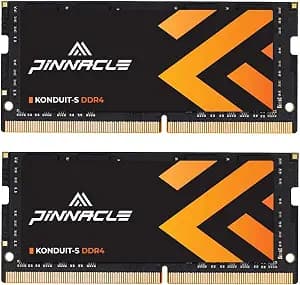
Timetec Pinnacle 32GB KIT(2x16GB) Premium DDR4 3200MHz (or 2933MHz or 2666MHz) PC4-25600 Non-ECC Unbuffered 1.2V CL22 260 Pin SODIMM Laptop Notebook PC Computer Memory RAM Upgrade
Description
Timetec – Memory of a lifetime Compatible with (But not Limited to): *Please click image for more compatible systems model Need to know if this part is compatible? Contact us with manufacturer and model information of your motherboard
Compare the trade-offs
Similar products, side by side
A random selection of analyzed products from the same category. Different products are not necessarily interchangeable.

Biwin Black Opal DW100 DDR5 RGB RAM 48GB (24GBx2) 6000MHz CL28 Computer Memory Intel XMP 3.0 AMD Expo Compatible- Black - DW100-48GB-6000-1R8-D28FB

Timetec Premium 32GB KIT (2x16GB) DDR4 3200MHz (PC4-3200AA) PC4-25600 SODIMM Laptop RAM – 260-Pin 1.2V CL22 Non-ECC Unbuffered Memory Module for Laptop, Notebook, Mini PC, All-in-One

Crucial Pro 32GB DDR5 RAM Kit (2x16GB), 6000MHz (or 5600MHz or 5200MHz or 4800MHz) Desktop Memory UDIMM 288-pin, Compatible with 13th Gen Intel Core and AMD Ryzen 7000 - CP2K16G60C48U5
One less thing to search
Before you buy: quick questions
この Timetec Pinnacle 32GB キットは私のノートパソコンに適合しますか、互換性をどうやって確認すればよいですか?
260ピンのDDR4 SODIMMスロットを持つほとんどのノートパソコンはこのキットを使用できますが、速度サポートはBIOSとマザーボードによります。ノートパソコンの取扱説明書または製造元のQVLを確認し、モデルのRAM制限(例:最大総RAM量と対応速度)を確認してください。多くのTikTokやRedditのユーザーは、ノートパソコンがより高速なDDR4をサポートしている場合に問題なく動作すると言っています。迷ったら、現在のRAMの仕様(速度、電圧、スロット)をキットの仕様と比較してください。
32GB へアップグレードした場合、どの程度の性能向上を期待すべきですか?
複数のアプリケーションやブラウザのタブを同時に多数実行する場合、よりスムーズなマルチタスクとアプリの起動の高速化を期待できます。実際の効果はCPU、SSD、ワークロードに依存します。ボトルネックがCPUボトルネックの場合やメモリ集約型タスクをあまり使用しない場合、アップグレードの効果は大きくない可能性があります。
取り付けはどのくらい簡単ですか、知っておくべきヒントはありますか?
取り付けは通常、比較的簡単で、約5~10分程度かかります。電源を切り、プラグを抜き、静電気を放電し、背面パネルを開け、モジュールを正しいスロットにしっかりおさめます。多くのユーザーがシンプルな“プラグ・アンド・プレイ”体験を報告していますが、速度や大きさが合わないものを混ぜないようにしてください。安定性や起動後の挙動に影響する可能性があります。
私のノートパソコンで動作しない場合の保証と返品オプションはどうなりますか?
地域や小売業者によって返品・保証規定が異なります。ほとんどの販売者はキットが未開封または未使用の場合に返品期間を提供し、RAMモジュールには一般的に何らかの保証が付いています。互換性の問題が発生した場合は、すぐにサポートに連絡し、返却や交換を容易にするために梱包をそのまま保ってください。
代替案を検討すべきでしょうか、それともアップグレードを後悔するリスクがありますか?
ノートパソコンにすでに16GBある場合、マルチタスクを重視する場合や大きなファイルを編集する場合、32GBは価値があることがあります。アップグレードスロットが限られている場合やモデルがRAM速度を好むと知られている場合は、互換性ガイドを確認し、正確なモデルの最近のユーザーフィードバックを読んでください。Timetecを他ブランド(Crucial、Corsair、G.Skill)と比較して、コスト対性能の最適な組み合わせを見つける人もいます。代替案もノートパソコンがサポートする速度と電圧に合致していることを確認してください。自信がない場合は、既存のRAMに16GBキットを追加する方が保守的な出発点となることがあります。多くの投稿は互換性を最初に確認し、不一致の速度を避けることを強調しています。
From a similar, more-reviewed product in this category: Crucial 16GB Kit (8GB x 2) DDR4 2666 MT/s (PC4-21300) UDIMM 288-Pin Memory - CT2K8G4DFRA266
Is this memory easy to install?
Yes. Reviewers describe it as easy to install, with one noting it took longer to open their Dell box than to snap in the two chips.
Will this improve my computer's performance?
Yes. Reviewers report their systems ran faster and smoother after upgrading, with one saying 16GB to 32GB made an older system snappy again.
Is this good value for the price?
Yes. Reviewers call it an excellent product for the price and a great price, with one describing it as stable, good, and cheap.
What are the key specifications of this memory kit?
It is a 16GB kit (2 x 8GB) of DDR4 2666 MHz UDIMM desktop memory, 288-pin, 1.2 volts, with a CAS latency of 19, and it carries a limited lifetime warranty.
Can this memory help with multitasking?
Yes. The listing states it increases your desktop's multitasking capabilities, and one reviewer reports being able to run 5-6 spreadsheets and several browsers with no problem.
Answers are limited to the manufacturer's listing and the reviews we analysed. Questions those sources cannot support are not answered here.
Transparent by design