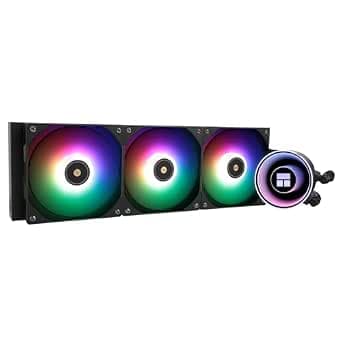
TR-Thermalright Frozen Notte 360 Black ARGB V2 Liquid CPU Cooler Infinite Mirror Light Effect, 360 mm Aio Cooling, 3PWM Fan 2000 rpm, for AM4/AM5, Intel LGA1851/1700/115x/1200/2011
Description
ARGB Infinity Mirror Light Effect - 4pin PWM power connector provides temperature control function with 2000RPM speed of the pre-installed fan to compensate for noise and airflow, and 5V 3pin ARGB lighting interface provides LED lighting effect and supports lighting effect series connection; Simplified installation - CPU water cooler with mounting keys, compatible slots AMD: AM4/AM5/FM1/FM2/FM2+AM3/AM3+/AM2/AM2+, Intel LGA1851/1700/1150/1151/1155/1156/1200/2011/206. 6; AIO radiator specifications - heat radiator specifications are 397x120x27mm, cold head: 72x72x54mm, water pump speed 5300RPM ± 10%, water pump interface: 12V 3pin, fan size: 120x120x25mm, speed: 2000RPM ± 10%, running noise ≤ 27.7dB (A) ), and the combination of High speed fans can bring the ultimate CPU cooling; Good heat dissipation: with 360 specification radiator and 120 mm ARGB balanced fan, round cold head ARGB infinity mirror light effect to create a quiet, high heat dissipation all-in-one water cooling radiator; Increased heat dissipation surface - The combination of highly efficient cooling radiator and water pipe can improve the water flow between the chambers, improve cooling performance and improve heat dissipation at high air output at 2000 rpm
One less thing to search
Before you buy: quick questions
Will the Thermalright Frozen Notte 360 fit my CPU socket and case out of the box?
Yes — it ships with mounting hardware for AM4, AM5, Intel LGA1851/1700/115x/1200, and 2011, so most modern builds are covered without extra kits. Just double-check your case supports a 360mm radiator (top or front mount), since that's the most common fit issue buyers run into.
How loud is it really, and is the noise a dealbreaker?
At idle and moderate loads it's quiet, but many Reddit and YouTube users note the three PWM fans get noticeably audible past ~1,500 RPM, and the pump has a faint hum. If you're chasing near-silent operation, consider tuning fan curves or looking at the Arctic Liquid Freezer series — otherwise, most owners find the noise acceptable for the cooling you get.
Does the ARGB lighting sync with my motherboard, and is installation difficult?
The infinite mirror pump and fans sync with major ecosystems like ASUS Aura, MSI Mystic Light, and Gigabyte RGB Fusion via a standard 5V ARGB header. Installation is generally straightforward — a few TikTok users mentioned needing a quick tutorial for the ARGB header, but most finish in under an hour.
Is it durable and worth the money compared to premium AIO brands?
Owners consistently praise its cooling performance and value, often calling it a "punch-above-its-price" cooler versus NZXT or Corsair. Long-term pump reliability is the main open question some buyers raise, so check the current warranty terms — but for the price, the build quality and temps are widely considered excellent.
Who is this cooler best suited for, and who should look elsewhere?
It's ideal for budget-conscious builders, RGB-focused setups, and first-time AIO users on AM4/AM5 who want strong cooling without premium pricing. If you're a silence-obsessed enthusiast or running a vertical radiator mount where tube routing gets awkward, a quieter or more flexible alternative may suit you better.
From a similar, more-reviewed product in this category: 4K144Hz HDMI Displayport KVM Switch 4 PC 2 Monitors 8K60Hz USB 3.0 KVM Switches For 4 Computers Share 2 Monitors and 4 USB Devices, Support Copy and Extension Display
Will this KVM switch work with my two HDMI monitors?
Not directly — and this is the detail most buyers wish they'd caught first. Monitor 1 must connect via **DisplayPort** and Monitor 2 via **HDMI**; the switch isn't designed for two HDMI displays, and adapter cables aren't recommended. Before ordering, check the ports on the back of both monitors. If you're running dual HDMI, an HDMI-only KVM will serve you far better.
Can I actually get 4K at 144Hz, or is that just marketing?
You can — but only if your entire signal chain supports it. Your graphics card, both monitors, *and* every cable in the run need to handle 4K@144Hz (or 8K@60Hz). Many reviewers note that weaker GPUs or standard HDMI cables will quietly cap you at 60Hz. Think of it as a team effort: one weak link and the whole chain drops to the lowest spec.
How reliable are the USB 3.0 ports with things like external SSDs or webcams?
For keyboards, mice, printers, and USB sticks, the four USB 3.0 ports are fast and dependable. High-power devices are a different story — the manufacturer itself recommends checking with support before connecting power-hungry gear like bus-powered SSDs. A quick message to AILVLVNG customer service before you buy can save you a return.
Is switching between computers smooth, and does the remote actually work?
You have two options: a physical button on the unit or the included remote. The remote is a real convenience for multi-PC desks, though users report it works best with a clear line of sight — treat it like a TV remote, not a long-range device. Expect a brief screen re-sync when switching inputs; that's normal EDID handshaking, not a defect.
The metal build looks great, but is this overkill for a non-technical user?
The metal housing is genuinely rugged and runs cool — a common point of praise. The real hurdle is setup: routing cables for four computers and two monitors takes patience, and labeling everything beforehand is worth the ten minutes. If you're comfortable with a bit of cable management, it's a solid long-term investment; if you want true plug-and-play, a simpler single-monitor KVM may suit you better.
Answers are limited to the manufacturer's listing and the reviews we analysed. Questions those sources cannot support are not answered here.
Transparent by design