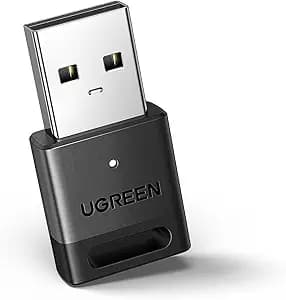
UGREEN USB Bluetooth 5.3 Adapter for PC, Plug & Play for Windows 11/10/8.1, Bluetooth Receiver & Transmitter for Keyboard/Mouse/Headphone/Speakers/Printer
Description
Upgraded Bluetooth 5.3 Adapter: This bluetooth adapter for pc uses the latest upgraded Bluetooth 5.3 BR+EDR technology, greatly improves the stability of the connection data transfer speed, reduces the possibility of signal interruption and power consumption.; Up to 5 Devices Sync Connected: UGREEN Bluetooth dongle for PC supports up to 5 different types of Bluetooth devices to be connected at the same time without interfering with each other, such as Bluetooth mouse/keyboard/mobile phone/headphones, etc. If Bluetooth audio devices of the same type (such as speakers/headphones) are connected, only one device can play music.; Plug and Play: The Bluetooth adapter is developed for Windows systems only and does not support other systems. No driver installation is required under Windows 11/10/8.1. NOTE: Win 7, Linux and MacOS System are NOT supported.; Mini Size: An extremely compact Bluetooth stick that you can leave on your laptop or PC without removing it.The compact size does not interfere with other USB ports. Convenient to carry, no space occupation.; Note: 1. It can not be used directly on PS3, PS4, PS5, Switch, or Xbox Console; but it works with Game Controllers. 2. The transmission range will be affected by physical obstructions, wireless interference and the wall. 3. It's not compatible with TV or Car; What Can I do if the Bluetooth adapter can not work?: Ensure there are no other Bluetooth devices installed on the computer. If there are, disable all existing Bluetooth devices in "Device Manager", then insert the adapter and try again. (For detailed information please read the user manual)
Compare the trade-offs
Similar products, side by side
A random selection of analyzed products from the same category. Different products are not necessarily interchangeable.

TP-Link USB Bluetooth Adapter for PC, Bluetooth 5.3 Long Range Receiver, Plug and Play, Adjustable Antenna, Supports Windows 11/10/8.1/7 for Desktop, Laptop, Keyboard, Mouse, etc (UB500 Plus)

Bluetooth Audio Adapter for Music Streaming Sound System, Esinkin Wireless Audio Adapter Works with Smartphones and Tablets, Bluetooth Receiver for Home Stereo

UGREEN USB Bluetooth Adapter for PC, Bluetooth 6.0 Dongle Receiver EDR & BLE, Plug & Play for Windows 11/10/8.1, for Headphone/Keyboard/Mouse/Speakers/Printer
One less thing to search
Before you buy: quick questions
Is this adapter truly plug-and-play, or will I need to install drivers?
For the vast majority of users on Windows 10 and 11, it is completely plug-and-play. Just insert it into a USB port, and Windows will automatically set it up. Many reviews highlight this effortless setup as a major plus. You only need to manually install drivers in rare cases, typically on older systems like Windows 8.1.
I need it mainly for my wireless keyboard, mouse, and printer. Is it reliable for that?
Absolutely. This is where the UGREEN adapter receives its strongest praise. Users consistently report stable, dropout-free connections for HID (Human Interface Device) peripherals like keyboards, mice, and printers. It's an excellent and affordable solution for upgrading a desktop PC with these basic wireless devices.
How is the audio quality and stability for headphones or speakers?
For casual music, podcasts, and video calls, most users find it works well. However, some social media feedback notes that for latency-sensitive activities like competitive gaming or high-fidelity music streaming, you may experience occasional audio lag or choppiness. If crystal-clear, low-latency audio is your top priority, a dedicated audio transmitter or a gaming-grade adapter might be a better fit.
Can I use this to connect my smartphone to my old, non-Bluetooth desktop speakers?
This is a common point of confusion. The adapter's "transmitter" mode allows your PC to send audio *to* a Bluetooth speaker or headphone. It cannot make your non-Bluetooth PC speakers receive a signal from your phone. To do that, you would need a Bluetooth *receiver* for your speakers, not this PC adapter.
What's the real-world range, and does the build feel durable?
The effective range is typically around 10 meters (33 feet) in an open space, but walls, your PC case, and other USB devices can reduce it. For best results, use a front-facing USB port. Regarding build, while it functions reliably, a few users mention the lightweight plastic construction. It's designed to be compact and unobtrusive, but if your USB ports are very tight or you'll be plugging/unplugging it constantly, handling it with care is advised.
From a similar, more-reviewed product in this category: Internet Splitter 1 in 4 Out, Gigabit Ethernet LAN Splitter High Speed
Can both connected devices get full gigabit speed at the same time?
No. The manufacturer states this is a passive splitter, so only one device can actively use the connection at a time unless paired with a network switch or router that supports network bridging. It physically splits one Ethernet cable into four but does not double the bandwidth.
Does this splitter support Power over Ethernet (PoE) devices?
No. The listing states this splitter does not support PoE passthrough, and connecting a PoE-enabled device through it may result in unstable performance or no connection. A dedicated PoE splitter or injector is recommended instead.
Does using this splitter reduce internet speed?
The manufacturer says it is built with high-quality materials and gold-plated contacts to minimize signal loss, but as a passive splitter it does not manage traffic and is meant for alternating connections rather than simultaneous high-speed use. One reviewer reported both connected devices getting full 1000Mbps Gigabit speeds simultaneously using Cat 6 cables, while another said they could not detect any loss of performance.
Is the splitter well made and durable?
Reviews are mixed on this point. One reviewer said it works fine but seems made of very cheap plastic and questioned how long it would last, and another reported it stopped providing Ethernet after a brief power outage about two months in, while other reviewers described it as good quality with no problems so far.
Is it easy to set up for someone who is not tech-savvy?
One reviewer said it needs clearer instructions for a novice non-techie, though it seemed to work for different tasks and laptops. Others found it convenient, including one who noted the USB power supply makes it easy to use by simply connecting it to a computer.
Answers are limited to the manufacturer's listing and the reviews we analysed. Questions those sources cannot support are not answered here.
Transparent by design