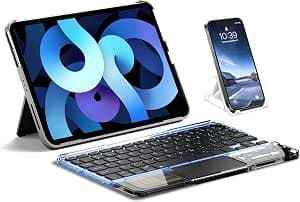
Ultra-Slim Bluetooth Keyboard with Touchpad, Wireless RGB Backlit, Portable Rechargeable Keyboard for iPad, Tablet, Laptop, Windows, Android, macOS Devices
Description
Seamlessly Switch Between 3 Devices via Bluetooth 5.3:Effortlessly pair with up to three devices — such as your phone, tablet, laptop, or even smart TV — and toggle between them with a simple press of FN + 1/2/3. Enjoy smooth multitasking and a strong, lag-free connection thanks to advanced Bluetooth 5.3 technology with up to 10 meters of stable range.; Ultra-Slim & Lightweight for Easy Portability:Measuring just 0.2 inches thin and weighing only 240g, this Bluetooth keyboard is designed for life on the go. Slip it into your bag or backpack and take it anywhere — ideal for travel, commuting, and business trips.; Comfortable & Laptop-Like Typing Experience:Enjoy smooth, precise control with the upgraded touchpad — now larger and more responsive, with no input lag. The top row features dedicated shortcut keys for quick access to common functions, while non-slip bottom grips keep the keyboard firmly in place. Whether you're working or browsing, you'll get a stable, laptop-style typing feel wherever you go.; Optimized for iPad, Fully Compatible with Windows: Seamlessly works with Windows and iPadOS, including iPad, iPad Pro, iPad Air, and iPad Mini. Whether you're typing documents or browsing on your iPad, this keyboard delivers a smooth, responsive experience that feels just right — making it the perfect match for iPad users who want to boost productivity on the go.; Built to Last with Long-Lasting Battery Life: The keys are durability-tested for over 5 million presses, ensuring reliable performance for years to come. On a full charge, the keyboard offers up to 150 days of standby time — perfect for travel, remote work, and anyone tired of frequent recharging.; 7-Color Backlit Bluetooth Keyboard:This ultra-slim wireless keyboard features 7 backlight color options — including 6 vibrant RGB tones and a clean white light — all with adjustable brightness to match your environment. Easily switch the lighting on or off with a single button. Designed with quiet and responsive scissor-switch keys, it delivers a smooth, comfortable typing experience that’s ideal for working or relaxing in low-light settings.; After-sales technical support:Our wireless keyboard kit products provide customers with perfect technical support, our customer service support team can quickly deal with any technical problems when you encounter problems.
Compare the trade-offs
Similar products, side by side
A random selection of analyzed products from the same category. Different products are not necessarily interchangeable.

Keychron K4 HE 96% Wireless Hall Effect Keyboard with Number Pad, Rapid Trigger Magnetic Switches, QMK Launcher, 2.4GHz/Bluetooth/Wired, Mac & Windows, Wood Accent Frame, Black (Non-Shine-Through)

Dell KB813 Black USB English Keyboard with Smart Card Reader-3WPNC

MONSGEEK FUN60 MAX Rapid Trigger Gaming Keyboard 8k SP Magnetic Switch HE Keyboard Multi-Modes Wireless 60% Nebula Black, Glare Magnetic Switch
One less thing to search
Before you buy: quick questions
Is the typing experience comfortable for long writing sessions or coding?
This keyboard is designed first for portability. While many users love it for on-the-go emails and chats, feedback from writers and programmers is mixed. The keys are low-profile and quiet. If you're used to a mechanical keyboard or deep key travel, you might find it less satisfying for 8-hour workdays. It's perfect as a compact travel companion, but heavy typists often keep a more tactile keyboard for their primary desk setup.
How reliable is the touchpad, and can it replace a mouse?
The integrated touchpad is best for basic navigation. Social media reviews consistently note it's small and very sensitive, great for quick taps and scrolls while mobile. However, for precise tasks like detailed graphic design or extensive spreadsheet work, users recommend keeping a separate mouse. Think of it as a convenient "emergency" pointer rather than a full mouse replacement.
What's the real-world battery life with the RGB backlighting on?
Battery life varies significantly with usage. With the vibrant RGB lights on at full brightness, you can expect roughly 8-15 hours of use, requiring charges every few days. With the backlighting turned off, it can last for weeks as advertised. Many TikTok users mention turning off the RGB during the day to extend battery life for travel.
I'm worried about durability because it's so slim. Will it survive in a backpack?
Its ultra-slim design is a strength for portability but does require a bit of care. The build is solid for daily use, but we (and many Reddit commenters) strongly recommend using a protective sleeve or hard case if you plan to toss it loosely into a bag with other items. It's durable under normal conditions but isn't designed to withstand heavy pressure or impacts.
Who is this keyboard really best for?
It's a fantastic fit for students, hybrid workers, and gamers who prioritize a sleek, portable setup with cool RGB flair. It shines for those using tablets or phones who need a compact typing solution for cafes, libraries, or travel. If your main need is a precise touchpad or a deeply tactile typing feel for long-form writing, you might be happier with a different style of keyboard. Check our full reviews to see how mobile enthusiasts rate it!
From a similar, more-reviewed product in this category: Razer Joro Wireless Gaming Keyboard, Portable Compact 75%, Low Profile Keys
Does the Razer Joro work wirelessly with Bluetooth, and how many devices can it pair with?
The listing states Bluetooth 5.0 with pairing for up to three devices across Windows, Mac, handhelds, and mobile, with shortcuts to switch between them. Reviews are mixed on wireless reliability: one reviewer reported stable, fast Bluetooth, while others reported connection problems and missed keystrokes after the keyboard sleeps.
How does the keyboard feel to type and game on?
The listing describes ultra low-profile switches with quick, precise actuation and satisfying tactile feedback. Reviewers who liked it compared the feel to laptop scissor keys and Apple-style chiclet keys, calling it quiet with good tactile response, though one noted the spacebar is small.
Is the Razer Joro actually portable and well built?
The listing says it weighs 374 g and is 16.5 mm thin with a full function row and full-sized arrow keys. Reviewers described it as sturdy and minimalist, and one noted the static angle is a deliberate trade-off for a keyboard meant to be carried around.
What are the complaints about the RGB lighting?
The listing advertises Chroma RGB with 16.8 million colors and dynamic effects. Reviewers reported a glow around the keys rather than through the lettering, secondary symbols that are hard to see, and one said the lighting stayed on while the PC was locked.
Do I need Razer Synapse software to use all the keyboard's features?
The listing ties Snap Tap and Chroma customization to Razer Synapse 4. Reviewers noted that some functions, such as turning off Fn lock to use F1–F12 directly, require Synapse, and one complained there is no Synapse software for SteamOS.
Answers are limited to the manufacturer's listing and the reviews we analysed. Questions those sources cannot support are not answered here.
Transparent by design