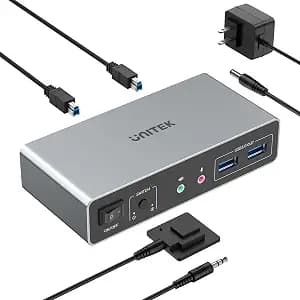
Unitek HDMI KVM Switch 2 Monitors 2 Computers 4K@60Hz USB 3.0 KVM Switches Share Dual HDMI Monitors 3 USB Ports for Keyboard Mouse Hard Drives Mic Headset Ports 2 Cable DC 5V Adapter Controller
Description
【HDMI 2 IN 2 OUT KVM Switch 】Compatible with HDMI video sources only.The Unitek HDMI KVM Switch lets you connect two computers to dual monitor and 3 USB 3.0 devices, such as a keyboard, mouse, hard drives, U disk, and printer. This KVM switch is also compatible with a wide range of input devices, including PCs and even PS4, and supports multiple operating systems like Windows 7/8/10/11/Vista/XP, Linux, Mac, and more.Mic and headset port support more function.; NOTE: DO NOT COMPATIBLE WITH LAPTOPS !; USAGE INSTRUCTIONS: This product is designed for use with desktop hosts only.The included USB A-to-B cable must be used. If HDMI and DP video outputs are required simultaneously, both host devices must have all necessary cables connected, including the USB B cable, HDMI cable.; 【4K Resolution & HDCP 】Enjoy crystal-clear visuals with support for resolutions up to 4K@60Hz, 2K, 3D, and 1080P, giving you the flexibility to meet various display needs. The HDMI KVM switch also supports HDMI 2.0, HDCP 2.2/1.4, USB 2.0, 3D, and HDR, ensuring stunning, lifelike image quality with vibrant colors that truly pop.; 【Two Ways of Switching】Easily switch between two computers with the one-button switch or the desktop controller, helping you save desk space while sharing your monitor, keyboard, and mouse. This boosts productivity whether you’re working from home or in the office. The wired remote switch allows you to place the KVM switch in a hidden or distant location, keeping your desk neat and organized. Simply position the remote control within easy reach for quick access.; 【5Gbps USB 3.0 ports】 Featuring four USB-A ports, the Unitek KVM switch seamlessly integrates with both USB 2.0 and USB 3.0 devices, including keyboards, mice, USB flash drives, printers, and mobile hard drives. With USB 3.0, you get lightning-fast data transfer speeds of up to 5Gbps, significantly faster than USB 2.0’s 480Mbps, allowing for quicker file and image transfers to make your work and life more efficient.; 【Plug and Play】It supports HDMI 2.0 and HDCP 2.2 standards. This KVM switch is a breeze to install — just plug it in, and you’re good to go with no driver software required.; 【Mirror or Extend Mode】 1.Windows System: Press Win + P, From the menu, select: Duplicate (Mirror Mode): Both screens show the same content.Extend (Extended Mode): Combines both screens into a larger workspace. 2.macOS System: After connecting an external display, press Option + F1 (or use the Touch Bar display icon).In the pop-up menu, select "Mirror" or "Extend".; 【5V2A Power Adapter】The package includes a DC 5V 2A power adapter to ensure stable performance when using multiple USB devices. The package also includes 2 x USB A to B cables, 1 x desktop controller, and 1 x DC 5V/2A power adapter-NOTE:Be sure to connect to a power source when using high-power equipment.
Compare the trade-offs
Similar products, side by side
A random selection of analyzed products from the same category. Different products are not necessarily interchangeable.

UGREEN 8K@60Hz HDMI Displayport KVM Switch 3 Monitors 2 Computers, Aluminum

8K@60Hz USB 3.0 KVM Switch hdmi 2 Port 4K@120Hz KVM Switcher for 2 Computers Share 1 Monitor and one Set of Keyboard Mouse webcame and Hard Disk, Wired Controller and 12V/1A DC Power Included

Unitek HDMI KVM Switch 1 Monitor 2 Computers with Power Adapter
One less thing to search
Before you buy: quick questions
Does this KVM switch reliably support audio through the microphone and headset ports?
For basic audio playback, it generally works well. However, a common note from users, especially on platforms like Reddit, is that the microphone pass-through can be inconsistent. Some report static or the mic cutting out during computer switches. If crystal-clear, uninterrupted mic audio is critical for your work or streaming, this might not be the ideal choice.
Is the build quality sturdy, and what about the included power adapter?
The unit is functional but lightweight, with a plastic casing that some users describe as feeling less premium. A few reviews mentioned the included DC power adapter failing prematurely. While many units work without issue, it's a good idea to have a compatible 5V adapter on hand just in case, as the switch requires external power to operate correctly.
I'm not very technical. Is this easy to set up for a dual-monitor home office?
The core video switching is often plug-and-play. However, many users find the included instructions lacking, especially for configuring dual monitors and multiple USB devices. Don't be discouraged if it doesn't work instantly—online forums and video tutorials are filled with helpful setup tips from the community that can get you up and running smoothly.
Who is this KVM switch best suited for, and who might want to look elsewhere?
It's an excellent value-driven solution for remote workers or anyone looking to cleanly share two monitors between two computers for general productivity (email, browsing, office apps). If your primary needs are seamless 4K video switching and peripheral sharing, you'll likely be satisfied. Gamers, streamers, or audio/video professionals who need guaranteed high-bandwidth USB and flawless audio may want to consider a more specialized, higher-end model.
Does it deliver true USB 3.0 transfer speeds for external hard drives?
While it features USB 3.0 ports, the data throughput is a common point of feedback. Users connecting external storage drives often report speeds closer to USB 2.0. It's perfectly reliable for connecting your keyboard, mouse, or webcam, but for frequent large file transfers, you'll get better performance connecting your hard drive directly to your computer.
From a similar, more-reviewed product in this category: Unitek HDMI KVM Switch 1 Monitor 2 Computers with Power Adapter
Can I switch between computers with a keyboard shortcut, or do I have to press a button?
This model uses a physical button on the unit — there's no hotkey switching. That's the most common complaint in reviews, so if keyboard shortcuts are a must-have for your workflow, you'll want to look at a hotkey-capable KVM instead. If you're fine reaching for a button (or placing the switch within arm's reach), it works reliably.
Do I need to use the included power adapter, or can it run without it?
Use the adapter. While some users have tried bus-powering it, the most stable experience — especially with wireless peripherals — comes from plugging in the included DC adapter. Several reviewers noted mouse dropouts when running unpowered, so treat the adapter as required, not optional.
Will it work with my Mac and Windows PC together, and does it handle 4K?
Yes, mixed Mac/Windows setups are one of its most common use cases, and it's plug-and-play for both. For resolution, check your monitor's specs against the switch's rated maximum before buying — some users with high-refresh or 4K@60Hz displays ran into EDID handshake issues (blank screen after sleep), which is the second-most-cited complaint. Standard 1080p and 4K@30Hz setups report smooth sailing.
Are the cables included, and are they long enough for a desktop tower?
Yes — HDMI and USB cables are in the box, which reviewers consistently call a nice bonus. That said, they're on the short side (roughly 3 ft), so they're ideal for laptop docks or monitors sitting close to both computers. If your tower lives under the desk, plan on buying longer cables.
Who is this KVM best suited for — and who should skip it?
It's a great fit for remote workers, students, or anyone sharing one monitor, keyboard, and mouse between two computers on a budget, especially if you value compact size, included cables, and simple setup. Skip it if you need hotkey switching, dual-monitor output, DisplayPort, or rock-solid EDID behavior with a fussy high-refresh display — in those cases, a TESmart or Cable Matters alternative will save you the return shipping.
Answers are limited to the manufacturer's listing and the reviews we analysed. Questions those sources cannot support are not answered here.
Transparent by design