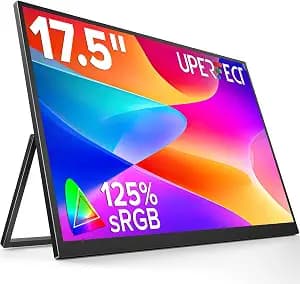
UPERFECT 17.5" Portable Monitor 1920×1200 FHD 16:10 IPS 125% sRGB 400 nits USB-C & HDMI Laptop Extender with 180° Adjustable Stand, Travel Second Screen for MacBook, PC, Phone & Gaming
Description
【Immersive Visual Experience】The UPERFECT 17.5" portable monitor features a 1920×1200 FHD 16:10 IPS screen with 125% sRGB color, 400 nits brightness, and a 1500:1 contrast ratio. This USB-C laptop monitor delivers vivid colors, sharp details, and wide viewing angles, perfect as a second screen for gaming, streaming, creative editing, and work productivity.; 【Stand & VESA Installable】Designed as a slim travel monitor, it comes with a built-in 180° adjustable stand for landscape and portrait use. The integrated 75mm VESA mount (M4) lets you install this external display on a wall, monitor arm, or desktop stand, offering flexible home office and mobile workstation setups.; 【Dual USB-C & HDMI Connectivity】Equipped with two full-featured USB-C ports and Mini HDMI, this portable laptop monitor connects easily to laptops, PCs, smartphones, tablets, and gaming consoles. Ideal for business presentations, video editing, console gaming, and remote work on the go.; 【Multi-Screen Productivity】 Use as an extended, mirrored, or main secondary display to boost productivity. The 16:10 ratio provides extra vertical workspace, making this productivity monitor perfect for coding, data analysis, Office work, photo/video editing, multitasking, and professional workflows on Windows, macOS, and Android.; 【Plug-and-Play & Eye Care Audio】A single USB-C cable handles both power and video—no driver or app required (full-featured USB-C needed). This plug-and-play portable display features flicker-free and low blue light eye protection, while the dual stereo speakers offer enhanced audio for movies, gaming, and mobile entertainment.
One less thing to search
Before you buy: quick questions
Does this portable monitor have its own battery, or does it need to be plugged in?
It needs to be plugged in. The UPERFECT monitor draws power directly from your connected device (laptop, phone, gaming console) via USB-C or from a separate power adapter. This is a common point of clarification—many users love the simplicity, but if you need a truly cord-free experience for use on a long flight, you'd want to look for a model with an integrated battery.
Is the adjustable stand stable enough for use on my lap or a couch?
The 180° stand offers great viewing angles, but its stability can vary on uneven surfaces. On a firm desk, it's rock-solid. However, as noted in some user reviews, using it on a soft surface like a bed or your lap may cause slight wobbling if you move around. For lap use, many find it perfectly acceptable, but if absolute stability in any condition is your top priority, you might consider a monitor with a different stand design.
I'm confused about the USB-C ports. How do I set it up correctly with my MacBook?
It's simpler than it looks! You only need one cable for both video and power. Connect a USB-C cable from your MacBook's Thunderbolt port to the monitor's USB-C port labeled "Full-Function" (usually the one closest to the center or with a specific icon). That's it—it should power on and extend your display instantly. The second USB-C port is for power-only input if you need an alternative source.
How is the screen quality for color-sensitive work like photo editing?
The 125% sRGB color gamut and IPS panel provide vibrant and accurate colors that many hobbyist and semi-pro editors find excellent for the price. It's a standout feature praised in reviews. For critical professional work, some users recommend a quick calibration, as color temperature can vary slightly out of the box. Overall, it's considered a fantastic value for creative tasks.
Who is this monitor NOT a good fit for?
While versatile, it might not be the best match for two types of users: 1) Those seeking ultimate portability without any cords (as it requires a power source), and 2) Users who need a perfectly calibrated, professional-grade display right out of the box without any manual adjustment. It shines brightest for travelers, remote workers, students, and gamers looking for a high-quality, affordable second screen.
Answers are limited to the manufacturer's listing and the reviews we analysed. Questions those sources cannot support are not answered here.
Transparent by design