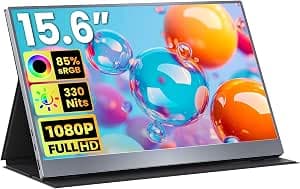
Upperizon Portable Monitor 15.6 Inch FHD 85% sRGB 60Hz IPS HDR HDMI USB-C Travel Monitor for Laptop, MacBook, PC, Surface PS5, Xbox, External Display with Case and Speakers
Description
Upperizon Portable Monitor 15.6 Inch FHD 85% sRGB 60Hz IPS HDR HDMI USB-C Travel Monitor for Laptop, Macbook, PC, Surface PS5, Xbox, External Display with Case and Speakers, VESA Compatible
One less thing to search
Before you buy: quick questions
Is this truly a plug-and-play monitor for devices like a Nintendo Switch or laptop?
Yes, for the most part! It's designed for easy connectivity. For your Nintendo Switch, you can connect it directly in portable mode using a USB-C to USB-C cable (included). For laptops, a single USB-C cable can often handle both video and power if your port supports DisplayPort Alt Mode. We include all necessary cables (HDMI, USB-C), and many TikTok users have shown how quickly they set it up with their MacBook or gaming console.
How durable is the monitor for regular travel? I'm worried about screen scratches.
That's a smart concern. The monitor itself is lightweight but feels solid. Its best defense is the included hard-shell case, which has a front cover to protect the screen. While the case is praised for inclusion, some Reddit users suggest it's good for general protection in a backpack but recommend additional caution against sharp pressure. For frequent, rugged travel, using a padded laptop sleeve *inside* the case is a popular user hack for extra peace of mind.
Can I power the monitor using just my laptop, or do I need a separate power brick?
It depends on your laptop's USB-C port. If your port supports "power delivery" and "DisplayPort Alt Mode" (common on newer laptops), a single cable can do both! If you encounter issues, the reliable solution—as mentioned in many reviews—is to use the included HDMI cable for video and the USB-C cable for power (connected to your laptop or a phone charger). We recommend checking your laptop's specifications for the smoothest experience.
The specs mention HDR and built-in speakers. How good are they really?
Let's be honest so you have the right expectations. The HDR is a software-enhanced feature that can brighten the image, but it's not true, high-end HDR for cinematic movies. The built-in speakers are convenient for basic audio in a pinch but are quite basic—they lack bass and volume. Almost every review, including positive ones, suggests using headphones or external speakers for gaming, movies, or music. This monitor's strengths are its vibrant visual panel and portability, not its audio.
Who is this portable monitor NOT a good fit for?
It might not be the best match if you are a competitive esports gamer needing a 120Hz+ refresh rate, a professional photo/video editor requiring 100% sRGB color calibration, or someone who prioritizes premium metal construction. It's a fantastic value-driven solution for students, remote workers, casual gamers, and travelers who need a reliable, portable second screen without breaking the bank.
Answers are limited to the manufacturer's listing and the reviews we analysed. Questions those sources cannot support are not answered here.
Transparent by design