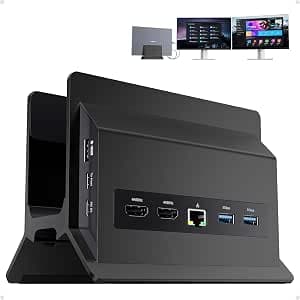
USB C Docking Station 11 in 1 Dual Monitor, Laptop Docking Stations with 2xHDMI 4K 60Hz, 3xUSB A/C 10Gbps, RJ45 for Full-Featured Type-C Laptops (Black)
Description
【HDMI Docking Station Problems Troubleshooting】 1. Note for using Dock's HDMI port(s) with your laptop in Clamshell mode: 1) Please preset your Windows laptop Do not sleep automatically. 2) Please connect a mouse to wake up the monitor when you set your laptop to CLAMShell mode. 3) Please connect a PD power adapter higher than 65W to the "USB C-PD" port on the dock; 2. Please connect your monitor to HDMI ports, not USB-C ports, all USB-C ports on dock do not support video output.; 【VERTICAL DOCKING STATION WITH DUAL SCREEN】- This USB-C docking station supports SST (ABB/AAA) or MST (ABC) mode on Windows laptops to extend/mirror 2 displays simultaneously. Start enjoying stunning 4K resolution at 60Hz (DP1.4 laptop) with stunning clarity for a truly exciting and immersive work experience. NOTE: Due to Mac OS limitations, this dock is not compatible with MacBook/Macbook Pro and will NOT split the screen. Not compatible with Mac mini m4.; 【Laptop Docking Station with Full Connectivity】 - PULWTOP laptop docking station for dual monitors includes 2 HDMI 4K at 60Hz, 2 USB C Gen2 10Gbps, USB A Gen2 10Gbps, 2 USB 3.0 5Gbps, Wired RJ45 Gigabit Ethernet, USB A 2.0, USB-C PD100W and USB C to port Host. Effortlessly supports 2 external monitors for Full HD movies, games, office meetings and entertainment, while providing enough ports for mouse, keyboard and most other USB A/C devices. NOTE: AC adapter is NOT included; 【HIGH SPEED DATA TRANSFER】 - Ultra-fast USB C and USB-A data ports provide transfer speed of up to 10Gbps, allowing you to transfer large files in seconds between laptops and tablets, smartphones, USB sticks and other external storage devices. The 2 USB-A ports (5Gbps) offer more connectivity options for USB A drives, printers, while an additional USB A 2.0 port for mouse/keyboard with lower latency. NOTE: ALL USB C data ports ONLY support data transfer, DO NOT support video and charging; 【Vertical Docking Station to Optimize Your Desk】 The vertical docking station design can keep your laptop in an upright position, which improves air circulation and good heat dissipation to prevent overheating and extend the life of your laptop, as well as save space. Easy to install, no tools required, automatically locks to hold the laptop. Holds devices up to 1.6 inches thick, suitable for holding most laptops and notebooks even with cases.; 【PD Charging & Wide Compatibility】: USB-C PD port supports up to 100W input and 85W safe charging on your host. The USB-C laptop docking station is compatible with most Thunderbolt 4/3, USB4 and USB-C Windows/ChromeOS laptops (support power, data transfer and alternative display mode). Note: It is recommended to use power above 65W to ensure stable power input for your laptops.
One less thing to search
Before you buy: quick questions
Is a power adapter included, and what do I need to power it fully?
No, a power adapter is not included. To use all ports (especially dual 4K monitors), you'll need to provide your own USB-C Power Delivery (PD) charger. We recommend a 100W adapter for optimal performance. Many TikTok users have shared success using compact 100W GaN chargers for a clean setup.
I have a MacBook (M1/M2/M3 chip). Will this support dual 4K monitors at 60Hz?
Compatibility can be inconsistent for dual 4K@60Hz on modern MacBooks. While it often works for a single 4K display, some users report needing specific settings or achieving only 30Hz on the second monitor. For guaranteed dual 4K@60Hz on Apple Silicon Macs, a Thunderbolt dock (like those from CalDigit or Anker) is a more reliable choice.
How is the build quality and does it overheat during long work sessions?
The dock has a sturdy, space-saving vertical design that users praise. During heavy, continuous use with multiple ports active, it's common for the unit to become warm to the touch—this is noted in many Reddit discussions. This is typical for compact docks, but it's designed to operate safely within these temperatures. For 24/7 operation, ensuring good ventilation around the dock is advised.
What if it doesn't work with my specific laptop setup? What's the return policy?
We offer a standard return window for items in new condition. Given the compatibility nuances, especially around monitors and Macs, we recommend testing the dock thoroughly early on. If you encounter issues, our support team can help with basic troubleshooting. Many YouTube reviewers suggest checking your laptop's port specifications (look for "DisplayPort Alt Mode" support) before purchasing to ensure compatibility.
Who is this docking station best suited for?
This dock is an excellent value-driven solution for Windows/PC laptop users (from brands like Dell, HP, and Lenovo) who need robust connectivity—dual 4K monitors, Ethernet, and multiple USB ports—without the premium price tag. It's perfect for remote professionals, students, and home office users looking to declutter their desk with the vertical stand design.
Answers are limited to the manufacturer's listing and the reviews we analysed. Questions those sources cannot support are not answered here.
Transparent by design