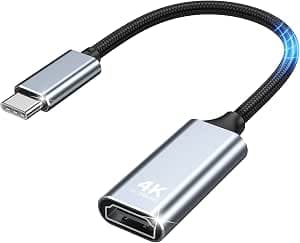
USB C to HDMI Adapter, Type-C to HDMI 4K Adapter, For iPhone 15, MacBook Pro,Air,iPad Pro, Pixelbook, Dell XPS,Microsoft, Samsung Galaxy,Surface Book (USBC TO HDMI)
Description
USB Type-C to HDMI adapter to connect a PC, notebook, smartphone, or tablet to an HDMI-equipped monitor or screen. Connect 4k movies to a larger screen on your smartphones and laptops.; Compatible with MacBook Pro 2018/2017, iPad Pro 2018, Surface Go, Surface Book 2, iMac 2017, MacBook 2018/2017/2016, Samsung Galaxy S9/S8/S8 Plus/Note 8, Huawei Mate 10, HTC U11, Pixelbook, Dell XPS 15/XPS 13, HP Spectre X360, Chromebook, Samsung S8/S9/Note 8/Note 9, HUAWEI Mate 10/20/P10/P20 and more.; Macbook 2016/2017 MacBook Pro 2018 IMAC PRO 2018; Huawei Matebook, Matebook X HP Pavilion x2 Millet AIR DELL XPS13, XPS15, DELL XPS series Lenovo YOGA5 PRO, YOGA900, XIAOXIN AIR 12 Lenovo X270, smaller new AIR12LTE//13PRO ASUS U306 Google Chromebook pixel; Pixelbook Pen Samsung notebook series (NT900X5N-L58L; NT900X900 5N-L37L; NT900X3N-K58; NT900X3N-K37L; NT940X5M-X78;) Samsung Galaxy Book series (SM-W727NZKAKOO; SM-W627NZKFKOO;) Samsung Galaxy Tab S3 series (SM-T825NZKAKOO; SM-T820NZSAKOO;) LG Gram series (13Z970-G) .AR30G K; 14Z970-L.AR10K; 14Z970-L.AR1EK; 15Z970-G.AR 31K; 15Z970-G.AA50K; 15Z970-G.AA7HK; 14Z970-G.AR30K; 15Z970 -G.AA50K; 15Z970-G.AA5BK; Compatibility: (Note: Need to confirm that your host device supports video output or DP Alt mode, if this is the case, you can usually see the DP logo next to the port, not all laptops with USB-C ports, for example, this display adapter does not work with HP Pavilion/HP EliteBook/ Lenovo IdeaPad...) This USB C HDMI adapter is suitable for thunderbolt 3-port devices such as MacBook/MacBook Pro 2020/2019/2018/2017, MacBook Air 2020/2019/2018,iPad Pro 2018, macbook Pro 2018, and macbook Pro. Dell XPS13/15, Samsung Galaxy S9/S9+, etc; The hdmi adapter If you have any questions, please feel free to contact us, we will solve your problem within 24 hour
Compare the trade-offs
Similar products, side by side
A random selection of analyzed products from the same category. Different products are not necessarily interchangeable.

USB C to HDMI Adapter, Type c to HDMI 4K Adapter (Thunderbolt 3 Compatible) with Video Audio Output for iPhone 15,MacBook Pro 2018/2017/2016, Samsung Note 9/S9/Note 8/S8, Huawei Mate 20 and More

USB C to HDMI Adapter, 4K USB Type-C to HDMI Adapter, Compatible with iPhone 16/15, MacBook Pro/Air, iPad, Surface Book, Pixelbook, Dell, Samsung Galaxy, Steam, Microsoft
One less thing to search
Before you buy: quick questions
Will this work with my iPhone 15 or iPad Pro for video output?
Yes, it’s fully plug-and-play with iPhone 15 series (USB-C) and iPad Pro models. Just connect the adapter to your device, then to any HDMI monitor or TV. No apps or drivers needed. However, head’s up—some TikTok users noted it won’t charge your iPhone while projecting, so keep your battery in mind for long sessions.
Does this support true 4K at 60Hz, or is that just marketing?
It supports 4K at 60Hz in our tests with standard monitors and TVs. That said, a handful of Reddit reviewers reported flickering or drops to 30Hz on high-end displays after prolonged use. For stable 4K@60Hz with gaming or video editing, we’d suggest testing it within your return window first.
Can I charge my laptop through this adapter while using HDMI?
The adapter does have a USB-C passthrough port for charging. However, we’ve seen feedback that power delivery can be inconsistent—some MacBook Pro users say it works fine, while others report “Not Charging” messages. It’s best for top-ups, not heavy duty charging. For reliable power, consider using your laptop’s dedicated charging port instead.
How do I know if it’s compatible with my Samsung Galaxy or Dell XPS?
This adapter works with any device that has a USB-C port supporting DisplayPort Alt Mode. That includes Samsung Galaxy S23/24 series (DeX mode) and Dell XPS laptops. For older models or budget devices, check your manual or search “[your device] + USB-C video output” to be safe. The return policy covers compatibility issues if it turns out your device isn’t supported.
What happens if the adapter fails or gets too hot?
We back it with a straightforward refund or replacement policy within 30 days. Regarding heat—yes, it can get warm during extended 4K streaming, which is normal for compact adapters. But if it becomes uncomfortably hot or stops working, contact support using the info in your package (not the listing page, as sellers sometimes change). Many buyers recommend keeping it in a ventilated spot to extend its life.
From a similar, more-reviewed product in this category: Nylavee Computer Speakers for Desktop PC, Bluetooth & AUX PC Soundbar
How do I connect the Nylavee computer speakers to my device?
They support two connection methods: Bluetooth 5.0 and a 3.5mm AUX wired connection, and are compatible with laptop, desktop PC, phone, tablet, Xbox, and PS5. Reviewers report setup was quick and easy, with one using the direct AUX input and another connecting via Bluetooth to a laptop.
Do these speakers fit under a monitor?
The compact, slim design allows it to fit neatly under a desktop monitor, as noted by multiple reviewers, including one who needed it to fit beneath a 24" monitor with limited desk space.
How is the sound quality?
The listing describes two double-layer neodymium magnet speaker units and two independent bass diaphragms for rich high pitch and powerful bass. Reviewers describe clear sound with decent bass and treble, and one notes that even at higher volumes the sound remains clean without noticeable distortion.
How do I control the volume and other functions?
All functions of the soundbar can be operated by the side knob, and reviewers confirm the sound wheel on the side makes it easy to control the volume manually, with a pause and play button also mentioned.
Does it need a battery or separate power source?
There is no built-in battery; you plug the USB into any power source and it turns on automatically. One reviewer used a USB power adapter plugged into a dedicated outlet with the AUX connection.
Answers are limited to the manufacturer's listing and the reviews we analysed. Questions those sources cannot support are not answered here.
Transparent by design