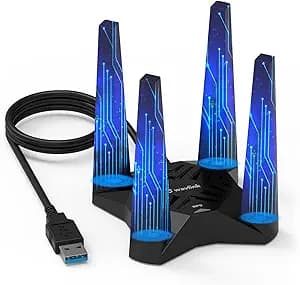
USB WiFi 6 Adapter for Desktop PC, WAVLINK AX1800 WiFi 6 Adapter, Dual Band 2.4GHz/5GHz Wireless Network Adapter with 4x3dBi High Gain Antennas, MU-MIMO, OFDMA, WPA3, Supports Windows 10/11 Only
Description
【Upgrade Your PC WiFi Performance】WAVLINK 𝐔𝐒𝐁 𝟑.𝟎 𝐖𝐢𝐅𝐢 𝟔 𝐚𝐝𝐚𝐩𝐭𝐞𝐫 supports both 𝟐.𝟒𝐆𝐇𝐳 𝐚𝐧𝐝 𝟓.𝟖𝐆𝐇𝐳 frequency bands (600Mbps on 2.4GHz, 1200Mbps on 5.8GHz ), providing a stable and fast wireless signal. Ultra-low latency, no stuttering, suitable for gaming, streaming video, and more. 𝐏𝐥𝐞𝐚𝐬𝐞 𝐮𝐬𝐞 𝐔𝐒𝐁 𝟑.𝟎 𝐩𝐨𝐫𝐭 𝐭𝐨 𝐞𝐧𝐬𝐮𝐫𝐞 𝐨𝐩𝐭𝐢𝐦𝐚𝐥 𝐩𝐞𝐫𝐟𝐨𝐫𝐦𝐚𝐧𝐜𝐞.; 【Increased WiFi Coverage & Stability】Equipped with 𝟒𝐱𝟑𝐝𝐁𝐢 𝐡𝐢𝐠𝐡-𝐠𝐚𝐢𝐧 𝐚𝐧𝐭𝐞𝐧𝐧𝐚𝐬, this PC WiFi adapter provides strong signal and stable connection. The included 𝐔𝐒𝐁 𝟑.𝟎 𝐜𝐚𝐛𝐥𝐞 supports data transfer speeds up to 5Gbps, ensures maximum throughput performance and a more stable internet connection for the wifi adapter.; 【Soft AP Mode & WiFi Mode】This WiFi adapter has a soft AP function that turns a wired network connection into a WiFi hotspot, transmitting wireless signals from your networked PC to your mobile, laptop, tablet, or other devices. Alternatively, in WiFi Mode, you can directly connect your PC to the WiFi signal, providing 1800mbps network without the need for an Ethernet cable.; 【WPA3 Secure & Flexible Deployment】This USB WiFi 6 adapter adopts 𝐖𝐏𝐀𝟑 encryption (backward compatible with WPA2/WPA), enabling secure connection. 𝐌𝐚𝐠𝐧𝐞𝐭𝐢𝐜 𝐛𝐚𝐬𝐞 𝐝𝐞𝐬𝐢𝐠𝐧 𝐰𝐢𝐭𝐡 𝐚 𝟏 𝐦𝐞𝐭𝐞𝐫 𝐔𝐒𝐁 𝟑.𝟎 𝐜𝐚𝐛𝐥𝐞 𝐞𝐧𝐬𝐮𝐫𝐞𝐬 𝐟𝐥𝐞𝐱𝐢𝐛𝐥𝐞 𝐩𝐥𝐚𝐜𝐞𝐦𝐞𝐧𝐭, ideal wifi adapter for desktop PC. 𝐎𝐧𝐥𝐲 𝐈𝐧 𝐑𝐚𝐫𝐞 𝐂𝐚𝐬𝐞𝐬, 𝐈𝐟 𝐭𝐡𝐞 𝐚𝐝𝐚𝐩𝐭𝐞𝐫 𝐰𝐚𝐬 𝐜𝐮𝐭𝐭𝐢𝐧𝐠 𝐢𝐧 𝐚𝐧𝐝 𝐨𝐮𝐭 𝐬𝐨𝐦𝐞𝐭𝐢𝐦𝐞𝐬, 𝐏𝐥𝐞𝐚𝐬𝐞 𝐓𝐫𝐲 𝐭𝐨 𝐫𝐞𝐩𝐥𝐚𝐜𝐞 𝐭𝐡𝐞 𝐔𝐒𝐁 𝐜𝐚𝐛𝐥𝐞.; 【Compatibility Systems】This wifi usb adapter 𝐨𝐧𝐥𝐲 supports 𝐖𝐢𝐧𝐝𝐨𝐰𝐬 𝟏𝟎/𝟏𝟏 (32/64 bit). The adapter comes with the built-in driver, allowing for seamless usage after a easy setup. Note: The driver pop-up window will appear in the lower right corner of the taskbar. If the pop-up window does not appear, open “This PC,” look for "CD Drive‘’, and then proceed with the installation. 𝐈𝐟 𝐲𝐨𝐮 𝐧𝐞𝐞𝐝 𝐭𝐨 𝐝𝐨𝐰𝐧𝐥𝐨𝐚𝐝 𝐭𝐡𝐞 𝐝𝐫𝐢𝐯𝐞𝐫 𝐦𝐚𝐧𝐮𝐚𝐥𝐥𝐲, 𝐩𝐥𝐞𝐚𝐬𝐞 𝐬𝐞𝐚𝐫𝐜𝐡 𝐟𝐨𝐫 𝐖𝐋-𝐖𝐍𝟔𝟗𝟑𝐗𝟏𝐅 𝐢𝐧 𝐭𝐡𝐞 𝐒𝐮𝐩𝐩𝐨𝐫𝐭-𝐃𝐫𝐢𝐯𝐞𝐫 𝐬𝐞𝐜𝐭𝐢𝐨𝐧 𝐨𝐧 𝐭𝐡𝐞 𝐖𝐚𝐯𝐥𝐢𝐧𝐤.𝐜𝐨𝐦 𝐰𝐞𝐛𝐬𝐢𝐭𝐞 𝐭𝐨 𝐝𝐨𝐰𝐧𝐥𝐨𝐚𝐝 𝐭𝐡𝐞 𝐥𝐚𝐭𝐞𝐬𝐭 𝐝𝐫𝐢𝐯𝐞𝐫.; 【𝐀𝐛𝐨𝐮𝐭 𝐀𝐟𝐭𝐞𝐫 𝐒𝐚𝐥𝐞𝐬】: Please feel free to contact us if you have any questions. 𝐏𝐡𝐨𝐧𝐞 𝐬𝐮𝐩𝐩𝐨𝐫𝐭: +𝟏𝟖𝟖𝟖𝟗𝟕𝟑𝟎𝟖𝟖𝟑 ( 𝐔𝐓𝐂-𝟓 ) 𝐌𝐨𝐧-𝐅𝐫𝐢 𝟗𝐀𝐌-𝟔𝐏𝐌. 𝐄𝐦𝐚𝐢𝐥 𝐬𝐮𝐩𝐩𝐨𝐫𝐭: 𝐂𝐨𝐧𝐭𝐚𝐜𝐭@𝐰𝐚𝐯𝐥𝐢𝐧𝐤.𝐜𝐨𝐦. 𝐎𝐫 𝐜𝐨𝐧𝐭𝐚𝐜𝐭 𝐮𝐬 𝐯𝐢𝐚 𝐀𝐦𝐚𝐳𝐨𝐧. 𝐖𝐞 𝐰𝐢𝐥𝐥 𝐩𝐫𝐨𝐯𝐢𝐝𝐞 𝐬𝐨𝐥𝐮𝐭𝐢𝐨𝐧𝐬 𝐰𝐢𝐭𝐡𝐢𝐧 𝟖𝐡. 𝐘𝐨𝐮'𝐥𝐥 𝐀𝐥𝐬𝐨 𝐄𝐧𝐣𝐨𝐲 𝐓𝐰𝐨 𝐘𝐞𝐚𝐫𝐬 𝐎𝐟 𝐒𝐮𝐩𝐩𝐨𝐫𝐭. 𝐈𝐟 𝐀𝐧𝐲𝐭𝐡𝐢𝐧𝐠 𝐆𝐨𝐞𝐬 𝐖𝐫𝐨𝐧𝐠 𝐃𝐮𝐫𝐢𝐧𝐠 𝐓𝐡𝐚𝐭 𝐓𝐢𝐦𝐞, 𝐖𝐞'𝐥𝐥 𝐒𝐞𝐧𝐝 𝐘𝐨𝐮 𝐀 𝐁𝐫𝐚𝐧𝐝-𝐧𝐞𝐰 𝐑𝐞𝐩𝐥𝐚𝐜𝐞𝐦𝐞𝐧𝐭 𝐅𝐨𝐫 𝐅𝐫𝐞𝐞.; 𝐄𝐬𝐬𝐞𝐧𝐭𝐢𝐚𝐥 𝐂𝐥𝐚𝐫𝐢𝐟𝐢𝐜𝐚𝐭𝐢𝐨𝐧 & 𝐎𝐩𝐭𝐢𝐦𝐚𝐥 𝐔𝐬𝐞: This is a USB WiFi 6 Adapter designed to add or upgrade WiFi capability to your computer. It is 𝐍𝐎𝐓 a WiFi booster, extender, or repeater and 𝐜𝐚𝐧𝐧𝐨𝐭 strengthen existing signals from your router. Driver installation is required for the system to recognize the device. For the best experience, we recommend pairing it with a WiFi 6 router to unlock its full potential. Please note, if used with a standard WiFi 5 router, the performance will be limited.
Compare the trade-offs
Similar products, side by side
A random selection of analyzed products from the same category. Different products are not necessarily interchangeable.

Plugable USB to Ethernet Adapter, USB 3.0 to Gigabit Ethernet, Compatible with Windows 11, 10, 8.1, 7, XP, macOS, Linux, Chrome OS

TP-Link Nano USB WiFi Dongle 150Mbps High Gain Wireless Network Adapter for PC Desktop and Laptops. Supports Win10/8.1/8/7/XP Linux 2.6.18-4.4.3, Mac OS 10.9-10.15 (TL-WN722N)

WAVLINK AX5400 USB WiFi 6E Adapter for PC, Tri-Band USB3.0 WiFi Adapter for Desktop PC Laptop, Wireless Adapters with 4x5 dBi,Antennas, 6G/5.8G/2.4G, OFDMA, WPA3, WiFi Dongle for Windows 11/10 ONLY
One less thing to search
Before you buy: quick questions
Is the WAVLINK AX1800 USB WiFi Adapter truly plug-and-play, or do I need to install drivers manually?
You’ll need to load the driver, but it’s quick once you know the trick. On Windows 11, the system won't pick it up automatically, so you’ll need to download the driver from the WAVLINK website. Several Reddit users suggest doing this *before* plugging in the adapter to save yourself a headache. Once the driver is installed, the adapter is recognized on every subsequent reboot.
I have a desktop in a room far from my router. Will this adapter actually improve my signal, or is it just for close-range use?
Yes, it’s specifically designed to fix this problem. The four external antennas are the key selling point here. In real-world tests mentioned in YouTube reviews, users saw a significant improvement from "one bar" to "full bars" in rooms where built-in USB adapters failed. It’s still not a substitute for a high-end PCIe card with external antenna mounts, but for a standard wall/distance situation, it performs very well. For best results, use the included USB extension cable to get the adapter up high and away from the PC chassis interference.
Will this adapter overheat and disconnect during long gaming or streaming sessions?
This is the most common criticism we found in the reviews. While the adapter doesn't throttle for normal web browsing, some users on TikTok and Reddit reported that after 30–45 minutes of heavy use (downloads or gaming), the unit gets warm, which can sometimes lead to a disconnect. It’s not universal, but it does happen. To help, ensure it's in a well-ventilated area and not sandwiched between a hot GPU and a wall. If you plan on marathon gaming sessions where a drop is unacceptable, a PCIe card might be a safer bet.
How fast is it really? I want to upgrade from my old AC1200 adapter but don't want to waste money if there's no difference.
You *will* see a bump, but not necessarily the "1800" number on the box. That figure is a theoretical maximum. In practice, most users report a modest but real improvement in speed and, more importantly, in latency stability, especially on crowded networks thanks to OFDMA and MU-MIMO. If you have a true gigabit connection and a Wi-Fi 6 router, you’ll see higher sustained speeds than your old AC adapter. If you only have a 100 Mbps plan, you might not notice a huge difference in raw speed, but your connection should feel more consistent.
I saw one review saying it stopped working after a week. Should I be worried about the build quality and durability?
The internals are generally fine, but the antennas are the weak point. There are a few reports of the antenna hinges becoming loose or wiggling over time. The good news is that they are standard RP-SMA antennas, so if one breaks, you can easily purchase a replacement set online for a few dollars. The adapter itself is a solid performer for the price point. If you treat it with reasonable care and check your driver updates, it should serve you well for a couple of years without issue. Just be mindful to handle it by the body, not the antennas, when unplugging it.
From a similar, more-reviewed product in this category: Internet Splitter 1 in 4 Out, Gigabit Ethernet LAN Splitter High Speed
Can both connected devices get full gigabit speed at the same time?
No. The manufacturer states this is a passive splitter, so only one device can actively use the connection at a time unless paired with a network switch or router that supports network bridging. It physically splits one Ethernet cable into four but does not double the bandwidth.
Does this splitter support Power over Ethernet (PoE) devices?
No. The listing states this splitter does not support PoE passthrough, and connecting a PoE-enabled device through it may result in unstable performance or no connection. A dedicated PoE splitter or injector is recommended instead.
Does using this splitter reduce internet speed?
The manufacturer says it is built with high-quality materials and gold-plated contacts to minimize signal loss, but as a passive splitter it does not manage traffic and is meant for alternating connections rather than simultaneous high-speed use. One reviewer reported both connected devices getting full 1000Mbps Gigabit speeds simultaneously using Cat 6 cables, while another said they could not detect any loss of performance.
Is the splitter well made and durable?
Reviews are mixed on this point. One reviewer said it works fine but seems made of very cheap plastic and questioned how long it would last, and another reported it stopped providing Ethernet after a brief power outage about two months in, while other reviewers described it as good quality with no problems so far.
Is it easy to set up for someone who is not tech-savvy?
One reviewer said it needs clearer instructions for a novice non-techie, though it seemed to work for different tasks and laptops. Others found it convenient, including one who noted the USB power supply makes it easy to use by simply connecting it to a computer.
Answers are limited to the manufacturer's listing and the reviews we analysed. Questions those sources cannot support are not answered here.
Transparent by design