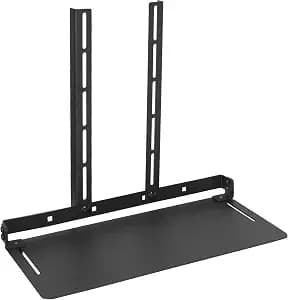
VIVO 13 inch Over Under VESA Monitor Shelf Mount, Holds Media Devices, Speakers, Routers, and More, Fits VESA 75mm, 100mm, 200mm, Black, MOUNT-SF01M
Description
VIVO Storage Solutions: Low profile 13” x 6” steel shelf fits seamessly in your workspace for an organized and sleek set-up --Patent Pending--; Compatibility: This mount adjusts to fit monitor VESA pattern widths 75mm, 100mm, and 200mm. Please Note: The attachment location will depend on your monitor’s VESA pattern and mounting orientation; Over/Under Screen Placement: You can mount this sleek shelf over or under your monitor screen for a customized display; Convenient Storage Solution: Gain additional space for your media devices, speakers, routers, and other small accessories with minimal hassle. Sturdy design supports up to 4.4 lbs in weight; Easy Assembly: We provide step-by-step instructions and all the hardware for fast and easy installation. The VESA brackets can mount directly to the hole patterns on your monitor or to an existing VESA plate
Compare the trade-offs
Similar products, side by side
A random selection of analyzed products from the same category. Different products are not necessarily interchangeable.

suptek Single Monitor Mount Gas Spring Arm Mount with Base,Free Standing Pneumatic Height Adjustable Monitor Desk Stand for 17 to 32 inch,Holds up to 22 lbs,Black(ML8C)

monTEK Single Monitor Arm, Mechanical Spring Monitor Arm for 17-40" Ultrawide Screens, Adjustable Monitor Desk Mount Holds up to 26.4 lbs with C Clamp/Grommet Desk Mount, VESA 75/100mm

FORGING MOUNT Heavy Duty Single Monitor Arm Stand Fits 17-42" Computer Screen, Adjustable Gas Spring Desk Mount Holds up to 33lbs, Full Motion with Clamp/Grommet Base, VESA Mount 75x75/100x100
One less thing to search
Before you buy: quick questions
Will this shelf mount fit my monitor if the VESA screws aren’t completely flat on the back?
The mount works best on monitors with a standard, flat or minimally recessed VESA pattern (75x75, 100x100, or 200x100mm). If your monitor has a deep recess or an unusual curve, the included spacers might not be long enough to bridge the gap. As a fast check: look at the back of your monitor — if the screw holes sit more than 3–4mm below the surface, you may need longer screws or washers. A handful of TikTok reviewers with curved monitors had to improvise, but users with standard flat-back screens found it a perfect fit. ---
Can it really hold a speaker or a router without sagging?
Yes — but with a caveat. The shelf is solid for lighter media (under 6–8 lbs total), like a slim soundbar, a cable modem, or a small external drive. Heavier items (a 10+ lb subwoofer or an oversized gaming console) will cause a noticeable sag, and some Amazon reviewers noted the metal bends under sustained weight. If you’re planning to stack multiple devices, we’d recommend keeping it to one primary item plus a few lightweight accessories. ---
Is the 13-inch depth enough for a standard network router?
For most standard routers (up to 12 inches wide and 1.5–2 inches thick), yes. The open design means you can let the back edge overhang slightly without it tipping, as long as the center of gravity stays on the shelf. However, if your router has tall antennas or a bulky power brick, check the depth first — users with fatter modems (3+ inches) reported the devices hanging off the back edge, which looked messy and felt unstable. ---
What’s the warranty and return process like if it doesn’t fit my monitor?
VIVO offers a 3-year manufacturer warranty, and most buyers went through Amazon’s standard 30-day return window without hassle. If you bought it directly from VIVO, their support team usually responds within 24 hours with a prepaid return label. That said, a few users noted that returning after a month (due to a delayed incompatibility discovery) required a bit of back-and-forth, so we’d suggest testing the fit immediately upon delivery. ---
Is this mount better than buying a simple clamp-on shelf or a vertical stand?
If you want an integrated, clean look that hides your devices behind the monitor, this is a great pick — it frees up desk space and keeps cables tidy. However, if you have heavy audio gear or plan on frequent adjustments, a clamp-on shelf (like the Wali brand) offers more rigidity. This VIVO model shines for the “set once, forget it” user who prioritizes a clutter-free desk with minimal visual distraction. For heavier setups, spend a few dollars more on a steel-frame alternative.
From a similar, more-reviewed product in this category: FORGING MOUNT Heavy Duty Single Monitor Arm Stand Fits 17-42" Computer Screen, Adjustable Gas Spring Desk Mount Holds up to 33lbs, Full Motion with Clamp/Grommet Base, VESA Mount 75x75/100x100
Will this arm really hold a 40" or 43" monitor without sagging?
Yes — reviewers regularly mount 40" and 43" displays and report a secure, stable hold. Just keep your monitor (plus the VESA plate) under the 33 lb limit, and expect to spend a few minutes tightening the gas spring tension the first time. Once dialed in, it stays put.
How difficult is the tension adjustment? I've seen complaints about it.
It's the most common gripe, and honestly it's fair — the arm ships at minimum tension, so heavier screens need many turns of the included Allen key before they hold position. It's not hard, just tedious. Do it *before* mounting the monitor if you can, and you'll save yourself some frustration.
Will the clamp fit my desk? What if it doesn't?
The C-clamp works on most desks up to about 2" thick with a flat underside, while the grommet base is the better choice for thicker tops or desks with a metal frame or lip underneath. If you have a glass desk or an unusually beveled edge, measure first — and check the return policy before drilling anything.
Is installation really as easy as people say?
For most users, yes — 15 to 30 minutes solo with the included hardware and instructions. You'll need a Phillips screwdriver and the supplied Allen key. The only step that trips people up is tension tuning, and having a second person help lift larger monitors onto the plate makes it much smoother.
Is it worth it compared to cheaper arms or premium brands like Ergotron?
If you want heavy-duty capacity, both clamp and grommet mounting, and smooth gas-spring motion without paying Ergotron prices, this is a strong value pick — many TikTok and YouTube reviewers call it a "budget HX." If you need tool-free tension adjustment or plan to mount something over 35 lbs, step up to a premium arm instead.
Answers are limited to the manufacturer's listing and the reviews we analysed. Questions those sources cannot support are not answered here.
Transparent by design