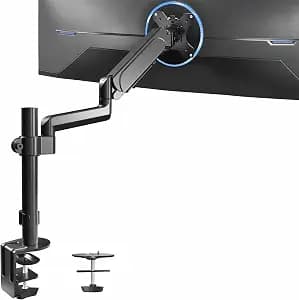
VIVO Single Monitor Arm Mount for 17 to 32 inch Screens - Tension Height Adjustment, Full Articulating Tilt, Swivel, Heavy Duty VESA Stand with Desk C-clamp and Grommet Option STAND-V001K
Description
Fits 17" to 32" Screens: Single monitor mount holds most computer monitors 17" to 32" in size and up to 19.8 lbs in weight (each) with VESA 75x75mm or 100x100mm mounting holes; Articulation and Height Adjustment: Flexible arm offers +35° to -35° tilt, 180° swivel, and 360° rotation for comfortable viewing angles. The tension spring provides smooth height transitions by perfectly counterbalancing the weight of your monitor; Solid Steel Construction: Provides excellent support for one monitor screen weighing up to 19.8 lbs. The VESA plate bracket is removable for easy slide-on monitor installation; Integrated Cable Management: Provides a clean look to the monitor setup and allows easier height adjustment by keeping cables from pulling, detaching, or tangling during transitions; Drill-Free Mounting: This product secures to your surface of choice up to 3" thick via a heavy-duty C-clamp, or use the equally sturdy optional grommet mount to suit your preferred layout
Compare the trade-offs
Similar products, side by side
A random selection of analyzed products from the same category. Different products are not necessarily interchangeable.

ErGear 13 to 49 inches Single Monitor Mount for Ultrawide Screens,Holds 26.5lbs,Heavy Duty Single Monitor Arm,Single Monitor Stand with Swivel,Tilt,Rotation for Home and Office,VESA 75/100mm

BONTEC Monitor Arm Desk Mount, Gas Spring Monitor Stand, Adjustable Full Motion VESA with C Clamp & Grommet Base, Supports 6.6-19.8lbs LCD/LED Tilt, Swivel, Rotation (Single Arm, 15-32 Inch)

suptek Single Monitor Mount Gas Spring Arm Mount with Base,Free Standing Pneumatic Height Adjustable Monitor Desk Stand for 17 to 32 inch,Holds up to 22 lbs,Black(ML8C)
One less thing to search
Before you buy: quick questions
I have a thick standing desk. Will the included C-clamp fit, or will I need to drill a grommet hole?
The C-clamp is designed for desks up to 3.25 inches thick. If your desk is thicker than that, you'll need to use the included grommet mount (which requires a hole in your desk). Many users with standing desks just inside this limit have reported success, but it's a common point to check before purchasing.
How difficult is the assembly and tension adjustment? I'm not very handy.
Most reviews highlight the assembly as straightforward, taking 15-30 minutes. The spring tension mechanism is the trickiest part—it requires adjusting a bolt to perfectly counterbalance your monitor's weight. Don't be alarmed if it feels stiff at first; it's a normal part of the setup. As one YouTube reviewer put it, "Take your time with the tension screw, and you'll be rewarded with buttery-smooth movement."
Is the cable management effective, or will I see a lot of wires?
The arm includes basic cable clips to route wires along the arm itself. While functional, this is a noted area for improvement. A common social media tip is to supplement with your own Velcro straps or sleeving for a completely clean look. The clips do the job of preventing dangling cables but aren't the most robust solution.
My monitor is a 32-inch curved screen. Is this arm sturdy enough to hold it without sagging?
Yes, the STAND-V001K is rated for monitors up to 32 inches and 22 lbs. It uses a heavy-duty gas spring and robust joints. Users with 32-inch monitors consistently praise its stability once the tension is properly set. The key is to ensure your specific monitor's weight (check the manual) is under the 22 lb limit, as some ultrawides can be heavier.
How does this VIVO arm compare to more expensive brands like Ergotron?
The VIVO arm is celebrated for delivering about 80-90% of the functionality of premium arms at a fraction of the cost. The main differences are in the fit and finish, the sophistication of the cable management system, and the smoothness of the tilt mechanism. For most home office and gaming setups, the VIVO provides exceptional value and reliability. The Ergotron is often considered for heavy, professional-use monitors where absolute precision and durability are paramount.
From a similar, more-reviewed product in this category: FORGING MOUNT Heavy Duty Single Monitor Arm Stand Fits 17-42" Computer Screen, Adjustable Gas Spring Desk Mount Holds up to 33lbs, Full Motion with Clamp/Grommet Base, VESA Mount 75x75/100x100
Will this arm really hold a 40" or 43" monitor without sagging?
Yes — reviewers regularly mount 40" and 43" displays and report a secure, stable hold. Just keep your monitor (plus the VESA plate) under the 33 lb limit, and expect to spend a few minutes tightening the gas spring tension the first time. Once dialed in, it stays put.
How difficult is the tension adjustment? I've seen complaints about it.
It's the most common gripe, and honestly it's fair — the arm ships at minimum tension, so heavier screens need many turns of the included Allen key before they hold position. It's not hard, just tedious. Do it *before* mounting the monitor if you can, and you'll save yourself some frustration.
Will the clamp fit my desk? What if it doesn't?
The C-clamp works on most desks up to about 2" thick with a flat underside, while the grommet base is the better choice for thicker tops or desks with a metal frame or lip underneath. If you have a glass desk or an unusually beveled edge, measure first — and check the return policy before drilling anything.
Is installation really as easy as people say?
For most users, yes — 15 to 30 minutes solo with the included hardware and instructions. You'll need a Phillips screwdriver and the supplied Allen key. The only step that trips people up is tension tuning, and having a second person help lift larger monitors onto the plate makes it much smoother.
Is it worth it compared to cheaper arms or premium brands like Ergotron?
If you want heavy-duty capacity, both clamp and grommet mounting, and smooth gas-spring motion without paying Ergotron prices, this is a strong value pick — many TikTok and YouTube reviewers call it a "budget HX." If you need tool-free tension adjustment or plan to mount something over 35 lbs, step up to a premium arm instead.
Answers are limited to the manufacturer's listing and the reviews we analysed. Questions those sources cannot support are not answered here.
Transparent by design