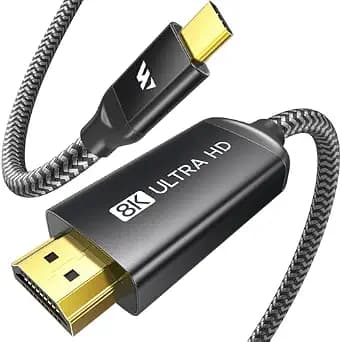
Warrky USB C to HDMI 2.1 Cable 8K@60Hz, 4K@240Hz/120Hz, [Gold-Plated Plug, Aluminum Case] 48Gbps, HDCP2.3, Fit with Thunderbolt 3/4/5, USB4, iPhone 17/16, MacBook Pro/Air, Galaxy S24, Dell, XPS, 6FT
Description
Stunning 8K Resolution: Our USB-C to 8K HDMI Cable leverages cutting-edge technology, supporting up to 8K@60Hz, 4K@240Hz/120Hz, and 2K@240Hz. Dive into visuals that are four times more detailed than 4K, capturing every subtlety. Ideal for both high-octane gaming and cinematic immersion, this cable propels you into the future of entertainment. Make sure both input and output devices support 8K@60Hz. This USB-C to HDMI Cord is designed for the latest GPUs and CPUs, ensuring compatibility with Nvidia RTX 3000, AMD Radeon RX 6000, and Intel Iris Xe graphics for outstanding performance.; 48Gbps Ultra High Speed: With Ultra-Fast bandwidth speeds soaring from 18Gbps to 48Gbps, this cable can easily handle extreme 4K@240Hz/120Hz and even 8K@60Hz. This 8K USBC to HDMI cable supports QFT, minimizing screen delay for precise gaming. With QMS and ALLM, enjoy a lag-free experience for ultimate gaming performance. All connected devices must support the above features in order to use them. Additionally, features like eARC, ARC, and Dolby Atmos will provide you with a unique audio-visual feast.; Robust and Reliable: This USB Type-C to HDMI cable features a sturdy and durable aluminum casing that extends its lifespan. It effectively shields against electromagnetic interference, ensuring stable and clear signal transmission while facilitating heat dissipation. Equipped with a high-performance chip, this Thunderbolt 5 to HDMI cable protects against EMI interference and guarantees secure, noise-free, high-speed data transmission. Additionally, the braided nylon cable enhances durability, and the strain relief design makes plugging and unplugging easier.; Versatile Compatibility: This USB4 to HDMI 2.1 cable is only for USB-C (USB 3.1 Gen 2) ports with video output function “DP Alt Mode” and Thunderbolt 3/4/5. Compatible with iPhone 17/16/15 Pro Max/Pro/Plus (The 17 Air model does not support video output function), MacBook Pro/Air, iPad Pro/Air 2020-2024, Dell XPS 17/15/13, HP Chromebook x360, Surface Book 3, Surface Laptop Studio/3/4, Surface Pro 7/8/9, Samsung Tablet S9, Galaxy S23, Note 20 LG V40, Steam Deck, and more.; WARRKY : is dedicated to introducing superb-quality products that are sophisticatedly designed and reasonably priced for providing the best solutions to connect your work and life. Consult for fast and responsible support within 18hrs!; Note: The MacBook series only supports 4K@60Hz at most when connected to any USB-C to HDMI cables due to limitations of the macOS system itself. *Note: The transmission is Uni-directional, only from the USB-C to HDMI. Charging and docking stationis not supported.
Compare the trade-offs
Similar products, side by side
A random selection of analyzed products from the same category. Different products are not necessarily interchangeable.

UGREEN 240W USB C Cable, 40Gbps USB C Cable USB4.0 GEN3 8K 60Hz PD 3.1 Video Cable Compatible with Thunderbolt 4/3, USB C Monitors, Hubs, Docks, MacBook, iPhone 17/16/15, Galaxy S25/S24, 3.3FT

UGREEN 240W USB C to USB C Cable USB4 Gen4 80Gbps for Thunderbolt 5/4/3, Premium 18K Dual 8K Triple 4K Display PD3.1 Charging Compatible with USB C Monitors, MacBook, iPad, iPhone 17/16/15, 3.3FT

OWC 0.8M Thunderbolt 5 (USB-C) Cable,up to 80Gb/s of bi-Directional Data Speed, up to 120Gb/s for Higher Display Bandwidth, 240W
One less thing to search
Before you buy: quick questions
Ich habe einen bestimmten Dell/Lenovo/HP-Laptop und Monitor. Wie kann ich sicher sein, dass dieses Kabel mit meinem genauen Setup funktioniert?
Das Warrky-Kabel bietet eine breite Kompatibilität mit Thunderbolt 3/4- und USB4/3.2-Anschlüssen, was die meisten modernen Laptops abdeckt. Allerdings kann die Kompatibilität bei bestimmten Enterprise- oder älteren Modellen laut Nutzerberichten variieren. Wir empfehlen, in der Bedienungsanleitung Ihres Geräts zu prüfen, ob der USB-C-Anschluss "DisplayPort Alt Mode" unterstützt. Für höchste Sicherheit kann die Suche nach Ihrem Laptop-Modell + "HDMI 2.1-Kabel" in Nutzerforen praxisnahe Bestätigungen liefern.
Ist das Kabel sehr steif? Ich muss es durch eine enge Kabelmanagementhülse führen.
Viele Benutzer loben das langlebige, hochwertige Gefühl der geflochtenen Nylon- und Aluminiumummantelung, aber einige merken an, dass sie weniger flexibel ist als dünnere Kabel. Sie ist für Langlebigkeit und Signalintegrität ausgelegt, nicht für maximale Biegsamkeit. Wenn Ihr Setup extreme Biegungen oder häufiges Neupositionieren erfordert, könnte es Ihnen etwas steif vorkommen. Bei festen Installationen (z. B. hinter einem Fernseher oder Schreibtisch) wird seine Steifigkeit im Allgemeinen als Vorteil angesehen.
Ich habe dieses Kabel für mein iPhone 16 Pro gekauft, um auf meinem 4K@120Hz-Fernseher zu spielen, aber ich bekomme keine 120Hz. Ist das Kabel defekt?
Das ist ein häufiger Irrtum! Das Kabel ist wie beworben vollständig für 4K@120Hz/240Hz geeignet. Die derzeitige Einschränkung liegt jedoch in der iOS-Software, nicht in der Hardware. Derzeit begrenzt die Software von Apple die Bildwiederholraten externer Displays. Das Kabel ist zukunftssicher für den Fall, dass Apple höhere Bildwiederholraten ermöglicht, aber im Moment liefert es das maximale Signal, das Ihr iPhone derzeit zulässt.
Wie verhält sich dieses Kabel im Vergleich zu einem einfachen USB-C-auf-HDMI-Kabel für 20 $? Ist der Aufpreis es wert?
Auf jeden Fall, wenn Sie die Leistung benötigen. Ein einfaches Kabel schafft vielleicht 4K@30Hz. Dieses 48-Gbit/s-HDMI-2.1-Kabel ermöglicht 4K@120Hz, 1440p@240Hz oder 8K@60Hz für flüssiges Gaming mit hoher Bildwiederholrate, professionelle Videobearbeitung und nahtlose Desktop-Nutzung in hoher Auflösung. Stellen Sie es sich wie den Unterschied zwischen einem Gartenschlauch und einem Feuerwehrschlauch vor – beide transportieren Wasser, aber Kapazität und Leistung sind in verschiedenen Ligen. Die robuste Verarbeitung trägt ebenfalls zu seiner Langlebigkeit bei.
Was soll ich tun, wenn ich ein "Kein Signal"-Problem oder intermittierendes Flackern habe?
Keine Sorge, das lässt sich oft beheben! Versuchen Sie zuerst die klassische Technik-Lösung: Ziehen Sie das Kabel von beiden Geräten ab, warten Sie 10 Sekunden und schließen Sie es fest wieder an. Stellen Sie für den Ersttest sicher, dass Sie direkt in den Port Ihres Geräts einstecken und nicht über einen Hub oder eine Dockingstation. Überprüfen Sie dann die Anzeigeeinstellungen Ihres Computers/Telefons, um sicherzustellen, dass der externe Bildschirm erkannt wird und die richtige Auflösung/Bildwiederholfrequenz eingestellt ist. Viele Reddit-Nutzer haben ihre Probleme mit diesen einfachen Schritten gelöst. Wenn die Probleme weiterhin bestehen, ist unser Support-Team da, um bei der Fehlerbehebung zu helfen.
From a similar, more-reviewed product in this category: Silkland USB4 for Thunderbolt 4 Cable 1FT, 40Gbps, 240W Charging, 8K@60Hz
Is this cable actually 1 foot long?
One reviewer confirmed it is exactly 12 inches as specified, and another described it as 6 1/2 feet long, so the length may vary by listing variant. The product title specifies 1FT.
Does it work with an eGPU setup?
One reviewer reported it works amazingly with their RX 7600M XT eGPU, and the listing states it is compatible with eGPU rigs.
Will it drive an 8K or high-refresh monitor?
The listing states it supports single 8K@60Hz, 5K@60Hz, or 4K@144Hz, as well as dual 4K@60Hz displays with HDR, but requires DP Alt Mode support on the connected devices.
Does it support 240W charging?
The listing states it supports up to 240W (48V/5A) PD 3.1 charging with an E-Marker chip that auto-detects devices to deliver 180W/140W/100W/60W/35W/18W as needed. One reviewer confirmed the advertised 240W charging value.
How durable is the cable?
The listing states the multi-layer braided cable withstands 5,000+ 180° bends with 86% thicker tinplate shielding, and reviewers described it as well built and very good quality. One reviewer did note it is thick and inflexible.
Answers are limited to the manufacturer's listing and the reviews we analysed. Questions those sources cannot support are not answered here.
Transparent by design