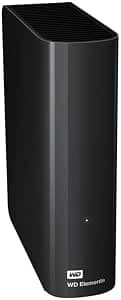
WD 12TB Elements USB 3.1 Gen 1 External Desktop Hard Drive - Ideal for easily expanding storage and storing photos, music, videos and important files - Black
Description
The WD Elements Desktop Hard Drive with USB 3.0 is a reliable, high-capacity storage device that offers fast data transfer speeds and universal connectivity with USB 3.0 and USB 2.0 devices.; IMPROVE PC PERFORMANCE. When the indoor unit is almost full, the PC slows down. Don't delete files: free up space on your internal drive, transferring files to the WD Elements desktop HDD and see how your computer will fly again!; HIGH CAPACITY EYE-DESIGN. Attractive design and capacity up to 20TB - that's why WD Elements Desktop HDD is the easiest way to expand storage space and store more files, photos, music and videos.; HIGH TRANSFER SPEEDS. Connected to a USB 3.0 port, WD Elements desktop hard drive delivers fast data transfer speeds.; THE SIMPLICITY OF PLUG-AND-PLAY. The WD Elements desktop hard drive is ready to use on Windows 10+ PCs, simply plug it into the USB port and instantly add storage space.; Compatible with USB 3.0 and USB 2.0. This drive ensures compatibility with the latest USB 3.0 devices and also backwards compatibility with USB 2.0 devices.; WD QUALITY.We know how important your data is. This is why we have developed the indoor unit following strict criteria of durability, impact resistance and long-term reliability.We also protect the unit with a durable and stylish case.
One less thing to search
Before you buy: quick questions
Is this hard drive compatible with my gaming console or smart TV, and is it easy to set up?
Yes, it's widely compatible! For devices like PlayStation, Xbox, or smart TVs that support external storage via USB, it typically works as a simple plug-and-play device for storing games or media. Just note that some devices may require you to format the drive through their system settings first, which will erase any existing data. Many users on forums like Reddit confirm it's a straightforward process.
How loud does the drive get, and can I leave it running all the time?
During active file transfers or heavy use, you will likely hear typical hard drive sounds like spinning and occasional soft clicking. It's a normal part of its operation but can be noticeable in a very quiet room. As seen in many YouTube reviews, it's designed for desktop use and can be left on continuously, though it may get warm. For 24/7 operation, ensure it has good ventilation.
I've heard the included cable is short. What should I know about connectivity?
You're right to check! The provided USB 3.0 cable is on the shorter side (typically around 18 inches), which can limit placement. For best performance and reliable power delivery—especially important for a 12TB drive—we recommend using the included cable with a direct connection to your computer. If you need a longer reach, purchase a high-quality, *powered* USB 3.0 hub or an active extension cable to avoid connectivity issues.
What's the real difference between this "Elements" drive and more expensive models like the WD My Book?
The WD Elements is focused on providing massive, reliable storage at the best value, which is why it's so popular for backups and media libraries. The main trade-offs are that it lacks the hardware encryption and automatic backup software found in the My Book series. As several tech reviewers have noted, if you don't need those specific features, the Elements offers fantastic storage per dollar.
Is this a good drive for taking apart to use the internal hard drive in my desktop PC or NAS?
This is a common question from advanced users. While some people successfully "shuck" (remove) the internal drive, it's not officially supported by WD and will void your warranty. The internal drives can vary, and you might encounter compatibility issues with certain NAS systems or power supplies. If building a NAS is your primary goal, a drive specifically designed for that environment (like a WD Red) is often a more reliable choice, despite the higher cost.
Answers are limited to the manufacturer's listing and the reviews we analysed. Questions those sources cannot support are not answered here.
Transparent by design