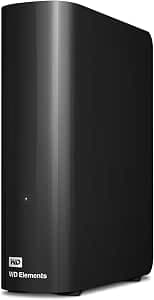
WD 22TB Elements USB 3.1 Gen 1 External Desktop Hard Drive - Ideal for easily expanding storage and storing photos, music, videos and important files - Black
Description
WD Elements Desktop Hard Drive with USB 3.0 offers high capacity, additional storage, fast data transfer speeds and universal connectivity with USB 3.0 and USB 2.0 devices. The drive has a capacity of up to 22TB; Improve PC performance; when the internal drive is almost full, the PC slows down. Do not delete files: free up internal drive space by transferring files to WD Elements HDD desktop memory and bring back your computer; Store more than what's important; with capacity up to 22TB, WD Elements hard drive lets you store more photos, videos, music and files; Fast transfer speed; when connected to a USB 3.0 port, WD Elements hard drive delivers fast data transfer speeds; SIMPLICITY OF PLUG AND PLAY; WD Elements hard drive works straight out of the box with Windows 10+ PC, just plug it into the USB port to add storage instantly.
One less thing to search
Before you buy: quick questions
Is this drive suitable for running 24/7, like for a home server or constant backup?
While many users report it runs reliably for extended periods, it's officially designed for occasional use and direct-attached storage. Social media discussions, particularly on tech forums, note that it can run warm during sustained activity. For true 24/7 operation, a NAS drive or an enterprise-grade solution is recommended for better heat management and longevity.
How loud does it get, and will the noise be distracting on a desk?
Experiences vary. The majority of reviewers find it relatively quiet with a soft hum. However, a common note on Reddit and YouTube is that some units produce a noticeable, rhythmic ticking or clicking sound during read/write operations. If you're sensitive to noise or keep it on a desktop in a quiet room, this is something to consider.
I've heard about disconnection issues. How do I avoid them?
This is often a power delivery issue. The drive draws more power than smaller portable drives. For stable operation, always plug it directly into a USB port on your computer, not through an unpowered hub. Using the included USB-Y cable (if provided) or connecting to a powered hub ensures it gets consistent power and prevents random ejections, as many users have confirmed.
What's the real-world transfer speed, and is the USB standard a bottleneck?
With its USB 3.1 Gen 1 (5 Gbps) interface, you can expect real-world speeds of around 130-160 MB/s for large, sequential files. This is perfectly fine for backing up media libraries or storing archives. Tech-focused buyers on forums sometimes wish for a faster interface, but for its primary use case—affordable bulk storage—the speed is generally considered adequate and a trade-off for the excellent value.
With some reports of drives failing, how should I use this for important data?
This is a crucial point echoed across reviews: this drive should not be your only copy of critical data. It's an excellent solution for *expanding* storage or creating a *secondary* backup. Always follow the 3-2-1 backup rule: keep three copies of your data, on two different media, with one copy offsite. For irreplaceable files, consider complementing this with a cloud backup service or a separate NAS system for added security.
Answers are limited to the manufacturer's listing and the reviews we analysed. Questions those sources cannot support are not answered here.
Transparent by design