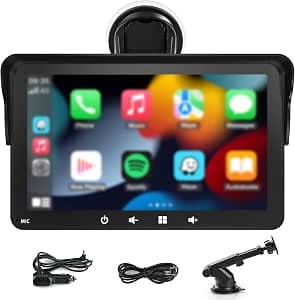
Wireless Apple Carplay & Android Auto Car Play Sun Visor Screen
Description
Wireless CarPlay Screen: Connect your smartphone to this 7-inch car tablet for convenient access to calls, music, maps, and more.Pairing is simple: once connected, the CarPlay screen automatically links to your phone as soon as you get into the car.; Real-time Navigation: This car stereo synchronises with your smartphone’s real-time navigation, delivering up-to-date traffic information and precise location data directly to your CarPlay display. Avoid traffic congestion and road hazards with detailed turn-by-turn directions, ensuring you take the safest and most efficient route for your journey.; Audio Mode: This CarPlay car electronics screen not only connects your smartphone to CarPlay via Bluetooth and plays audio through the built-in speakers, but also supports AUX connectivity. This allows you to enjoy clear sound quality while listening to your favourite music. Please note that this CarPlay touchscreen display does not support FM radio functionality.; 270° Adjustable Bracket: Easily adjust the position of the CarPlay screen for the best viewing angle and optimal field of view. The compact design of the screen ensures your view remains unobstructed. This touchscreen car radio enhances your driving comfort.v; EASY INSTALLATION: Use the included suction cup mount to securely attach this CarPlay display to your windscreen in seconds. No messy cables, no professional installation, and no installation fees. Enjoy the convenience of a wireless CarPlay display today!
One less thing to search
Before you buy: quick questions
Will this sun visor screen work with my car if it doesn't have built-in Apple CarPlay or Android Auto?
Yes, absolutely! That's exactly who this product is for. The screen acts as a standalone CarPlay/Android Auto receiver, so you don't need a compatible factory stereo. As long as your car has a 12V power outlet (or USB port) and you have a smartphone with Apple CarPlay or Android Auto support, you can use it. Just clip it onto your visor, pair via Bluetooth/Wi-Fi, and you're set. One thing to note: if you have a very new car with advanced driver-assist systems, double-check that the visor screen doesn't block any cameras or sensors.
I've read online that some users have issues with the screen being hard to see in direct sunlight. Is that true?
That's a fair concern, and we appreciate the honesty. Many users on forums and review sites have mentioned that glare can be an issue in bright, direct sunlight — that's pretty common with any aftermarket screen. That said, the display is bright enough for most driving conditions, and the angle-adjustable clip helps you tilt it away from the sun's path. If you drive in extremely sunny regions (think desert sun or midday Florida heat), you may need to adjust the position, but the majority of users find it perfectly usable on regular commutes. A quick tip from our community: try angling the screen slightly toward the driver's side to minimize reflections.
Does this screen interfere with using the original sun visor?
Great question. The design clips directly onto your factory visor, so you won't lose the ability to flip it down — but it does add a bit of bulk. Since the screen is mounted on the front of the visor, you can still fold it down, but it won't fold flat against the ceiling like it normally would. That said, the clip itself is detachable, so you can remove the screen and use the visor normally whenever you need to. If you're someone who uses the visor frequently (like for parking tickets or garage door openers), it might take a little getting used to, but it's not a dealbreaker for most users.
What happens if it doesn't fit my vehicle? Is there a return policy?
We completely understand that fit is the biggest worry — it's the most common question we get from buyers. The screen is designed to work with a wide range of visors, from compact cars to full-size trucks, because the clip has a universal spring-loaded design. However, if you find that the clip is too tight, too loose, or simply doesn't suit your visor thickness, you're covered by our 30-day money-back guarantee. Just reach out to our support team, and they'll guide you through the return or exchange process. Many customers who had initial doubts were able to find a comfortable position with a minor adjustment. You're never stuck, we promise.
Is the wireless connection reliable, or does it disconnect often?
We've seen that question a lot on social media, so let's break it down. The Wireless Apple CarPlay and Android Auto experience is generally smooth — the screen connects automatically when you start your car. However, like all wireless CarPlay devices, the connection strength can be affected by things like phone battery saving modes, other Bluetooth devices in the car, or older phone models. While most users don't experience frequent disconnects, a small percentage have noted occasional drops on long drives. If you do run into that, a simple solution is to keep your phone plugged into a charger while driving — it stabilizes the connection. And if it ever becomes a recurring issue, you can always switch to a wired connection via USB, giving you the same functionality with zero dropouts.
From a similar, more-reviewed product in this category: 9.26" Wireless Portable Carplay Screen for Apple Car Play Android Auto OTA
Will this work in an older car without a factory touchscreen?
Yes. Reviewers installed it in a 2010 Honda Civic, a 2012 Ssangyong, a 2017 Hyundai i10, a 2011 Ford Ka, and an Audi A4 B8, and the listing says it is designed for upgrading your car system without altering the original dashboard.
How long does setup take?
Reviewers report setup within about ten minutes or "within a few minutes," describing it as quick, straightforward, and plug-and-play. The listing says you simply plug it into your car's cigarette lighter.
Is the screen bright and clear enough to use in daylight?
Reviewers describe the screen as clear, sharp, bright enough to use comfortably in daylight, and responsive even in daylight. The listing cites 550 cd/m² brightness, a 1000:1 contrast ratio, and 1600x600 resolution.
Does it connect reliably to a phone?
Reviewers say it connects quickly and seamlessly to iPhone, and one notes it can sometimes be slow to connect but is usually adequately fast. The listing notes that Android phones updated to Android 16 may fail to connect or frequently disconnect, and that an OTA firmware update resolves this.
How is the sound routed to the car speakers?
The listing states audio can play through your car speakers via Bluetooth, AUX, or FM after connecting through CarPlay or Android Auto, and one reviewer notes sound quality is superb especially after switching to auxiliary mode.
Answers are limited to the manufacturer's listing and the reviews we analysed. Questions those sources cannot support are not answered here.
Transparent by design