Wireless Carplay Android Auto, Wireless Car Dongle for Android Phone 11+

Wireless Carplay Android Auto, Wireless Car Dongle for Android Phone 11+

4.7 on Amazon41 ratingswww.amazon.com
Review reliability
80/ 100Grade B
Every review is top-rated and includes specific, verifiable detail, with authentic voice and no promotional phrasing, and the average gap between star ratings and text tone is 0.41.
Affiliate link — commission is the same whatever the score.

Description

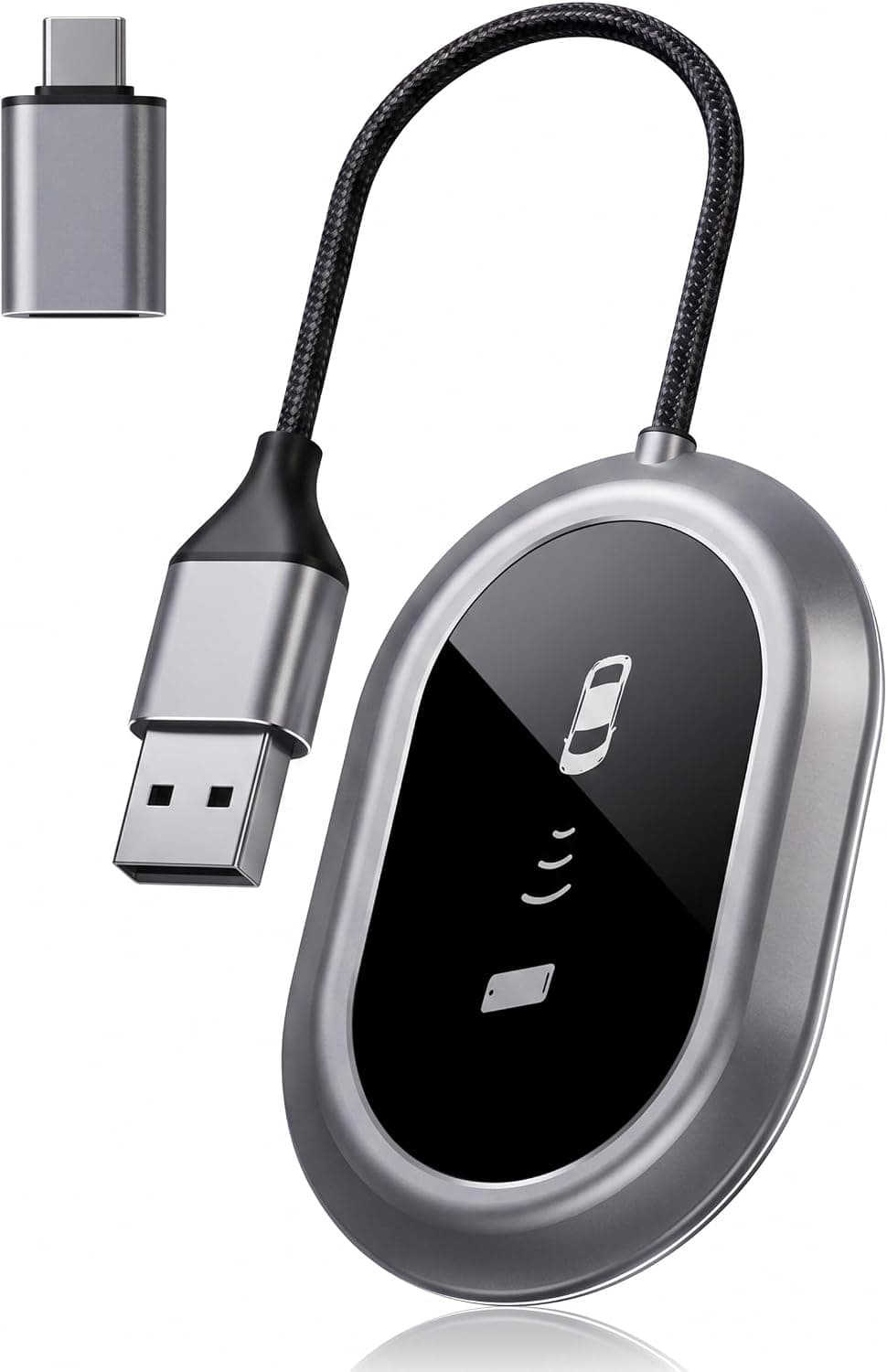
Product description Daily Drive, Minus One More Cable Previous page Next page 1 STEP 2 STEP 3 STEP 4 STEP Previous page Next page 1 Screen Mirror Music 2 Car Screen Pixl 3 All in One 4 Adaptable Car Mode Product Specifications Product Type Wireless Android Auto Adapter, converts an existing factory wired Android Auto connection into wireless Android Auto. Supported Operating System Android 11.0 or later only. Supported Smartphones Android smartphones running Android 11+ with built-in or supported Android Auto functionality. Vehicle Compatibility Require Vehicle must already support factory wired Android Auto through a data-enabled USB port. Unsupported Devices Not compatible with iPhone, iPad, tablets, or smartphones without Android Auto support. Input Interface USB-A male connector, includes an external USB-A to USB-C adapter for compatible USB-C Android Auto data ports. Input Voltage 5V DC. Input current and rated power are not stated in the manual. Bluetooth Frequency 2.4 GHz. Bluetooth is primarily used for initial discovery and pairing. Wi-Fi Frequency Bands Supports 2.4 GHz and 5 GHz Wi-Fi. Supported Bluetooth Versions Manual lists compatibility with Bluetooth 2.1+EDR / 3.0 / 4.x / 5. Wi-Fi Security Format Supports WEP / WPA2 / WPA3-SAE Personal / MFP as listed in the manual. Wireless Signal Name Bluetooth and Wi-Fi signals are identified as CF01-XXXX, where “XXXX” is the individual product serial identifier. Connection Method First time setup begins through Bluetooth pairing, the Android phone then automatically connects to the adapter’s Wi-Fi for wireless Android Auto transmission. Automatic Reconnection After initial pairing, CF01 reconnects automatically when phone Bluetooth and Wi-Fi are enabled, CF01 Wi-Fi Auto-Connect is active, and the vehicle’s Android Auto setting permits automatic connection. Multi-Phone Pairing Multiple Android phones can be paired, but only one phone can connect at a time. CF01 reconnects to the last-used phone by default. Firmware Diagnostic Interface Connect to CF01 Wi-Fi using password 12345678, then open a browser and visit 192.168.1.101 for firmware updates, issue submission, Audio Streaming Mode and Delayed Start settings.

Compare the trade-offs

Similar products, side by side

A random selection of analyzed products from the same category. Different products are not necessarily interchangeable.

Check the evidence

What the review excerpts say

Included does not mean verified authentic. Flagged does not mean proven fake. These are analytical classifications.

Showing 3 illustrative excerpts, not the complete review set.

Included in analysis5.0/5 stars

Makes Wired CarPlay Much More Convenient for Everyday Driving.

“My car already has factory wired CarPlay, so I plugged this adapter into the same USB port that I normally use for my iPhone. The first setup was straightforward. I found the adapter through Bluetooth, paired it with my phone, and after the initial connection CarPlay appeared on the car screen without needing to install an app or create an account. The biggest difference became noticeable during everyday driving. Instead of getting into the car, finding my cable, and plugging in my phone every single time, I can leave my iPhone in my bag or pocket. After the first pairing, the adapter reconnects automatically when I start the car. I just wait for CarPlay to come up and then use it normally. Once connected, the experience feels very similar to using wired CarPlay. I can open Maps, play music, make calls, use Siri, and control everything from the car screen as usual. My steering-wheel controls also continue to work, so I haven't had to change the way I normally use CarPlay. I also like how small the adapter is. It doesn't add a large device or extra cable around the center console. My car uses USB-A, so I connected it directly, but a USB-C adapter is included for compatible vehicles that use that type of CarPlay port. For short trips especially, this has been surprisingly convenient. Before, I sometimes wouldn't bother connecting my phone if I was only driving somewhere nearby. Now CarPlay is available without that extra step. This is definitely something to check for compatibility before buying because the car needs to already have wired Apple CarPlay, and this particular model is for iPhone rather than Android. For the right vehicle, though, it is a simple upgrade that makes factory CarPlay much easier to live with every day.”

Signals matched: Specific detail: entity, process, scenario · Reads as an authentic voice

Included in analysis5.0/5 stars

Phone stays in my pocket the whole trip

“Pairing took a moment and then the familiar Android Auto layout filled the display. I did not change settings on the car. I did not load a new app beyond what I already use. Plug-and-play connection is the phrase on the page and it matches what happened in the driveway. After that first handshake I have left the phone in my pocket on every trip I have taken. Navigation still talks. Music still follows the album I picked before I left the house. Voice assistant still handles the next address when I do not want to glance down at a red light. Calls come through the car and I can tap the wheel to pick up. I am not a person who tears gadgets apart to see the board inside. I wanted the wired system I already paid for to stop needing the wire. Converts wired to wireless is the job and it does that job. I use it for grocery runs, a weekly visit across town, and the late drive home when I just want a quiet playlist and the next turn spoken out loud. Messages stay on the display until I am parked. I have not seen the connection fall off in stop and go traffic near the overpass. The adapter is small enough that I forget the shape of it once the trim sits around it. Aluminum construction makes it feel less like a toy than the plastic sticks I have tried in other ports over the years. I am leaving it plugged in. I do not plan to pack it up and move it around. What I notice most is that I stop thinking about the phone the minute the car is in gear. That is the habit I wanted back. The dash looks like a dash. My pocket holds the phone. The map still knows the way. Instant connection sounds like ad talk until I sit there and watch the screen come up without a cable in my hand. I watch it come up and then I drive.”

Signals matched: Specific detail: process, scenario · Reads as an authentic voice

Included in analysis5.0/5 stars

Plug It In and Leave the Phone Alone

“The immediate win after getting this set up was finally being able to stop fumbling for a charging cable every single time I got into the car. I just plugged the adapter into the USB port, paired my phone, and was able to keep my phone tucked away instead of having a wire stretched across the center console. The setup process was refreshingly quick and painless. There was no need to spend ages digging through complicated vehicle menus, and pairing was simple enough that I never had to glance back at the manual. Once everything connected, the familiar interface popped up right on the dash display—exactly what you hope for with a gadget like this. It's been running smoothly for quick grocery runs and longer highway drives alike, with the sheer convenience being the standout highlight. Getting in, turning the key, and having maps and audio ready without fishing around for a cord makes a noticeable difference. It's also great when my son is riding along, since we no longer have to pass a cable back and forth across the front seats just to run the display. The dongle itself has a tiny footprint that sits flush against the USB port without getting in the way. I just leave it plugged in full-time so it can do its thing in the background without a second thought.”

Signals matched: Specific detail: process, scenario · Reads as an authentic voice
One less thing to search

Before you buy: quick questions

Will this wireless adapter work with my phone and my car?

It's designed for Android phones running Android 11 or newer, paired with a car that already supports *wired* Android Auto through its factory screen. If your car has never run Android Auto via USB, this dongle won't add that capability. Many Reddit users recommend double-checking both your phone's OS version and your head unit's compatibility before ordering — it takes two minutes and saves a lot of frustration.

How easy is the setup, and does it stay connected?

Most buyers say the first pairing takes a minute or two, and after that the phone connects automatically whenever you start the car — no cable, no tapping. That said, a handful of YouTube reviewers mention occasional dropouts mid-drive, usually fixed by a quick replug. If you need absolutely rock-solid stability for long trips, a wired connection may still be the safer bet.

Does it feel cheap or flimsy in person?

It's small and lightweight, and a few users describe the plastic as "basic" — but since it lives tucked into your USB port, most people forget it's even there. Build quality hasn't been a common complaint; the bigger talking points in reviews are setup ease and the cleaner console you get by ditching the cable.

What if it doesn't work with my car — can I return it?

Yes, standard return and refund policies apply, and buyers consistently report the listing is accurate about what the device does and doesn't support. The most common return reason isn't defects — it's compatibility mismatches, like an older phone or a car without wired Android Auto. Ordering from a seller with a clear refund window is the smart move.

Is it worth it compared to just using a USB cable or a pricier brand?

If you're tired of plugging in every trip, most reviewers say yes — it delivers 90% of the convenience for a fraction of OEM wireless prices. Some shoppers cross-shop the Motorola MA1 for its brand reputation, but at a noticeably higher cost. For Android 11+ users with compatible cars, this dongle is widely seen as the best value-for-money pick in its category.

From a similar, more-reviewed product in this category: Wireless CarPlay Adapter for Apple iPhone 2026 Upgraded (Silver)

Is this adapter compatible with Android phones?
From the manufacturer's listing

No. The manufacturer listing states it is not compatible with Android and is intended for Apple iPhone, supporting iPhone 6 and iOS 10 and above.

How easy is setup, and will it reconnect automatically?
From 50 kept reviews mentioning "ease of use"From the manufacturer's listing

Reviews describe setup as easy and quick, with some saying it took about 10 to 30 seconds. The listing says it is plug-and-play with one-time pairing and automatically connects at later startups.

What CarPlay functions does it support?
From 81 kept reviews mentioning "functionality"From the manufacturer's listing

The manufacturer listing says it supports navigation, music playback, calls, Siri Assistant, and text messaging through the vehicle control interface. Reviews mention using maps, music, and most apps.

Will it work with my car's factory wired CarPlay?
From 21 kept reviews mentioning "compatibility"From the manufacturer's listing

The listing claims compatibility with 98% of factory-installed wired CarPlay systems. Reviews report success with cars such as Honda, Mercedes Benz GLC300, 2022 Sentra, KIA, and 21 CX9, but some reviews say it did not work well with Mazda CX5.

Does it overheat or disconnect during use?
From 18 kept reviews mentioning "durability"

Some reviews report overheating and disconnecting after about 10 to 30 minutes, while others describe stable, reliable connections. The manufacturer listing does not address overheating.

Answers are limited to the manufacturer's listing and the reviews we analysed. Questions those sources cannot support are not answered here.

Transparent by design

Understand the analysis