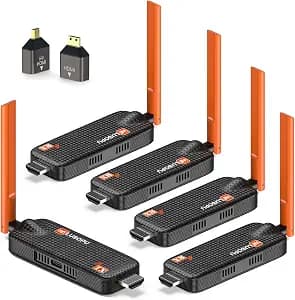
Wireless HDMI Transmitter and 4 Receivers, Support Up to 6 Receivers, 5.8G HDMI Wireless Extender Casting Content for PC Laptop Camera Cable Box to Multiple TVs Monitors Projectors -165FT
Description
【Multi-Display Casting】 WELUSOPU wireless HDMI transmitter and 4 receivers allow you to stream audio and video wirelessly from your source device to multiple displays, supporting up to 6 receivers simultaneously. Perfect for home theaters, conference rooms, classrooms, bars, restaurants, or any setup requiring multi-display functionality.; 【Long Range and Low-Latency Transmission】Enjoy screen casting with a stable signal range of up to 165FT (50 meters) in open spaces. Advanced 5.8G/2.4G dual-band, auto frequency hopping, and 60Hz support, this wireless HDMI transmitter and 4 receivers ensures almost no latency, interference-free connection, even in challenging WiFi environments.; 【Stunning Video and Audio Quality】 Supports 4K input and 1080p HD output for crystal-clear visuals. Combined with stereo sound, this HDMI wireless transmitter delivers an immersive audio-visual experience, whether you're watching movies, gaming, learning, business meetings, family gatherings, camping, or giving a presentation.; 【Support for Multiple Receivers】Stream content to up to 6 receivers simultaneously with virtually no latency, ensuring smooth screen mirroring across multiple displays. With the upgraded chips, this wireless HDMI extender resolves overheating issues, allowing you to enjoy continuous use for an entire day without signal drops.; 【Easily Share Content】 WELUSOPU wireless HDMI kit is a simple plug-and-play design. No Bluetooth, WiFi, or apps needed—just connect and wireless screen sharing. It not only saves you time but also keeps your office or living space clean and organized, free from messy cables or complicated configurations.; 【Smartphones & Tablets As A Display】 Using our app and the wireless HDMI transmitter, you can mirror content to 6 touch-screen devices (iOS & Android). Enjoy videos and audio from your HDMI output device on smartphones or tablets. Perfect for on-the-go monitoring, stay connected to your screen's information from any place. Note: Supports mirroring only; does not offer reverse operations.; 【Broad Compatibility 】Compatible with a wide range of HDMI-enabled devices, including cable boxes, Blu-ray players, DVD, laptops, PCs, MacBooks, st-reaming devices (e.g., Ro-ku, A-pple TV, Fi-re Stick), DSLR cameras, camcorders, set-top boxes, soundbar, karaoke, TVs, projectors, monitors, and more. At WELUSOPU, we stand by our commitment to quality, reliability, and your satisfaction.
Compare the trade-offs
Similar products, side by side
A random selection of analyzed products from the same category. Different products are not necessarily interchangeable.

Airplane Bluetooth Adapter for Headphones,Qualcomm Chipset,Black

Avantree Audikast 4 - Auracast & Bluetooth 5.4 TV Transmitter 2-in-1 for Headphones & Selected Hearing Aids, aptX Adaptive & HD, Optical & AUX Output, Future-Ready & Upgradeable
Twelve South AirFly Pro, Bluetooth Wireless Audio Transmitter, White
One less thing to search
Before you buy: quick questions
What's the real-world range, and will it work through walls?
For the clearest signal and minimal lag, a direct line of sight within 30-50 feet is recommended. While it can transmit through one interior wall for many users, performance becomes inconsistent—signal drop or pixelation is common. For reliable whole-house coverage, this may not be the ideal solution. Most successful setups use it within the same room or in open-floor commercial spaces.
Is there any audio or video lag, making it bad for gaming or movies?
Some users, especially those using it for gaming consoles or home theater PCs, report a slight audio delay (lip-sync issue). For casual TV watching or presentations, this often isn't noticeable. However, if you're a serious gamer where split-second timing is critical, or a home cinema purist, the latency might be a deal-breaker. Many positive reviews for this kit are from users displaying static content or giving presentations.
I need to connect 6 screens. Should I buy two extra receivers?
While the system technically supports up to 6 receivers, user feedback strongly suggests that performance—especially latency and stability—degrades with each added unit. The 4-receiver kit is considered the practical, reliable limit for smooth operation. For 5-6 screens, you're better off considering a more professional-grade system or using two separate transmitter setups.
How durable is it for all-day, everyday use in a business?
The units are lightweight plastic and the power adapters can get warm during extended use. For permanent installations in businesses (like restaurants or churches running digital signage 8+ hours a day), many users recommend ensuring good ventilation. It's popular for its value in these settings, but it's not built like industrial-grade hardware. Having a spare unit on hand is a common practice among business buyers.
What if it doesn't work with my specific device, like a Nintendo Switch or an older Blu-ray player?
Compatibility is generally excellent with standard HDMI outputs. The most common hiccups come from devices with HDCP copy protection (like some cable boxes) or unusual resolution outputs. A quick tip from user forums: try connecting the problematic device directly to a TV first to ensure it outputs a standard signal, then introduce the wireless extender. The company's support can be slow, so checking your source device's settings is the best first step.
From a similar, more-reviewed product in this category: Twelve South AirFly Pro, Bluetooth Wireless Audio Transmitter, White
Do I need to re-pair my Bluetooth headphones every time I turn the AirFly Pro on?
No. The AirFly Pro remembers previously paired headphones even after being powered off, and it will reconnect automatically when turned on. It also supports pairing two sets of headphones simultaneously, and both will reconnect on their own.
How do I pair the AirFly Pro for the first time?
Press and hold the power button for 4 seconds until the light flashes amber and white to indicate pairing mode. Put your headphones into Bluetooth pairing mode, and the AirFly Pro will detect and connect automatically once it finds them; initial pairing can take up to 90 seconds.
What is the difference between TX mode and RX mode?
TX mode sends audio from a wired headphone jack to your Bluetooth headphones, for use on airplanes, gym treadmills, hotel TVs, or any device with a 3.5mm audio out. RX mode works in reverse, receiving Bluetooth audio from your phone or tablet and playing it through a wired speaker or AUX input, for car stereos, boat speakers, or other non-Bluetooth systems with an AUX port.
What is the battery life, and how do I charge the AirFly Pro?
The AirFly Pro has up to 16 hours of battery life on a full charge, and the LED will flash amber 3 times when the battery is low. To recharge, plug the included USB-C to USB-A cable into the device and connect it to any powered USB port; it is fully charged within 2 hours.
Does the AirFly Pro work with hearing aids?
It may work with hearing aids that support standard Bluetooth and can enter pairing mode without a smartphone app, but hearing aids that rely on Bluetooth Low Energy (BLE) or require a companion app to pair are not compatible. Because hearing aid Bluetooth implementations vary widely by brand and model, check with your hearing aid manufacturer before purchasing.
Answers are limited to the manufacturer's listing and the reviews we analysed. Questions those sources cannot support are not answered here.
Transparent by design