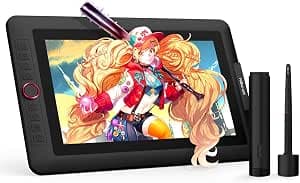
XPPen Drawing Tablet with Screen Full-Laminated Graphics Drawing Monitor Artist13.3 Pro Graphics Tablet with Adjustable Stand and 8 Shortcut Keys (8192 Levels Pen Pressure, 123% sRGB)
Description
PLEASE NOTE:XPPen Artist13.3 Pro drawing tablet Need to connect with computer,you need to use it with your computer or laptop, the 3 in 1 cable is included; Drawing Tablet with Screen: Tilt Function- XPPen Artist 13.3 Pro supports up to 60 degrees of tilt function, so now you don't need to adjust the brush direction in the software again and again. Simply tilt to add shading to your creation and enjoy smoother and more natural transitions between lines and strokes; Graphics Tablets: High Color Gamut- The 13.3 inch fully-laminated FHD Display pairs a superb color accuracy of 88% NTSC (Adobe RGB≧91%,sRGB≧123%) with a 178-degree viewing angle and delivers rich colors, vivid images, and dazzling details in a wider view. Your creative world is now as powerful as it is colorful; Drawing Pad: One is enough- The sleek Red Dial on the display is expertly designed with creators in mind, its strategic placement allows for natural drawing postures. With just one wheel, you can effortlessly zoom in and out, adjust brush sizes, and flip the canvas—all tailored to suit the habits of everyday artists. The 8 customizable shortcut keys allow you to personalize your setup, streamlining your workflow and enhancing creative efficiency; Drawing Display: Versatility and Compatibility- Supports Windows 10/8/7(32/64bit), Mac OS X 10.10 and higher. Compatible with Photoshop, Illustrator, SAI, CDR, GIMP, Krita, Medibang, Fire Alpaca, Blender 3D and more. Or register your XPPen Artist13.3 Pro drawing tablet on XPPen web to apply for an ArtRage 5, openCanvas and Cartoon Animator 4 Pipeline drawing program; Drawing Tablet: Fully-laminated Screen- The Artist 13.3 Pro seamlessly combines the glass and screen, to create a distraction-less working environment, virtually no parallax; Drawing Display: Battery-free stylus- Comes with a multifunctional pen case that serves as both a stand and holder, 8 durable replacement nibs, and this stylus ergonomic design for comfort during long sessions. It features two customizable shortcut keys for workflow efficiency and a battery-free design with a 60° tilt and 8192 pressure levels, providing a lag-free drawing experience at 220 RPS. The low Initial Activation Force (IAF) ensures a natural drawing feel
One less thing to search
Before you buy: quick questions
Ist dieses Tablet wirklich anfängerfreundlich, oder ist die Einrichtung kompliziert?
Es ist ein ausgezeichnetes Werkzeug für Anfänger in Bezug auf Preis-Leistungs-Verhältnis und Funktionen, aber seien Sie auf einen Einrichtungsprozess vorbereitet. Im Gegensatz zu einem iPad erfordert es die Installation von Treibern. Es gibt viele YouTube-Tutorials und Reddit-Threads, die helfen, und die meisten Benutzer bekommen es reibungslos zum Laufen. Der anfängliche Zeitaufwand lohnt sich für die professionelle Hardware, die Sie zu diesem Preis erhalten.
Wie ist das tatsächliche Zeichenerlebnis auf dem Bildschirm?
Das Zeichenerlebnis wird für seine Reaktionsfähigkeit und Farbbrillanz hoch bewertet. Allerdings wird von Nutzern häufig angemerkt, dass der vorinstallierte Bildschirmschutz eine matte, strukturierte Haptik hat, um Spiegelungen zu vermeiden. Einige lieben diese papierähnliche Reibung, andere empfinden sie als zu körnig. Sie können direkt darauf zeichnen oder ihn bei Bedarf vorsichtig durch einen glatteren Schutz von Drittanbietern ersetzen.
Was ist im Lieferumfang enthalten und muss ich noch etwas kaufen, um loszulegen?
Die Box ist sehr komplett! Sie erhalten das Tablet, den batteriefreien Stift, einen verstellbaren Ständer, einen Zeichenhandschuh, zusätzliche Stiftspitzen (insgesamt 8) und alle notwendigen Kabel (HDMI, USB, 3-in-1). Sie brauchen *nichts* weiter. Viele Benutzer empfehlen jedoch, später ein Pack Ersatzstiftspitzen (wie Filzspitzen für ein weicheres Gefühl) zu kaufen, da sich die Standardspitzen bei intensiver Nutzung abnutzen können.
Ich mache mir Sorgen wegen der 13,3"-Größe. Wird der Zeichenbereich zu klein wirken?
Dies ist eine häufige Sorge vor dem Kauf. Der 13,3"-Bildschirm ist fantastisch für die Portabilität und spart Platz auf dem Schreibtisch, aber wenn Sie an große Skizzenbücher gewöhnt sind, kann der aktive Bereich beengend wirken. Die meisten Künstler passen sich an, indem sie in ihrer Software schwenken und zoomen. Wenn Sie hauptsächlich an großen, detaillierten Illustrationen arbeiten und das Budget/den Platz haben, sollten Sie ein 15,6"- oder größeres Modell in Betracht ziehen. Für die meisten Hobbykünstler, Studenten und allgemeine digitale Arbeiten ist das 13,3"-Modell eine gute Balance.
Wie schneidet dieses Produkt im Vergleich zu einem Wacom oder einem iPad als erste Grafiktablette ab?
Es liegt perfekt dazwischen. Ein iPad ist als Gesamtpaket (Tablet + App + Stift) teurer, bietet aber ultimative Portabilität und Einfachheit. Ein Wacom in dieser Preisklasse würde normalerweise keinen Bildschirm enthalten. Der XPPen Artist 13.3 Pro bietet Ihnen ein hochwertiges Zeichenerlebnis *mit Bildschirm* zu einem viel niedrigeren Preis. Der Kompromiss, wie in vielen Online-Bewertungen erwähnt, ist, dass Sie möglicherweise mehr anfängliche Softwarekonfiguration benötigen als bei einem Apple-Produkt. Für engagierte digitale Kunst mit begrenztem Budget ist es eine erstklassige Wahl.
From a similar, more-reviewed product in this category: ProtoArc KM100-A Backlit Bluetooth Keyboard and Mouse for Mac, Space Gray
Is the ProtoArc KM100-A compatible with Windows?
No. The manufacturer states the keyboard and mouse set is designed exclusively for macOS 10.12 and above, iPadOS, and iOS, and does not support Windows, Android, or Linux; media and function keys do not work on Windows.
Can I switch the keyboard and mouse between multiple devices?
Yes. The combo offers 3 Bluetooth channels and supports Bluetooth 5.1 or above, and reviewers confirm you can separately switch between 3 options.
How is the typing feel and noise level of the keyboard?
Reviewers describe the keys as smooth, responsive, crisp, and satisfying with a quiet press that still gives good feedback, and the flat design is similar to the Magic Keyboard for a neutral wrist position.
Does the keyboard have backlighting?
Yes, it is a backlit keyboard, and reviewers call the backlighting a fantastic addition that looks stunning in Space Gray and helps with typing in low light.
How long does the battery last?
Reviews are mixed: some say battery saver mode is great and they are satisfied with the charge, while others report the battery drains quickly even on the lowest backlight setting.
Answers are limited to the manufacturer's listing and the reviews we analysed. Questions those sources cannot support are not answered here.
Transparent by design