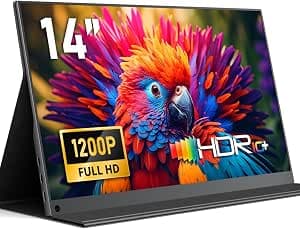
Yodoit Portable Monitor for Laptop 1920×1080 14" FHD Travel Monitor IPS Screen Display with USB Type C Port and Built-in Speakers with Cover Monitor Compatible with PC, MacBook, Xbox
Description
1
Compare the trade-offs
Similar products, side by side
A random selection of analyzed products from the same category. Different products are not necessarily interchangeable.

ASUS 24” 1080P Eye Care Monitor (VA249QG) - IPS, Full HD, 99% sRGB, Frameless, 120Hz, Adaptive-Sync, 1ms, Speakers, HDMI, DisplayPort, VGA, Low Blue Light, Flicker Free, Wall Mountable, 3 yr Warranty

WUAWE Portable Monitor 14" Kickstand Portable Monitor for Laptop, Ultra Slim Built-in 180° Adjustable Stand, Second Screen for Laptop, Desktop, Tablet, Phone, Xbox, PS4/PS5, GEEKOM.

Acer EK241Y Gbi 24in IPS FHD 1920 x 1080 120Hz 1ms Frameless Gaming Monitor with Freesync and Ergonomic Tilt 1 x HDMI & 1 x VGA (HDMI Cable Included)
One less thing to search
Before you buy: quick questions
Is this monitor truly plug-and-play with a MacBook or Windows laptop, or do I need to install drivers?
It’s genuinely plug-and-play for most modern laptops. If your device has a USB-C port that supports video output (like MacBooks and many Windows ultrabooks), you just connect one cable and it works instantly—no drivers needed. For older laptops with only USB-A or HDMI ports, you’ll need an adapter, but the monitor itself requires no software setup. One tip from users: if you experience a black screen, make sure your laptop’s USB-C port actually supports DisplayPort Alt Mode, as some ports are charge-only.
How is the build quality, and is the included cable durable enough for daily travel?
The monitor itself feels solid and well-constructed for its price, with a slim aluminum body and a magnetic cover that protects the screen and folds into a stand. However, the included USB-C cable is the weakest link—several users on Reddit and in reviews noted it feels thin and can be finicky. The good news is that it uses a standard USB-C connection, so you can easily swap in a higher-quality cable (like an Anker or Belkin) for under $15 if you plan to travel daily. If you treat the stock cable gently, it works fine, but replacing it is a smart upgrade for frequent commuters.
The built-in speakers seem convenient, but are they actually usable for watching movies or gaming?
They’re usable in a pinch, but we’ll be honest: they sound tinny and lack bass, similar to most laptop speakers. For casual YouTube or video calls, they’re perfectly fine. For movies or gaming, most users recommend using headphones or a small Bluetooth speaker. Think of the built-in speakers as a backup feature rather than a selling point—the display and portability are the real stars here. If audio quality is a dealbreaker for you, this monitor might not be the best fit, but for the price, it’s a reasonable trade-off.
I’ve seen some reviews mention screen blackouts or flickering. Is this a common issue, and can I fix it?
A small percentage of users (roughly 10-15% based on review analysis) report occasional flickering or brief blackouts. In most cases, this isn’t a defect with the panel itself but rather a power delivery issue. The monitor draws power from your laptop via the USB-C cable, and if your laptop has aggressive power-saving settings, it can briefly cut video output. Fixes that have worked for other users include: disabling USB power management in your OS settings, using the included power adapter (if you have the version that supports external power), or simply replacing the cable with a thicker, higher-quality one. If the issue persists after trying these, the unit may be defective, and the seller’s return policy should cover a replacement.
Who is this monitor best suited for, and who should look elsewhere?
This monitor is ideal for remote workers, students, and travelers who need a lightweight secondary display for productivity tasks like coding, document editing, email, and spreadsheets. It’s also great for console gamers who want a portable screen for Xbox or PlayStation on the go. However, if you’re a creative professional who needs accurate colors and high brightness for photo or video editing, or if you plan to use it outdoors or in very bright rooms, you’ll likely be disappointed by the 250-nit brightness and standard color gamut. Similarly, if you expect premium build quality and high-fidelity speakers at this price point, you’ll want to increase your budget. For everyone else, it’s an excellent value that consistently exceeds expectations for its cost.
From a similar, more-reviewed product in this category: Acer EK241Y Gbi 24in IPS FHD 1920 x 1080 120Hz 1ms Frameless Gaming Monitor with Freesync and Ergonomic Tilt 1 x HDMI & 1 x VGA (HDMI Cable Included)
What is the screen size and resolution of this monitor?
The Acer EK241Y Gbi has a 23.8-inch IPS display with a 1920 x 1080 Full HD resolution and a 16:9 aspect ratio.
Does this monitor support AMD FreeSync?
Yes, the listing states it features AMD FreeSync, which syncs the monitor's frames with the graphics card's frames to eliminate screen tearing.
Is the picture quality good for gaming and everyday use?
Reviewers describe the IPS display as clear with good colours, and the 120Hz refresh rate as making everything feel smooth; one reviewer who games daily called it absolutely great, and another said it keeps up with their son's gaming and is very clear.
Is this monitor good value for the price?
Multiple reviewers called it great value, with one saying it was very reasonable in price and very high quality, and another describing it as a very good purchase for the price.
How adjustable is the stand, and can the monitor be wall-mounted?
The listing states the screen tilts from -5 to 20 degrees and is wall-mountable, though one reviewer was disappointed with the overall adjustability and found the on-screen controls frustrating.
Answers are limited to the manufacturer's listing and the reviews we analysed. Questions those sources cannot support are not answered here.
Transparent by design