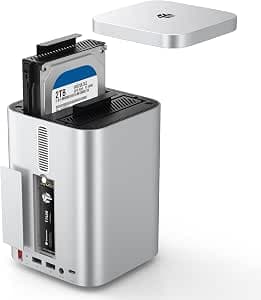
Yottamaster 2 Bay 10Gbps Hard Drive Case, USBC RAID Aluminium Enclosure for 2.5/3.5 HDD/SSD + M.2 NVMe/SATA SSD Max 56TB, 5*USB Ports, SD/TF Card Reader, Fan (Without Disk)
Description
【2-Bay RAID Case & Docking Hub】The HSD10 2-bay bay combines two SATA slots, a high-speed M.2 NVMe slot, SD/TF card reader and five USB ports (1×10Gbps + 3×USB 2.0) into a stylish aluminum drive — ideal for creatives, editors.; 【56TB SATA + M.2 SSD Hybrid Storage】 The 2-bay DAS Yottamaster box stores huge archives on two 3.5"/2.5" SATA drives (up to 24TB) while allowing direct editing from an M.2 NVMe SSD (up to 8TB). Built-in M.2 slot supports NVMe and SATA SSD (2230/2242/2260/2280). Up to 56TB total capacity — separate active projects from long-term storage for faster workflows.; 【High Speed 10Gbps via USB-C】2-bay RAID Yottamaster box features 10Gbps USB-C interface for fast transfers, perfect for 4K video, photo libraries and large projects. Use the NVMe slot as a direct editing unit or cache — no waiting, just creativity.; Flexible Hardware RAID Mode: The Yottamaster 2-bay RAID box supports RAID 1, JBOD or Normal (PM) modes, balancing speed, redundancy or capacity. Ideal for managing multi-camera streams on set or in the studio with up to 48TB of secure storage (RAID configurable only through the two SATA bays). Tip: Use the disk manager on your computer to check the RAID status.; 【Aluminum DAS with Active Cooling】 The 2-bay box features a sturdy aluminum body for efficient heat dissipation, a built-in silent fan and rear and lower air vents for stable performance during prolonged use.
One less thing to search
Before you buy: quick questions
Is this enclosure truly compatible with any 2.5" or 3.5" SATA drive and M.2 NVMe SSD? Are there any hidden size limits?
Yes, it's designed for broad compatibility. It supports standard 2.5" and 3.5" SATA HDDs/SSDs and both M.2 NVMe *and* SATA SSDs (up to 2280 size). There are no hidden size limits for the drives themselves—the "Max 56TB" refers to the total capacity using the largest commercially available drives in each bay. Just ensure your 3.5" drives are the typical desktop size.
How difficult is it to set up, especially the RAID modes? Is the included software necessary?
Setup is straightforward for single-disk use—it's essentially plug-and-play on modern Windows and Mac systems. Configuring RAID (JBOD, SPAN, RAID 0, or RAID 1) requires using the switch on the back and then initializing the array in your computer's disk utility (like Disk Management on Windows or Disk Utility on Mac). Many tech-savvy users skip the bundled software, finding their operating system's native tools simpler and more reliable.
I've seen comments about fan noise and heat. How effective is the cooling, and is the fan always running?
The all-aluminum body acts as a great heatsink. The fan automatically activates based on temperature. Most users find it quiet or inaudible during normal use, but a small number have reported louder units—this seems to be a quality control variance. For high-performance NVMe drives under sustained load, the enclosure will get warm, which is normal. The active cooling helps prevent thermal throttling. If absolute silence is critical, you can unplug the fan, but we only recommend this for light use with cooler-running drives.
The title mentions "5*USB Ports." Can I use these to connect more external hard drives?
This is a common point of clarification! Those five extra USB-A ports are for peripherals like keyboards, mice, or flash drives, and they operate at a lower speed (USB 2.0). They *cannot* be used to add more high-speed storage. The 10Gbps speed is dedicated solely to the two drive bays inside the enclosure. Think of them as a convenient hub for your other accessories.
Who is this product best suited for, and who might want to look at something else?
This enclosure is a fantastic fit for content creators, power users, and tech enthusiasts who need fast, versatile storage for editing, backups, or managing multiple drive types. It's great if you value a solid metal build and all-in-one convenience. If your primary need is completely silent operation for basic backups, a fanless, simpler enclosure may be better. Similarly, if you only use the latest Gen4/Gen5 NVMe drives and need maximum possible RAID speeds, a dedicated Thunderbolt NVMe enclosure would be a more performance-focused (though more expensive) alternative.
Answers are limited to the manufacturer's listing and the reviews we analysed. Questions those sources cannot support are not answered here.
Transparent by design