What people like
Versatile hub and easy setup
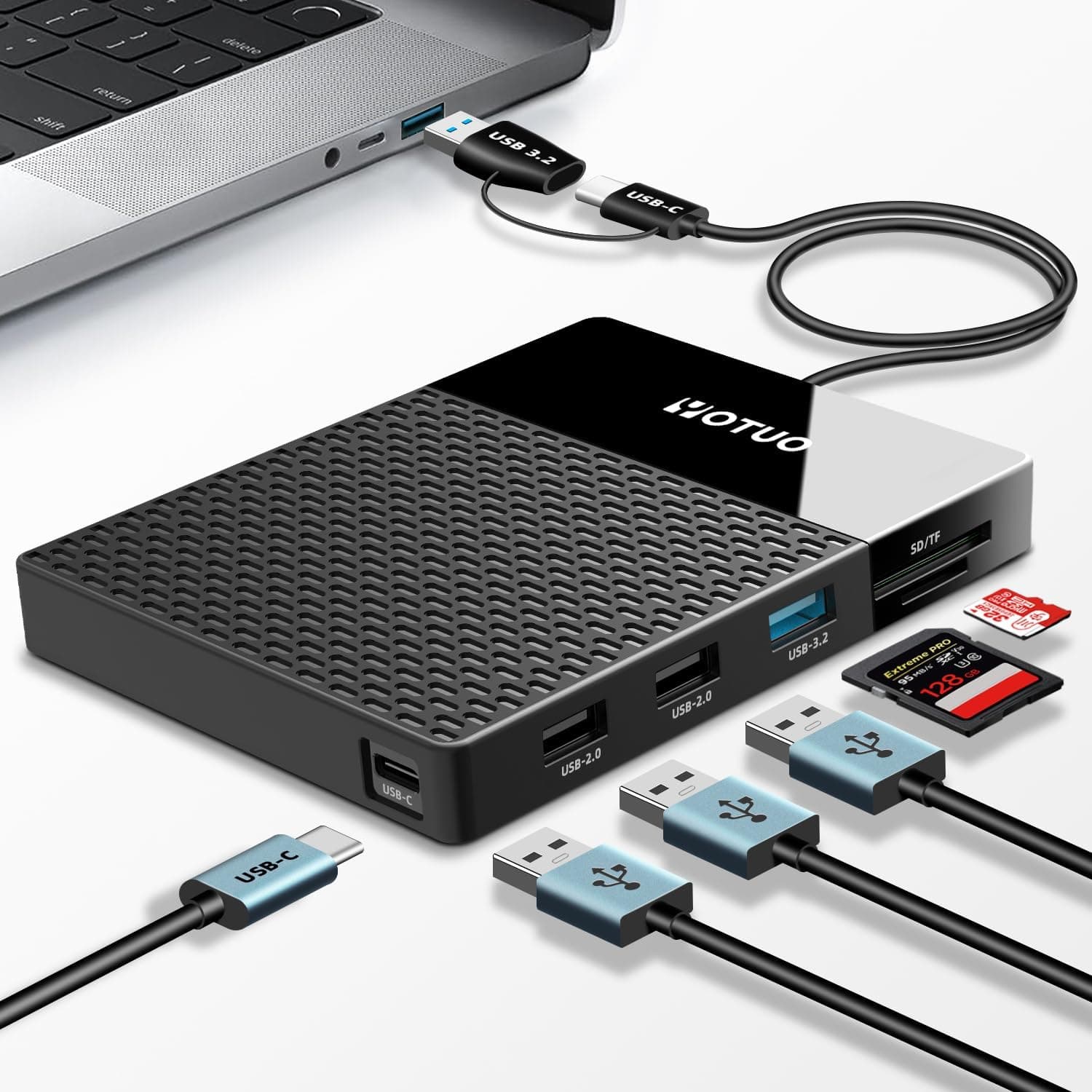
Reviewers value the built-in 7-in-1 USB-C hub and card reader, and many find the drive easy and intuitive to use. It is also praised as a flexible storage option for backups and photos.
The 30-second read
What people like
Reviewers value the built-in 7-in-1 USB-C hub and card reader, and many find the drive easy and intuitive to use. It is also praised as a flexible storage option for backups and photos.
The main watch-out
One reviewer reported the hard drive died after less than six months, with disconnection warnings and strange noises during file copies. Another noted uncertainty about long-term durability.
Before you choose
Some users found the required Micro B cable connection and card reader slots confusing or non-functional, so it is worth confirming these details before buying.
Your use case first
9 of 60 mentions describe a negative experience (15%).
5 of 34 mentions describe a negative experience (15%).
2 of 32 mentions describe a negative experience (6%).
72 of 160 mentions describe a negative experience (45%).
38 of 121 mentions describe a negative experience (31%).
26 of 69 mentions describe a negative experience (38%).
21 of 32 mentions describe a negative experience (66%).
23 of 28 mentions describe a negative experience (82%).
One review can mention several topics. Percentages describe the reviews we analysed, not all buyers or the product's overall failure rate.
Check the evidence
Included does not mean verified authentic. Flagged does not mean proven fake. These are analytical classifications.
Showing 3 illustrative excerpts, not the complete review set.
Seller Generously Solved a Cable Problem
“The "owner's manual" is a small card with a diagram showing the device and two cables on one side, and text with nine numbered points on the other. The manual says what to do if the device won't read, but doing those things didn't help. It also says to make another connection if using USB 3.0, but it doesn't say how or show a diagram. The 9th point is the email address for questions, which I used. I will update this review based on the answer. Meanwhile I will be looking for a different product to replace this one, just in case. No reply from seller after 2 days. I bought this, first, to copy 9 years of files from my old XPS that won’t support Windows 11 and then to a new laptop, and second to give me more USB ports because the new laptop has only two. My issue was that my old laptop can’t even see this product. Today I tried it on my new laptop and it seems to work, so I raised this review from 1 star to 2, and decided to keep it, although I will have to buy another external hard drive to copy from the old laptop to the new. If I had it to do over again knowing what I know now, would I still buy it? Since I need to buy an external hard drive anyway, plus a hub, I would not buy this. Another update: Seller did reply by email with guidance on connection sequence that I haven't had time to try yet, raised the possibility of a bad cable, and offered return or replacement through Amazon. Meanwhile based on advice I looked on seller's website for a driver, but there isn't one, and it says it's not needed because it should be plug and play (in my case it's plug and pray). Then I tried it on my new laptop and it worked, so I plan to keep it and use a different approach to copy data from the old laptop to the new. Because the seller did reply, although not promptly, and the device works on the new laptop, I changed 2 stars to 3, a grade of C, acceptable but only marginally. Final update, I hope. After receiving a separate Amazon order, with a different seller, for a cable, the device worked fine on my old laptop, in fact, better than my old Toshiba external hard drive that has problems. The seller correctly diagnosed the problem, then came through with a total refund, not just the offered partial refund. I would have been happy with the ten bucks I paid for the new cable, but I got the device for free, and also got a refund for the protection plan that I bought with it. While I wish the seller had been a bit more prompt, I have to give extra points for going above and beyond. Seller earned 5 stars, or a grade of A. And yes, if I had it to do over again knowing what I know now, I would definitely buy it.”
Signals matched: Specific detail: process, entity · Mentions: ease of use, compatibility · Reads as an authentic voice
They most adapable storage device you could imagine.
“Well, so far so good. I had expected this to be a USB-C device as in plug in a USB-C cable at both ends and power/data... done. That's not the case. I must say excellent instructions that come with the device explain that you should plug in the "Micro B" end of the supplied cable to the device before connecting to a computer/tablet/phone. That sort of makes sense as the "Micro B" connector looks a lot like a SATA HD connector. It's a plus that the other end of the cable is native USB C and has and attached adapter to use USB A 3.2. I tested by plugging a USB flashdrive into one of the ports on the drive and it showed up just like it had been plugged into the host computer. This will be super handy with my tablet that only has one USB C port. After plugging in the extra storage I'll still have a free USB C port plus 3 USB A ports (one is USB 3.2). I tested plugging in my old Lumix camera with it's "mini" to USB A cable. That didn't work with the USB 3.2 port but was fine with the other 2.0 ports. This is a very old camera so I attribute the lack of 3.2 connectivity to the camera and not this device. In fact it's a plus that it will find old hardware with the older protocol ports. This is going to be the "hub" of my travel pack.”
Signals matched: Specific detail: entity, process · Mentions: compatibility, ease of use · Reads as an authentic voice
Excellent Storage Solution for Photographer
“As a photographer, having reliable storage and easy access to my files is essential, and this external hard drive has been a fantastic addition to my workflow. The 1TB of storage provides plenty of room for thousands of high-resolution photos, and the built-in 7-in-1 USB-C hub is incredibly convenient. I love being able to transfer images directly from my camera's SD card while also connecting other accessories without needing multiple adapters. The USB 3.0 speeds make backing up large photo sessions quick and efficient, saving me valuable editing time. The drive is compact, lightweight, and easy to take to weddings, portrait sessions, and on-location shoots. It feels well made, and having both storage and a multiport hub in one device helps keep my workspace much more organized. If you're a photographer, videographer, or anyone who works with large files, this is an excellent investment. It's practical, reliable, and makes managing and backing up photos much easier. I would definitely recommend it!”
Signals matched: Specific detail: quantity, entity, scenario · Mentions: storage capacity, ease of use, ports, compatibility · Reads as an authentic voice
One less thing to search
The listing states it supports Windows, Mac OS, Linux, Android, and iOS (iPhone 15 and later), as well as desktops, laptops, smartphones, tablets, and TVs. It notes that Apple devices must have a USB-C port, and a Lightning to USB-C adapter will not resolve compatibility.
The listing explains that operating systems calculate capacity differently than manufacturers, so a 1TB drive shows approximately 931GB in Windows.
The listing says the DC-5V power cable is only necessary when power supply is inadequate or the connected device provides poor power output, and most models and usage scenarios do not require it. One reviewer noted the power/USB connector is only needed when running from an unpowered source.
One reviewer described the transfers as fast and another said it reads and writes pretty swiftly for a spinning drive. The listing notes that maximum performance requires using a USB 3.2 Gen 1x1 or later interface, and that speeds vary by host device and usage conditions.
Reviews are mixed: one reviewer reported the drive died after less than six months, while another said it was too soon to tell if it would last. The listing includes a warranty description of 1.
Answers are limited to the manufacturer's listing and the reviews we analysed. Questions those sources cannot support are not answered here.
Transparent by design