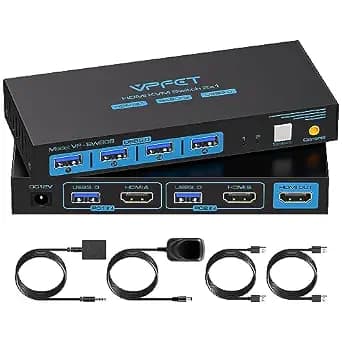
8K@60Hz USB 3.0 KVM Switch hdmi 2 Port 4K@120Hz KVM Switcher for 2 Computers Share 1 Monitor and one Set of Keyboard Mouse webcame and Hard Disk, Wired Controller and 12V/1A DC Power Included
Descripción
1
Compara las ventajas y desventajas
Productos similares, uno junto a otro
Una selección aleatoria de productos analizados de la misma categoría. Productos distintos no son necesariamente intercambiables.

UGREEN 8K@60Hz HDMI Displayport KVM Switch 3 Monitors 2 Computers, Aluminum

KVM/USB Mode KVM Switch 2 Monitors 2 Computers with Audio, ANXQQ 8K@30Hz 4K@144Hz USB 3.0 Dual Monitor KVM Switch Displayport, Share 4 USB Devices with Wired Control and Power Adapter

BENFEI USB 3.0 Switch, USB Switch 2 Computers Share 4 USB for PC, Mouse, Keyboard, Printer, Scanner, USB KVM Switch Selector Compatible with Windows, Mac, Linux
Una cosa menos que buscar
Antes de comprar: preguntas rápidas
このKVMスイッチは、高リフレッシュレートのゲーミングモニター(例:4K @ 120Hzまたは144Hz)で確実に動作しますか?
パフォーマンスは異なる場合があります。ハードウェアは4K@120Hzをサポートしていますが、Redditなどのフォーラムでは、ピークスペックでの安定したパフォーマンスの達成は、特定のモニター、ケーブル(認定済みのUltra High Speed HDMIを推奨)、コンピューターハードウェアに大きく依存すると多くのユーザーが報告しています。高リフレッシュレートのパフォーマンスを保証するには、直接接続が常に最適です。オフィスとゲームの混合使用では、4K@60Hzまたは1440p@120Hzでうまく動作することが多いです。
セットアップは本当に「プラグアンドプレイ」ですか、それともトラブルシューティングが必要ですか?
ほとんどのユーザーは、最適なパフォーマンスを得るためにある程度の設定が必要だと感じています。常に即座に使えるわけではありません。コミュニティからの一般的なヒントには、特定の順序でデバイスを接続する(まずモニター)、最初から付属の12V電源アダプターを使用する、切り替える前にコンピューターがUSBハブを完全に認識していることを確認するなどがあります。有線コントローラーは、一度設定すると最終的な切り替えプロセスを非常に簡単にします。
ウェブカメラと外付けハードドライブを2台のコンピューター間で問題なく共有できますか?
はい、それは主要な機能です。ただし、一部のウェブカメラやSSDなどの高帯域USBデバイスは、切り替え後に時々再接続が必要になる場合があることに注意してください。ソーシャルメディアのフィードバックによると、キーボード、マウス、およびほとんどの標準的なウェブカメラなどの周辺機器はシームレスに動作します。外付けハードドライブへのミッションクリティカルな常時アクセスの場合、一部の上級ユーザーは専用のネットワーク接続型ストレージ(NAS)ソリューションを好みます。
製造品質はどうですか?電源について心配すべきですか?
ユニットは機能しますが軽量です。付属の12V/1A電源アダプターはデバイスに十分ですが、長時間使用すると温かくなることに気づいたユーザーもいます。特に多くの給電USBデバイスを接続する場合は、長期的な信頼性のために適切な通風を確保することをお勧めします。ユニットとリモコンの物理スイッチボタンは、シンプルで耐久性があると報告されています。
このKVMスイッチはどのようなユーザーに最適で、どのようなユーザーは他の製品を検討すべきですか?
このスイッチは、標準または60Hzモニターを使用し、仕事用ノートパソコンと家庭用PCで机をきれいに共有したいユーザーに非常にコストパフォーマンスが優れています。オフィス環境の効率化に最適です。完璧なHDR、可変リフレッシュレート(G-Sync/FreeSync)、または一貫した超高リフレッシュ性能を必要とするゲーマー、ストリーマー、またはプロフェッショナルは、互換性の問題が発生する可能性があり、これらの特定のニーズには専用のプレミアムブランドのKVMスイッチの検討をお勧めします。
De un producto similar con más reseñas en esta categoría: Unitek HDMI KVM Switch 1 Monitor 2 Computers with Power Adapter
Can I switch between computers with a keyboard shortcut, or do I have to press a button?
This model uses a physical button on the unit — there's no hotkey switching. That's the most common complaint in reviews, so if keyboard shortcuts are a must-have for your workflow, you'll want to look at a hotkey-capable KVM instead. If you're fine reaching for a button (or placing the switch within arm's reach), it works reliably.
Do I need to use the included power adapter, or can it run without it?
Use the adapter. While some users have tried bus-powering it, the most stable experience — especially with wireless peripherals — comes from plugging in the included DC adapter. Several reviewers noted mouse dropouts when running unpowered, so treat the adapter as required, not optional.
Will it work with my Mac and Windows PC together, and does it handle 4K?
Yes, mixed Mac/Windows setups are one of its most common use cases, and it's plug-and-play for both. For resolution, check your monitor's specs against the switch's rated maximum before buying — some users with high-refresh or 4K@60Hz displays ran into EDID handshake issues (blank screen after sleep), which is the second-most-cited complaint. Standard 1080p and 4K@30Hz setups report smooth sailing.
Are the cables included, and are they long enough for a desktop tower?
Yes — HDMI and USB cables are in the box, which reviewers consistently call a nice bonus. That said, they're on the short side (roughly 3 ft), so they're ideal for laptop docks or monitors sitting close to both computers. If your tower lives under the desk, plan on buying longer cables.
Who is this KVM best suited for — and who should skip it?
It's a great fit for remote workers, students, or anyone sharing one monitor, keyboard, and mouse between two computers on a budget, especially if you value compact size, included cables, and simple setup. Skip it if you need hotkey switching, dual-monitor output, DisplayPort, or rock-solid EDID behavior with a fussy high-refresh display — in those cases, a TESmart or Cable Matters alternative will save you the return shipping.
Las respuestas se limitan a la ficha del fabricante y a las reseñas que analizamos. Las preguntas que esas fuentes no puedan respaldar no se responden aquí.
Transparente por diseño