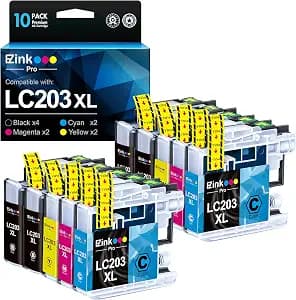
E-Z Ink Pro LC203XL Compatible for Brother LC203XL LC201XL Ink Cartridges | LC203 XL LC201 XL use with MFC-J480DW MFC-J880DW MFC-J4420DW MFC-J680DW MFC-J885DW (Black, Cyan, Magenta, Yellow,10 Pack)
Description
Tips: The updated LC203 ink cartridge has no locking clip, but not have effect on fit the printer to make it work; Compatible with: LC203 ink cartridges use with Brother MFC-4320DW MFC-J4420DW MFC-J4620DW MFC-J460DW MFC-J480DW MFC-J485DW MFC-J5520DW MFC-J5620W MFC-J5720DW MFC-J680DW MFC-J880DW MFC-J885DW; Package contents: 4 Black LC203, 2 Cyan LC203, 2 Magenta LC203, 2 Yellow LC203; Page yield: black is 550 pages per a LC203XL cartridge, color is 550 pages per a LC203XL cartridge (at 5% coverage); E-ZInk Pro LC203XL compatible ink cartridges replacement for Brother LC203XL LC203 LC201 LC201XL
Comparez les compromis
Produits similaires, côte à côte
Une sélection aléatoire de produits analysés de la même catégorie. Des produits différents ne sont pas nécessairement interchangeables.

Yowell 9 x LC223XL Colour Cartridges Compatible with Brother LC223 XL LC-223 Cyan Magenta Yellow Cartridges for Brother MFC-J5320DW MFC-J4420DW DCP-J562DW MFC-J480DW MFC-J880DW DCP-J4120DW

Thermal Printer Cleaning Pen Printhead Cleaner Kit for Electronic Face Sheet Print Head Alcohol Cleaning Card Printer, Pack of 5

Ink Cartridges Combo Pack
Une chose de moins à chercher
Avant d'acheter : questions rapides
Will these E-Z Ink Pro cartridges work with my Brother printer without needing to install special firmware or drivers?
Yes, these are designed as a direct, drop-in replacement. They don’t require any special firmware updates or driver installations. Just pop out the old cartridge and click the new one in. The printer will generally recognize the chip immediately. A few users have mentioned that if the printer doesn't initially detect the cartridge, simply removing it and reseating it firmly usually solves the issue.
What is your return or refund policy if one of the cartridges is defective or leaks?
We stand behind our products with a hassle-free warranty. If you receive a cartridge that is defective, leaks, or is dead on arrival, simply contact our support team with your order number and a photo of the issue. We will send you a replacement or offer a full refund, whichever you prefer, so you don't have to worry about losing money on a faulty unit.
The listing mentions compatibility with the MFC-J480DW and MFC-J880DW. My model is the MFC-J680DW; will it work?
Yes, absolutely. The LC203XL and LC201XL series are designed to be compatible with a wide range of Brother models, including the MFC-J4420DW, MFC-J480DW, MFC-J680DW, MFC-J880DW, and MFC-J885DW. As long as the printer uses the LC201XL/LC203XL cartridge family, these will fit correctly. You can always check your printer's manual to confirm the cartridge model number before ordering.
How does the page yield compare to the genuine Brother LC203XL ink cartridges?
You can expect a page yield that is very comparable to the genuine Brother cartridges, typically around 300 pages per black cartridge and 550 pages per color cartridge, based on 5% coverage (standard document printing). While your print settings and content will affect this number, most customers find the yield to be highly reasonable for the price. It’s an excellent value for standard home or school work.
I've heard about issues with print head clogging on compatible inks. Is this a problem with your cartridges?
To minimize clogging, we recommend printing something at least once a week to keep the ink flowing. Many of our customers use these cartridges in low-volume home environments without issues. However, if you notice streaking or missing lines, running the printer's automatic "Clean Print Head" cycle (found in your printer's maintenance menu) will usually resolve it. This is a standard maintenance step for any inkjet printer, regardless of the ink brand used.
D'un produit similaire mieux noté dans cette catégorie : CANON PG-210 OEM Ink Cartridge, BLACK
Will this PG-210 cartridge fit my Canon PIXMA printer?
It's designed for a specific set of PIXMA models — including the iP2700/iP2702, MP240/MP250/MP270/MP280/MP480/MP490/MP495, and MX330/MX340/MX350/MX360/MX410/MX420. If you own a newer model like the MX492, you'll need a different cartridge (PG-245), so double-check your printer's model number before ordering. A quick glance at your printer's front panel or manual will save you a return.
Is 220 pages a realistic yield, or will it run out sooner?
Canon's 220-page estimate is based on standard text documents at roughly 5% coverage — real-world mileage depends on what you print. Many users report getting close to that for plain text, but photo-heavy or graphics-dense printing drains ink faster. If you print a lot, the high-yield PG-210 XL is worth considering for a better cost-per-page.
Is this a genuine Canon cartridge or a third-party/compatible one?
This is a genuine OEM Canon cartridge (part number 2974B001), sealed and backed by Canon's limited warranty — not a remanufactured or third-party product. That matters if you've had clogging or recognition issues with off-brand inks; reviewers consistently praise the sharp, smudge-free output and reliable plug-and-play installation.
My printer says "low ink" or won't recognize the cartridge — what should I do?
First, remove and reseat the cartridge firmly until it clicks, then run a cleaning cycle from your printer's menu. A small number of users report premature "low ink" warnings or recognition errors, which usually resolve with a reseat or a power cycle. If the issue persists on a brand-new sealed cartridge, contact the seller for a replacement under warranty.
Is it worth paying more for OEM versus a cheaper third-party cartridge?
It depends on your priorities. Budget shoppers often compare this against third-party multipacks that cost significantly less, but many reviewers say they switched back to genuine Canon after dealing with clogs, streaks, or inconsistent output from knockoffs. For low-volume home and school printing where reliability matters most, the OEM cartridge is a solid, low-hassle choice — just factor in the higher per-page cost.
Les réponses se limitent à la fiche du fabricant et aux avis que nous avons analysés. Les questions que ces sources ne permettent pas de traiter restent sans réponse ici.
Transparent par conception