Inclus ne signifie pas vérifié authentique. Signalé ne signifie pas prouvé faux. Ce sont des classifications analytiques.
Affichage de 3 extraits illustratifs, pas l'ensemble complet des avis.
Inclus dans l'analyse5.0/5 étoiles
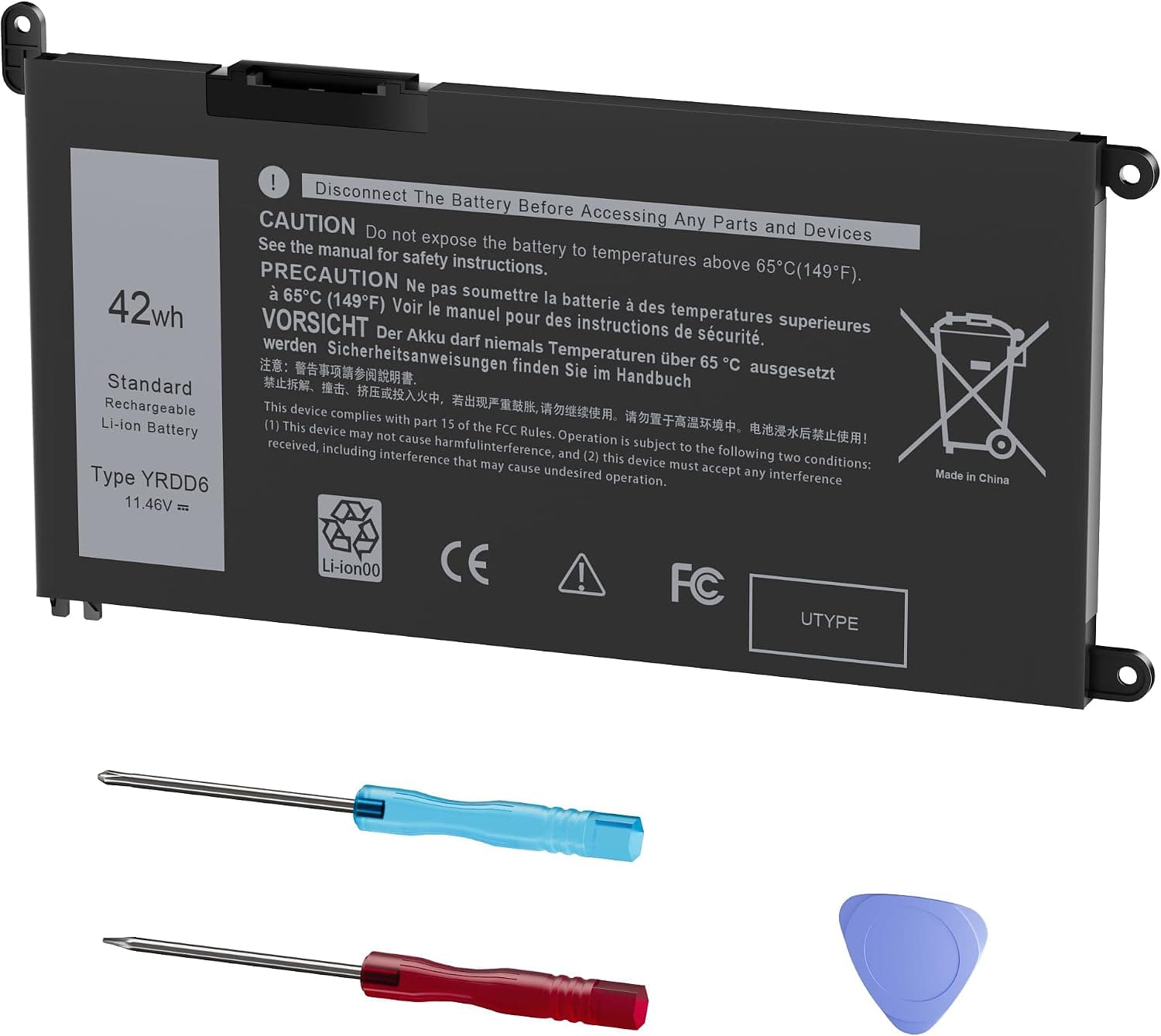
A new battery, removal tools and a manual with instructions are provided; replacement was a success
“This review is for a new, unused, unopened “Emanjor, 42Wh YRDD6 1VX1H VM732 Battery for Dell Inspiron.” The battery I received is similar and will work as a replacement for the Dell 3583 that I am renewing. For me, how easily the battery fits and installs, the longevity and consistent service that it provides over time, these things decide the ultimate value of this selection. Lay the Dell Inspiron 3583 laptop upside down on a flat surface. I prefer to work with a computer assembly tool kit over top of a clean towel and use a small ramakin to all tiny parts and for holding screws. I keep a small magnetic retrial pen handy just in case for hardware that jumps ship somewhere along the line. This battery replacement is straightforward and something that a basic DIY handyman can do. Experience opening and closing a laptop case is added benefit. With the help of YouTube, I learned how to do this myself. Locate and remove all the (10) tiny screws that secure the bottom case from the underside of the laptop. Use your fingers (not tools) to separate the bottom case from the rest of the laptop keeping the machine close to the table. Lift the bottom case evenly as you continue separation. Locate and remove the (4) screws that secure the corners of the battery. Unplug the connector and lift the battery from the laptop. Perform a "Hard Reset" (Flea Power Drain): During installation, it is standard procedure to press and hold the power button for 20 seconds while the battery is disconnected to remove residual static electricity. Plug in your AC adapter and charge the laptop to 100%. You can use the laptop while it charges. Once fully charged, unplug the AC adapter and allow the battery to drain completely until the computer shuts down (or reaches 6% or less). Plug the AC adapter back in and charge it to 100% uninterrupted. Once fully charged, turn on the laptop and immediately tap F2 to enter the BIOS setup. Confirm that the BIOS recognizes the new battery and that its health status is listed as "Normal" or "Good." After booting, you can press F12 to enter the boot menu and select "Diagnostics" to verify the battery is functioning correctly. Go to your Power & Battery settings in Windows and ensure your Power Mode is set to "Balanced" or your preferred setting. Ensure your system BIOS is up to date via the Dell Support website, which can improve battery management performance”
Signaux détectés : Détail spécifique : entity, quantity, process · Se lit comme une voix authentique
Inclus dans l'analyse5.0/5 étoiles
If it lasts, it's worth the price
“The battery of my Dell Inspiron 5593 (15-inch) has been slowly weakening with age. The last time I ran a battery report, the fully charged battery had a capacity of ~17,500 mWh as compared to a design capacity of 41,998 mWh. Small wonder it only ran for 45 minutes on battery alone. I took the plunge and picked up this aftermarket battery at less than one-third the price of the OEM direct from the manufacturer. The only problem was, of course, how to install the thing. The battery comes with a small toolkit: a 0 or 00 Phillips screwdriver and a teensy TORX driver, plus what looks like an off-brand guitar pick (see unboxed image including the old battery). It also comes with an "instructions" sheet, which proved pretty much useless. Well over half the verbiage on the sheet is about whether you actually *need* a new battery and how to start the process. The meat of the instructions turned out to be, in my case, useless -- "slide the latches to the unlocked position" -- because this model doesn't have latches. The alternative instructions are to "Remove the red bolt... and open the bottom cover..." Nope, no red bolt. So, off to Reddit and YouTube, where I not only found instructions and videos on opening the case but also learned what the "guitar pick" is for -- it's to pry the bottom off after you've removed a bunch of screws from the case, without using a metal implement that might scratch things up. HINT: for my 5593, the two screws in the corners near the hinges are apparently captive! You'll need to remove more screws to take out the battery (three in my case) and then puzzle out how to pull out the battery cable without damaging it. CAREFULLY is your friend; spend a few more minutes with Reddit and YouTube if you get nervous. Another hint: don't let your magnetized screwdriver touch anything in the laptop's innards. Reassemble, charge for a couple of minutes, cross fingers, and hit the power button. Whew: it works. At full charge, the battery capacity is identical to design capacity of 41,998 mWh. Yay! As always, if the battery proves to be of unacceptable quality, I'll be back to update.”
Signaux détectés : Détail spécifique : quantity, comparison, process · Se lit comme une voix authentique
Inclus dans l'analyse5.0/5 étoiles
Affordable Replacement Battery That Fits and Restores Laptop Runtime
“I purchased this battery for an older Dell Inspiron that had reached the point where it barely held a charge, and it has performed exactly as hoped. The fit was perfect with no modifications needed, and installation was simple and straightforward. It even came with a small screwdriver and plastic pry tool, which made removing the back cover much easier. Once installed, the laptop recognized the battery immediately without any warnings or compatibility issues. Windows displayed battery health information normally, and charging has been smooth and consistent. The improvement in runtime compared to the original worn-out battery is significant—the laptop is once again usable without constantly being tethered to a power outlet. The overall build quality appears comparable to the original battery. It fit securely using the existing screws and hasn’t shown any unusual heat during charging or use. I followed the standard recommendation to fully charge it before first use, and performance has been steady so far. While long-term durability will take time to evaluate, initial results have been very positive. For anyone looking to extend the life of an older Inspiron instead of replacing the entire laptop, this battery is a practical and cost-effective solution that does exactly what it’s supposed to do.”
Signaux détectés : Détail spécifique : process, scenario · Se lit comme une voix authentique