Inclus ne signifie pas vérifié authentique. Signalé ne signifie pas prouvé faux. Ce sont des classifications analytiques.
Affichage de 3 extraits illustratifs, pas l'ensemble complet des avis.
Inclus dans l'analyse2.0/5 étoiles
Good drone
“This is a decent entry level GPS drone, if you can get it to work. I own multiple Holy Stone drones and I have had some sort of issue with each of them. The HS175D, is no different. The HS customer service has always followed up and helped resolved issues for me in the past, within a reasonable time frame, but they have been completely MIA to all my emails for some reason. No response from them over the last 2 weeks. So, it's time to post a review... This is my 3rd HS175D drone. I had to exchange 2 of them already due to issues. Here is what I have had to deal with... 1) Pairing the drone to the controller, can be frustrating. Sometimes it pairs immediately, other times not at all. I have literally walked through the setup and calibration multiple times, after turning everything off and back on, just to get it to bind to the controller. Once I am able to bind the controller to the drone, it will take off and it will hover, before the controller just stops working completely. No responses to any input from the controller at all. Some of their other drones allow you to use the app to control the drone, but not this one. Even trying to land the drone from the app, is no responsive. The drone has literally flown away from me without my having any control over it before the "Return to home" feature kicks in when the connection to the controller is lost. With RTH, the drone flies straight up in the air before it will return to where it took off from. Having no control over it and watching it fly away like it does, is unnerving. I would just be there watching it having no idea if it was going to land where it started from or if it was going fly away and hit something or someone. Not a very pleasant feeling, to get from a hobby... 2) It will not fly unless it is in GPS mode, even though the manual says it will work without GPS. The GPS takes forever to link up with the satellites. It appears it needs at least 7-8 satellites before you can start using it, which is a little excessive if you ask me when syncing to 4-5 is all that is really needed. I have waited over 10 minutes before resetting everything and starting the setup process all over again. Some days, it would never sync up to any satellites at all. Crystal clear sky, no joy. But once you've exhausted all your patience with the binding and the GPS nonsense, the drone may start to work for you. 3) The most recent issue that I had to painfully deal with concerns the SD card. I purchased a 3 pack of PNY 64gb Hi Speed Micro SD cards when I bought the drone. These cards were made for this type of device. The card has been in the drone, since March of this year. I took it out of the drone so I could copy the files onto my PC. Well, to my surprise the 64gb card is now only reading as 7gb. That made me all happy inside. The card was formatted into "RAW" format, by the drone. It was setup by PNY as Fat32 format. I tried to fix the card using a Mac, a PC as well as 2 different Linux based platforms, no joy. I cannot access any of the files on the card at all! I can see the size of the drive, but not the contents. But here's the kicker, when I popped the card back in the drone, I can see all the images and videos inside the app. I can even watch the videos and view the pictures. But I can't pull them off the card at all, so having visibility over the files in the app, is completely useless if I can't take the files off the card. I can't even reformat the SD card either. I have tried 6 different programs on multiple computer platforms, it s not recognized at all!! I am very computer literate, I own a computer repair shop. I have honestly never seen this type of issue before. I can't find a way to fix this issue. I don't know what software they installed on the drone, but it shouldn't change the file format. And it really shouldn't be changing the attributes and policies on the SD card either. 5) It would have been nice to have gotten some support from HS. At the bare minimum, a response to any of the 4 emails I sent would have been nice. Even if they just told me to go %^%$ myself, it would have been something versus no response at all. It looks like this will be the last HS drone I will ever buy. Especially since I will have to work with PNY to try to get an exchange for the card. On the plus side, the drone does offer great battery life in comparison (that is, whenever you can get it to work right!) and the case is very nice too. That's all the positivity I can muster up at this point....”
Signaux détectés : Détail spécifique : entity, process · Mentionne : reliability, quality · Se lit comme une voix authentique
Inclus dans l'analyse5.0/5 étoiles
This drone performs exactly as advertised. Nothing less, nothing more.
“We needed to get a better look at some problems on an inaccessible roof, and inspection companies quoted high numbers just to look. Buying a quality, entry-level drone which could do the job was an easy decision. After reading reviews of a number of under-$200 drones, we chose the HS175D, and are very satisfied with our decision. Amazon delivered in less than a day, and the drone was flying, well controlled by a novice operator, within an hour. After a bit of practice, the drone took high-definition photos of the roof in question, and the phots were of exceptional quality and fully met our needs. In the following days, we flew the drone just for the fun of it, and found it more than met our expectations gained from reading the specifications. This drone does exactly what the manufacturer says it does, nothing more, and nothing less. It is very easy to learn to fly it. Best to steer clear of trees and other high structures of course. One important learning--if you think you are losing control, let go of the control sticks. The drone will simply stop moving and hover where it is, while the operator regains his composure. While we are totally satisfied, there are a few comments which we will pass along to other new operators. This assumes you have downloaded the software for the drone according to the instructions provided, and have initiated that software on your phone. 1) For best photographic results, a separately purchased SD card is recommended. After taking photos or videos, it is best to remove the SD card and insert it directly into a computer (using an adapter that comes with the SD cards). Download the files into the computer, but do not delete them from the SD card. Then reinsert the SD card into the drone, and use the drone software to delete the files. 2) And there is a bug. SD cards formatted by the drone itself have some problem that prevents a Mac computer from reading them (although a PC will read them). The fix is simple: Format the SD card with the computer, not with the drone. If using a Mac, choose the MS-DOS (FAT) option. 3) While taking video with the drone, if you attempt to take a still picture, the video will stop. You'll need to restart it. Not surprisingly, you cannot take video and still pics at the same time. Further, we found while using an iPhone along with the manual controller, as recommended, that the "Take Video" button on the controller will start video, but it will stop on its own about a second later. So, you should use the "Take Video" button on the phone screen instead, which works as you would expect: Press once to start video, press again to stop. 4). If the top-right Botton on the phone screen (marked with a circular star) is pressed , a small screen with Chinese characters appears on the phone screen. I have no idea what these characters mean. But pressing this icon on the screen does bring up the controls for the maximum height and distance you wish to allow, and includes a "novice" mode switch, which keeps the drone quite close to the operator. While this fairly inexpensive drone does not have the 2- or 3-axis gimbals or automatic obstacle avoidance of pricier drones, it certainly is a solid performer. Battery life has been about 20 minutes, and the automatic return home on a low battery is a very good included feature. We must also comment on Holy Stone's service personnel. We've had several questions for them, and found them to be available, exceptionally accommodating, and willing to take the time to answer a newby's questions (probably for the N-th time). Well done, Holy Stone! So, if you are seeking a solid-performing drone for a reasonable cost, the HS175D is worth considering.”
Signaux détectés : Détail spécifique : quantity, entity, scenario, process · Mentionne : quality, value for money, reliability · Se lit comme une voix authentique
Inclus dans l'analyse5.0/5 étoiles
Very Easy to Fly and great Picture/Video Quality
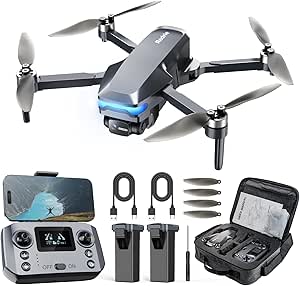
“In my opinion, this is and excellent drone for beginners (as I am a beginner myself). This is actually the first drone I ever bought and I thought a lot about which one to get to get started. After reading a lot of reviews and descriptions, I decided to get this HS175D drone and I am really amazed. The easy of flying, the picture quality and the stability of the drone are really impressive. When I first opened the box I was impressed how well organized everything was. The drone and the remote fit nicely into the high quality case and seem well secured. The package also includes 2 batteries, spare blades with screw driver, as well as 3 charging cables (2 for the batteries, so you can charge them at the same time, and one for the remote.) Some reviewers noted that the USB plugs are a little thick as they contain the charging electronics and LED, so you may not fit both of them next to each other on a single power brick, and that it true, but I did not really find that a big problem as I have so many USB outlets and I think its better to separate them on different outlets, just for safety reasons. Once everything was charged, I was ready to try my first flight and set up outside. Following the instructions it was super easy to start the first flight. Calibrating the drone is a bit tricky without the phone attached, as you need to constantly look at the flashing lights, but it worked. For the next flight I used the attached phone app and that made the calibration steps super easy. The WIFI connection was very stable, my only problem at the beginning was that my phone tried to switch back to my home WIFI, but after a few tries it stayed connected. Ready to fly, I unlocked the rotors and pushed the launch button and it immediately lifted up and hovered very stable a few feet away from me. I was amazed how stable the hover was. Even though there were winds up to 6mph that day it stayed within 2 feet of the start position. Amazing. It took some getting used to the controls, as they are sensitive, but I figured it out quickly and was able to fly all over the lot with ease. Again, I never flew a drone before and on my first try I flew around for 10 minutes without any incident. I have also tried out the "follow me" and "waypoint" features and the worked great. Now about the Picture and Video quality, I think they are great for fun and recreation. I took several photos and one video (see attached) and I think the quality is great. I am not sure what resolution it really is (some people have commented about 4k vs lower resolutions) but I feel it looks great, even on our big TV. When you do video, the electronic image stabilization creates some interesting artifacts, like moving ground (especially if you fly fast), but once you hover in a stable position the video quality is high and stable. Overall I can say this is a great drone for beginners and as this is my very first drone, I am really impressed and look forward to more fun flights with my HS175D drone.”
Signaux détectés : Détail spécifique : entity, comparison · Mentionne : suitability for beginners, ease of use, video quality, flight performance · Se lit comme une voix authentique