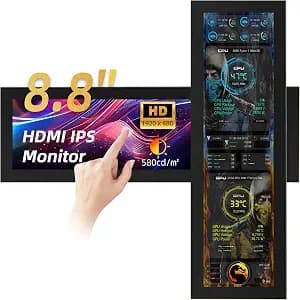
iPitstBit 8.8 Inch Touchscreen Monitor, 1920x480 PC Temperature Display, PC Sensor Panel Display, IPS USB Mini Screen for Raspberry Pi, AIDA64 CPU RAM Data Monitor ARGB Computer Case
Description
Computer Secondary Monitor is equipped with 1920×480 high-resolution screens, and has adjustable brightness of 580cd/m². It supports IPS full-view display, delivering clear and smooth visual experiences.; Supports multiple display modes, including extend, duplicate, and secondary screen, meeting diverse usage scenarios.; Transmits signals via a mini HDMI interface (mini HDMI to HDMI cable included), compatible with all devices with HDMI ports. It also supports systems like WINXP, WIN7, WIN8, WIN 10, and Raspberry Pi 3B/3B+/4B, etc.; No driver installation is required, simply connect the PC and the monitor via the USB-C and mini HDMI ports to use it immediately.; iPistBit offers a 30-day money-back guarantee and a 12-month warranty. If you have any problems, please contact us.
Comparez les compromis
Produits similaires, côte à côte
Une sélection aléatoire de produits analysés de la même catégorie. Des produits différents ne sont pas nécessairement interchangeables.

Deco Gear 40" Ultrawide Curved Monitor, 5120x2160, 5K2K, 21:9 75Hz 1ms MPRT

ASUS ROG Strix 27” 1440P OLED Gaming Monitor (XG27AQDMG) - QHD, Glossy OLED, 240Hz, 0.03ms, Custom Heatsink, Anti-flicker,Uniform Brightness, G-SYNC Compatible, 99% DCI-P3, DisplayWidget, 3yr warranty

KYY Portable Monitor 15.6inch 1080P FHD USB-C, HDMI Computer Display HDR IPS Gaming Monitor w/Premium Smart Cover & Screen Protector, Speakers, for Laptop PC MAC Phone PS4 Xbox Switch
Une chose de moins à chercher
Avant d'acheter : questions rapides
Does the touchscreen feature work reliably with Windows and software like AIDA64?
User experiences vary significantly. While the IPS display quality is consistently praised, the touchscreen functionality is the most reported issue. Some users have it working perfectly, while others find it non-functional or glitchy despite correct driver installation. It's advisable to check the seller's most recent reviews and be prepared for potential troubleshooting. Many YouTube setup guides emphasize verifying driver compatibility as a crucial first step.
What is the actual build quality like, and will it mount securely in my PC case?
Feedback on build quality is mixed. The screen itself is good, but the plastic casing and included mounts (like adhesive or small stands) are often described as lightweight or flimsy. For secure internal case mounting, several Reddit users recommend using a sturdy third-party VESA arm or bracket, as the built-in mounting options may not feel robust for long-term installation.
Is this product truly plug-and-play, or is setup complicated?
It is rarely plug-and-play, especially for the touchscreen function. Most users report needing to manually install specific drivers, configure AIDA64 layouts, or adjust Windows display settings. The provided instructions are often cited as lacking clarity. If you enjoy DIY tech projects and troubleshooting, you'll be better prepared for the setup process than someone expecting instant, seamless operation.
Who is this monitor best suited for, and who might want to look elsewhere?
This monitor is a great fit for tinkerers and DIY enthusiasts who value the unique ultra-wide form factor for system monitoring or Raspberry Pi projects and are comfortable with potential software/driver setup. It may not be ideal for users seeking a guaranteed, reliable touchscreen experience right out of the box. Those users often suggest considering established brands like Elecrow for more consistent touchscreen performance, albeit at a higher price point.
What should I do if I receive a unit with a dead pixel or the touchscreen doesn't work at all?
First, double-check all connections and driver installations using online community guides (searching the product name on Reddit often yields helpful tips). If the hardware itself is faulty, contact the seller immediately through your marketplace platform (e.g., Amazon Messages, AliExpress Dispute). Be clear and concise about the issue. Documenting the problem with a short video can be very helpful. Check the seller's specific return policy window, as experiences with after-sales support can vary.
D'un produit similaire mieux noté dans cette catégorie : KOORUI 24 Inch Gaming Monitor, 180Hz 1080P VA Display with 3000:1 Contrast
Does this monitor really run at 180Hz, and what do I need to enable it?
Yes — it's a native 180Hz panel, but you'll need to switch it on manually. Connect via the included HDMI cable (or a DisplayPort-capable setup), then set 180Hz in your GPU's display settings; it defaults to a lower refresh rate out of the box. Many Reddit and YouTube users note that enabling Adaptive Sync/FreeSync alongside it gives the smoothest experience, and it works with both AMD and NVIDIA cards.
How does the VA panel perform for gaming and everyday work?
The 3000:1 contrast gives noticeably deeper blacks than typical IPS budget monitors, which shines in dark game scenes and movies. For fast-paced competitive shooters, some TikTok and Reddit users mention mild ghosting/smearing in dark transitions — it's great for casual gaming, students, and office work, but color-critical creators or hardcore FPS players may prefer an IPS panel.
The stand looks basic — can I adjust the height or mount it?
Correct, the included stand only tilts (-5° to 20°) and doesn't offer height, swivel, or pivot adjustment, and a few users find the base slightly wobbly. The good news: it's VESA 100×100mm compatible, so a monitor arm or desk mount solves ergonomics entirely — a popular fix among dual-monitor and dorm-room setups.
What if I receive a unit with a dead pixel or backlight bleed?
Budget monitors can vary unit to unit, and some buyers report stuck pixels or corner bleed — but KOORUI backs it with a 3-year manufacturer warranty. If your unit arrives defective, contact the seller for a replacement or refund promptly; most users who did so report a smooth resolution, so inspect the screen within the return window.
Is it good value, and who is it best suited for?
At around $120, it's widely praised as one of the best budget 180Hz options — ideal for students, casual gamers, home-office users, and compact or dual-monitor setups. Just set expectations: no built-in speakers, a single HDMI plus VGA, and basic ergonomics. If you need height adjustment, color accuracy, or built-in audio, consider spending more on an IPS alternative.
Les réponses se limitent à la fiche du fabricant et aux avis que nous avons analysés. Les questions que ces sources ne permettent pas de traiter restent sans réponse ici.
Transparent par conception