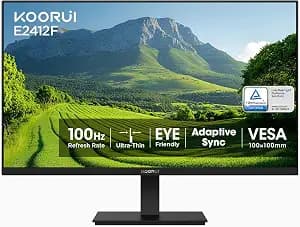
KOORUI 24-inch Computer Monitor Full HD 1920 x 1080p 100Hz VA Display 4000:1 Contrast Ratio with HDMI VGA, TÜV Rheinland Certified, 100 x 100 mm VESA Mountable, Ultra-Slim Design, Tilt, Black, E2412F
Description
TRUE COLOR VIVID DETAIL : The 24 inch 100hz computer gaming monitor cover 99% of the SRGB color gamut and 10bit gray level over 16.7M color numbers.It has 4000:1 contrast ratio with 1920 x 1080 full hd resolution in a 16:9 aspect ratio presenting stunning, high-quality images with excellent clarity.; ERGONOMIC DESIGN & TÜV-CERTIFIED EYE CARE: Supports tilt adjustment from -5° to 15° and VESA mount (100×100mm) for flexible installation and comfortable viewing. TÜV Rheinland Certified low blue light and flicker-free technology, combined with anti-glare coating, helps reduce eye strain and visual fatigue for all-day gaming, working, and studying.; SMOOTH FAST VISUALS: The 24 inch mointor combines a refresh rate of 100hz with Adaptive-Sync technology, A smooth-fast, tear-free experience in gaming and video playback applications. A great choice of business gaming display for desktop, or laptop at home.; ULTRA SLIM DESIGN: The 24" pc monitor feature three-sided slim bezels and a compact footprint, 178°wide viewing angle and ultrathin framless design maximizes the display area and enhances the overall viewing experience.; MULTI-FUNCTIONAL APPLICATION: Equipped with HDMI, VGA, and audio output ports, this monitor easily connects to PCs, laptops, gaming consoles, and other devices. Perfect for office work, home entertainment, online learning, and casual gaming.; CONNECTIVITY & COMPATIBILITY NOTICE: ⚠️ This monitor supports HDMI and VGA input only. DisplayPort (DP) is NOT supported and no DP cable is included. For MacBook, iMac, or other devices with USB-C / Thunderbolt ports, a USB-C to HDMI adapter is required (adapter not included). Screen size (24") is measured diagonally, not width or height. Please confirm device compatibility and size requirements before purchase
Comparez les compromis
Produits similaires, côte à côte
Une sélection aléatoire de produits analysés de la même catégorie. Des produits différents ne sont pas nécessairement interchangeables.

Dell 27 240Hz Gaming Monitor - SE2726HG - 27-inch FHD (1920x1080) Display, in-Plane Switching (IPS) Technology, AMD FreeSync Premium, TÜV 3-Star, 2X HDMI, DisplayPort 1.4, Tilt

InnoView 15.6-Inch Portable Monitor 1440p 120hz Monitor 100% sRBG 2K QHD, USB-C/HDMI, External Mmonitor for Laptop MacBook/Switch/PS5/Xbox (Adapter Not Included)

kksmart Portable Monitor for Laptop MacBook Surface PC Xbox PS5, Travel Monitor Second Screen for Laptop, HDMI USB-C VESA Compatible Built-in Speaker, 15.6inch
Une chose de moins à chercher
Avant d'acheter : questions rapides
Is KOORUI a trustworthy brand, and is this monitor good for everyday office work and studying?
Absolutely. Based on thousands of verified purchases and its TÜV Rheinland certification for low flicker and blue light, KOORUI has established itself as a reliable value brand. This monitor is consistently praised as an excellent choice for work and study due to its easy setup, clear Full HD text, and eye-comfort features—making it a top pick for students, remote workers, and as a secondary screen.
I want to wall-mount this. Are there any issues with the VESA mount?
The monitor is 100x100mm VESA compatible. Some users on forums have noted that the mount point is slightly recessed. For a smooth installation, we recommend using the provided screws initially, but having a set of longer M4 screws (about 10-12mm in length) on hand can make attaching your own mount bracket easier and more secure.
How does the 100Hz refresh rate benefit me if I'm not a hardcore gamer?
The jump from 60Hz to 100Hz is noticeable even in everyday use! Scrolling through websites and documents feels remarkably smoother, and mouse movement appears more fluid. For casual gaming, sports, or action movies, it provides a much more pleasing and responsive viewing experience than a standard 60Hz monitor, which is a huge part of its praised value.
What should I know about the stand and screen size before buying?
The stand offers tilt adjustment only—it does not adjust for height or swivel. Many happy users place it on a monitor arm or stack books underneath. Regarding size, while excellent as a secondary monitor or for compact desks, some Reddit users seeking an immersive primary display for gaming wished they'd opted for a 27-inch model. Consider your desk space and primary use.
What is the warranty and support like if I receive a defective unit?
KOORUI offers a standard limited warranty. The vast majority of units arrive in perfect working order, as reflected in the 4.5-star average. However, as with any electronics, a small percentage may have issues like dead pixels. For the fastest resolution, we recommend initiating any returns or warranty claims through your place of purchase (e.g., Amazon). Their A-to-Z guarantee often provides a more streamlined process than contacting the manufacturer directly.
D'un produit similaire mieux noté dans cette catégorie : KOORUI 24 Inch Gaming Monitor, 180Hz 1080P VA Display with 3000:1 Contrast
Does this monitor really run at 180Hz, and what do I need to enable it?
Yes — it's a native 180Hz panel, but you'll need to switch it on manually. Connect via the included HDMI cable (or a DisplayPort-capable setup), then set 180Hz in your GPU's display settings; it defaults to a lower refresh rate out of the box. Many Reddit and YouTube users note that enabling Adaptive Sync/FreeSync alongside it gives the smoothest experience, and it works with both AMD and NVIDIA cards.
How does the VA panel perform for gaming and everyday work?
The 3000:1 contrast gives noticeably deeper blacks than typical IPS budget monitors, which shines in dark game scenes and movies. For fast-paced competitive shooters, some TikTok and Reddit users mention mild ghosting/smearing in dark transitions — it's great for casual gaming, students, and office work, but color-critical creators or hardcore FPS players may prefer an IPS panel.
The stand looks basic — can I adjust the height or mount it?
Correct, the included stand only tilts (-5° to 20°) and doesn't offer height, swivel, or pivot adjustment, and a few users find the base slightly wobbly. The good news: it's VESA 100×100mm compatible, so a monitor arm or desk mount solves ergonomics entirely — a popular fix among dual-monitor and dorm-room setups.
What if I receive a unit with a dead pixel or backlight bleed?
Budget monitors can vary unit to unit, and some buyers report stuck pixels or corner bleed — but KOORUI backs it with a 3-year manufacturer warranty. If your unit arrives defective, contact the seller for a replacement or refund promptly; most users who did so report a smooth resolution, so inspect the screen within the return window.
Is it good value, and who is it best suited for?
At around $120, it's widely praised as one of the best budget 180Hz options — ideal for students, casual gamers, home-office users, and compact or dual-monitor setups. Just set expectations: no built-in speakers, a single HDMI plus VGA, and basic ergonomics. If you need height adjustment, color accuracy, or built-in audio, consider spending more on an IPS alternative.
Les réponses se limitent à la fiche du fabricant et aux avis que nous avons analysés. Les questions que ces sources ne permettent pas de traiter restent sans réponse ici.
Transparent par conception