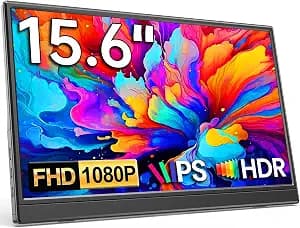
KQC Portable Monitor 15.6" 1080P FHD IPS Display, Ultra-Slim USB-C HDMI Travel Monitor with Kickstand, Zero Bezel Screen Extender for Laptop, Mac, Phone, PS, Xbox, Switch Gaming
Description
15.6" FHD IPS Portable Monitor – Features 1920×1080 resolution, 178° full viewing angle, HDR, and low blue light technology on a premium A-grade IPS panel. Delivers vibrant, clear visuals while reducing eye strain for work, gaming, or entertainment.; Dual USB-C & Mini HDMI Ports – Equipped with 2 USB-C ports and 1 Mini HDMI port. Supports plug-and-play with Thunderbolt 3/4 or full-featured USB-C devices using a single USB-C cable. No extra drivers or apps needed.; Portable & Built-In Stand – Weighing only 2.7 lbs, the ultra-slim monitor is easy to carry anywhere. The integrated stand allows flexible angle adjustment, while dual built-in speakers enhance your viewing and gaming experience. VESA mountable for added convenience.; Multiple Display Modes – Supports Copy Mode, Extended Mode, and Second Screen Mode. Ideal for meetings, productivity, and entertainment. HDR mode enhances image quality, and the screen easily switches between landscape and portrait orientations.; Broad Compatibility & Reliable Power – Works seamlessly with laptops, Mac, phones, PS, Xbox, Switch, and other HDMI/USB-C devices. If the monitor does not stay on, ensure sufficient power by connecting to a 5V/2A charger for uninterrupted use.
Comparez les compromis
Produits similaires, côte à côte
Une sélection aléatoire de produits analysés de la même catégorie. Des produits différents ne sont pas nécessairement interchangeables.

acer Nitro 27” 4K UHD 3840 x 2160 Gaming IPS Monitor | AMD FreeSync Premium | Up to 160Hz Refresh Rate with DFR to FHD 320Hz| Up to 0.5ms | 1 x Display Port 1.4 & 2 x HDMI 2.1 Ports | VG270K V4bmiipx

ASUS ROG Swift 32” 4K OLED Gaming Monitor (PG32UCDM) - UHD (3840 x 2160), QD-OLED, 240Hz, 0.03ms, G-SYNC Compatible, Custom Heatsink, Graphene Film, 99% DCI-P3, True 10-bit, 90W USB-C

ASUS ROG Strix 27” 1440P USB-C HDR Gaming Monitor (XG27ACMS) – QHD (2560 x 1440), 320Hz, 0.3ms, Fast IPS, Extreme Low Motion Blur Sync, G-SYNC Compatible, DisplayWidget, Tripod Socket, 3 yr Warranty
Une chose de moins à chercher
Avant d'acheter : questions rapides
Is the KQC portable monitor compatible with my laptop, Mac, or phone, and what cables do I need?
Yes. It supports USB-C and HDMI inputs, so you can use modern laptops, Macs, tablets, or consoles. If your device can power and video via USB-C, you’re typically set with one cable; otherwise you may need an HDMI connection plus a USB-C power source or charger. Many users report smooth setup with MacBook Pro, Switch, and Windows laptops.
Do I need a separate power adapter to use this monitor?
Not always. If your device can provide power through USB-C, you can run it without an extra charger. If not, you’ll need a USB-C PD charger or an external power source to keep the monitor running while in use.
How portable is it, and is there a case or stand included?
It’s ultra-slim and designed for travel—great in a backpack or laptop bag. A built-in kickstand helps with desk use, and many people supplement with a protective sleeve or case for transit.
How’s the display for work and casual gaming? Are there any downsides?
The 1080p IPS display provides sharp images and wide viewing angles, which is excellent for productivity and streaming. It’s suitable for casual gaming (e.g., Switch) but may not satisfy color-critical photo editing or high-end competitive gaming. Note that there are no included built-in speakers, so external audio is needed.
What about warranty, returns, and value for money?
Most buyers feel it offers solid value for the price and like the portability and ease of use. Return policies and warranty terms vary by retailer, but common options include a 30-day return window and manufacturer or seller warranties. Fast shipping is frequently mentioned in user chatter, contributing to a positive buying experience. If you need top-tier color accuracy or higher refresh rates, you might compare to pricier models.
D'un produit similaire mieux noté dans cette catégorie : KOORUI 24 Inch Gaming Monitor, 180Hz 1080P VA Display with 3000:1 Contrast
Does this monitor really run at 180Hz, and what do I need to enable it?
Yes — it's a native 180Hz panel, but you'll need to switch it on manually. Connect via the included HDMI cable (or a DisplayPort-capable setup), then set 180Hz in your GPU's display settings; it defaults to a lower refresh rate out of the box. Many Reddit and YouTube users note that enabling Adaptive Sync/FreeSync alongside it gives the smoothest experience, and it works with both AMD and NVIDIA cards.
How does the VA panel perform for gaming and everyday work?
The 3000:1 contrast gives noticeably deeper blacks than typical IPS budget monitors, which shines in dark game scenes and movies. For fast-paced competitive shooters, some TikTok and Reddit users mention mild ghosting/smearing in dark transitions — it's great for casual gaming, students, and office work, but color-critical creators or hardcore FPS players may prefer an IPS panel.
The stand looks basic — can I adjust the height or mount it?
Correct, the included stand only tilts (-5° to 20°) and doesn't offer height, swivel, or pivot adjustment, and a few users find the base slightly wobbly. The good news: it's VESA 100×100mm compatible, so a monitor arm or desk mount solves ergonomics entirely — a popular fix among dual-monitor and dorm-room setups.
What if I receive a unit with a dead pixel or backlight bleed?
Budget monitors can vary unit to unit, and some buyers report stuck pixels or corner bleed — but KOORUI backs it with a 3-year manufacturer warranty. If your unit arrives defective, contact the seller for a replacement or refund promptly; most users who did so report a smooth resolution, so inspect the screen within the return window.
Is it good value, and who is it best suited for?
At around $120, it's widely praised as one of the best budget 180Hz options — ideal for students, casual gamers, home-office users, and compact or dual-monitor setups. Just set expectations: no built-in speakers, a single HDMI plus VGA, and basic ergonomics. If you need height adjustment, color accuracy, or built-in audio, consider spending more on an IPS alternative.
Les réponses se limitent à la fiche du fabricant et aux avis que nous avons analysés. Les questions que ces sources ne permettent pas de traiter restent sans réponse ici.
Transparent par conception