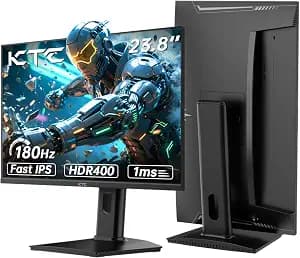
KTC 24 inch Gaming Monitor QHD 180Hz, Fast IPS 1440p Computer Monitor, Up to 185Hz, 1ms, G-Sync/FreeSync, HDR400, Height Adjustable, 2 x HDMI, 1 x DP H24T7
Description
This monitor features 2K QHD (2560x1440) resolution for extremely crisp and detailed images. With 99% sRGB color gamut coverage and HDR400, rich colors are reproduced, allowing you to enjoy games and content in a more realistic way.; 180Hz (up to 185Hz) refresh rate and 1ms response time are lightning fast, helping you precisely aim at moving enemies and gain the upper hand. Handles fast-moving action and transitions smoothly without ghosting.; Adaptive-Sync makes sure that team fights are super - smooth and free of screen tearing, which is beneficial for making perfect skill shots and achieving loading times without stuttering.; Low Blue Light technology and Flicker-free function reduce eye fatigue during long-term use. With a screen brightness of up to 400cd/㎡, it is clearly visible even in bright environments.; 24-inch 1440p monitor adopts Fast IPS panel to bring you excellent visual experience. VESA mount (100x100mm), -5°to 20°tilt, 90°±5°pivot, 110±5mm height,178°wide viewing angle, crosshair/timer/black level adjustment/RTS /FPS /RACING.
Comparez les compromis
Produits similaires, côte à côte
Une sélection aléatoire de produits analysés de la même catégorie. Des produits différents ne sont pas nécessairement interchangeables.

LG 27GS60QC-B Ultragear 27-inch Curved Gaming Monitor QHD (2560x1440) 180Hz 1ms 1000R AMD FreeSync HDR10 HDMIx2 DisplayPort Borderless Design Black Stabilizer DAS Crosshair FPS Counter - Black

GeeekPi 7-Inch Screen for Raspberry Pi, 1024x600 IPS LCD Display, HDMI Portable Monitor for Pi 5/4B/3B+/3B, Win11/10/8/7, Free-Driver

LG 24G411A-B 24-inch Ultragear Full HD (1920 x 1080) IPS Gaming Monitor, 144Hz (O/C), 1ms MBR, NVIDIA G-Sync Compatible, AMD FreeSync, HDR10, HDMI, DisplayPort, Slim Stand, Black
Une chose de moins à chercher
Avant d'acheter : questions rapides
Is KTC a trustworthy brand, and how does this monitor's quality hold up?
KTC is a respected original design manufacturer (ODM) that produces panels for several well-known brands. This particular H24T7 model is consistently praised in reviews for its excellent performance and value. While the on-screen menu feels a bit basic, the core panel quality, color accuracy, and adjustable stand are considered top-tier for the price. As with any monitor, there's a small chance of minor backlight bleed or a stuck pixel, but most users report flawless units.
My graphics card is a [RTX 3060 / RX 6600 XT]. Is it powerful enough for this 1440p, 180Hz monitor?
Great question! A card like an RTX 3060 or RX 6600 XT is a good match for 1440p gaming. You'll easily hit high frame rates in competitive esports titles like Valorant or CS2 to take full advantage of the 180Hz. For more demanding AAA games, you may need to adjust settings to a mix of High (not always Ultra) to maintain smoother frame rates. The monitor's G-Sync/FreeSync support will ensure any fluctuation feels perfectly smooth.
How good is the HDR400, really? I've seen mixed comments online.
It's important to set realistic expectations. The HDR400 certification means it gets bright enough (400 nits) and covers a wider color range than SDR, which does make supported games and videos look more vibrant and contrast-rich. Many Reddit users confirm it's a noticeable upgrade. However, as some YouTube reviewers note, it's not the transformative "OLED-like" HDR experience—it lacks local dimming zones for deep blacks. Think of it as a very effective "HDR-lite" that adds nice punch without the premium price tag.
The stand looks large. Will it fit on my desk?
The V-shaped stand is indeed substantial to provide stability for the height-adjustable mechanism. It has a depth (front to back) of approximately 9.5 inches (24 cm). We recommend measuring your desk space beforehand. If space is tight, the monitor is also VESA mount compatible (100x100mm), allowing you to use a monitor arm for a cleaner setup, which many users on setup-focused subreddits recommend.
Who is this monitor NOT for?
This monitor is an incredible value for most, but it might not be the perfect fit for two types of users: 1) Professionals requiring absolute color-critical precision for print/design work, who may need a factory-calibrated pro-art display. 2) Gamers who exclusively play slow-paced, cinematic single-player games and prioritize perfect contrast over high refresh rates—they might prefer a high-quality VA panel or save for a mini-LED. For fast-paced gamers, multi-taskers, and anyone upgrading from an older 1080p screen, it's frequently called a "game-changing" buy.
D'un produit similaire mieux noté dans cette catégorie : KOORUI 24 Inch Gaming Monitor, 180Hz 1080P VA Display with 3000:1 Contrast
Does this monitor really run at 180Hz, and what do I need to enable it?
Yes — it's a native 180Hz panel, but you'll need to switch it on manually. Connect via the included HDMI cable (or a DisplayPort-capable setup), then set 180Hz in your GPU's display settings; it defaults to a lower refresh rate out of the box. Many Reddit and YouTube users note that enabling Adaptive Sync/FreeSync alongside it gives the smoothest experience, and it works with both AMD and NVIDIA cards.
How does the VA panel perform for gaming and everyday work?
The 3000:1 contrast gives noticeably deeper blacks than typical IPS budget monitors, which shines in dark game scenes and movies. For fast-paced competitive shooters, some TikTok and Reddit users mention mild ghosting/smearing in dark transitions — it's great for casual gaming, students, and office work, but color-critical creators or hardcore FPS players may prefer an IPS panel.
The stand looks basic — can I adjust the height or mount it?
Correct, the included stand only tilts (-5° to 20°) and doesn't offer height, swivel, or pivot adjustment, and a few users find the base slightly wobbly. The good news: it's VESA 100×100mm compatible, so a monitor arm or desk mount solves ergonomics entirely — a popular fix among dual-monitor and dorm-room setups.
What if I receive a unit with a dead pixel or backlight bleed?
Budget monitors can vary unit to unit, and some buyers report stuck pixels or corner bleed — but KOORUI backs it with a 3-year manufacturer warranty. If your unit arrives defective, contact the seller for a replacement or refund promptly; most users who did so report a smooth resolution, so inspect the screen within the return window.
Is it good value, and who is it best suited for?
At around $120, it's widely praised as one of the best budget 180Hz options — ideal for students, casual gamers, home-office users, and compact or dual-monitor setups. Just set expectations: no built-in speakers, a single HDMI plus VGA, and basic ergonomics. If you need height adjustment, color accuracy, or built-in audio, consider spending more on an IPS alternative.
Les réponses se limitent à la fiche du fabricant et aux avis que nous avons analysés. Les questions que ces sources ne permettent pas de traiter restent sans réponse ici.
Transparent par conception