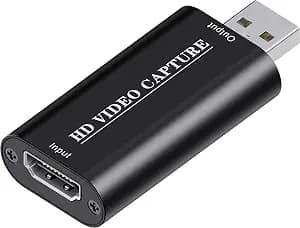
VIXLW 4K HDMI Video Capture Card, Game Audio Adapter, HDMI to USB 2.0 Capture Card for Streaming Gaming Recording, Cam Link Card for Windows Mac OS Camera Nintendo Switch X Box OBS
विवरण
【4K VIDEO CAPTURE CARD】Made with upgraded chip, captures 4K@60Hz video input at full speed, no lag, no delay, capture card also supports 1920×1080@30Hz highest image quality output, capture video to USB through HDMI, you can Directly save to computer and mobile phone; suitable for high-definition video live broadcast, video capture, online conference, video streaming, video course; equipped with high-definition USB cable.; 【HDMI real-time screen sharing】The HDMI interface is made of nano-metal material, so that the video can reach ultra-low latency. The audio and video capture card can capture video and audio at the same time, and store the video signal into the computer and smartphone, and support OBS post-video. Editor, this is an excellent solution for online meetings and live broadcasts, economical and fast, 4K HDMI Capture Card is widely used in live broadcast, conference, photography, medicine, daily office.; 【Plug and Play】4K video capture card has built-in drivers, no need to install complicated programs, no external power supply, plug and play, very convenient, just plug into your computer, you can use it, the shell is made of aluminum alloy seamlessly , small size, very convenient to carry, suitable for capturing interesting details in life, can be used for indoor and outdoor live broadcast, and the color of the picture is more delicate.; 【Wide Compatibility】The video capture card adopts advanced chips, intelligent identification equipment, and is widely compatible with electronic equipment, which can easily capture wonderful moments and comes with a USB cable. It supports third-party video capture software such as OBS, Win, MacOs, Android, etc. It can also perform video capture and online live broadcast at the same time, store and share videos at the same time, and easily realize video splicing, which is very convenient.; 【24 hours local technical support】We have a professional technical team for more than ten years, serving you 24 hours a day. You are welcome to contact us if you have any questions.
खोजने की एक चीज़ कम
खरीदने से पहले: त्वरित सवाल
Is there any lag when playing games through this capture card?
Yes, there is a slight but noticeable latency (delay) when using the captured video feed for gameplay. This is common for USB 2.0 capture cards at this price point. Most users find it perfectly fine for recording or streaming where you're watching your game on a monitor connected via the "pass-through" signal. However, if you plan to play the game by watching the video feed in your streaming software (like OBS), the lag makes it unsuitable for fast-paced, competitive games.
Does it really record in 4K, and is it truly plug-and-play?
It's important to clarify: this device passes through a 4K signal from your console to your TV/monitor, but the maximum capture resolution is 1080p at 30fps. For most streaming platforms, this is more than sufficient. As for setup, the majority of users on Windows 10/11 and modern macOS report a genuine plug-and-play experience—just connect it and it's recognized by software like OBS. However, a small number of users, especially those with specific system configurations, have needed to manually install USB drivers for it to work correctly.
What's the build quality like, and who is this best suited for?
The card has a lightweight, compact plastic housing. Many reviewers note it feels less robust than premium brands but remains functional for stationary setups. It's an excellent starter card for beginners, students, or hobbyists who want to dip their toes into streaming or recording without a major investment. It's also great for non-live uses like capturing gameplay clips or recording presentations. If you need a device for daily, heavy professional use or prioritize a metal, durable build, you may want to consider higher-end alternatives.
I'm having audio sync or static issues. What can I do?
Audio setup can be tricky. First, ensure you've selected the correct audio input device in your streaming software (often listed as the capture card's name). Many TikTok and Reddit users have solved problems by using the included 3.5mm audio loopback cable. Connect this cable from your controller or PC's audio output to the card's audio input port to capture clean, synchronized game audio and voice chat. For PC capture, setting the card as both the video and audio source in OBS is usually the key.
How does this compare to more expensive brands like Elgato?
This card excels as a budget-friendly entry point. Compared to brands like Elgato, the main trade-offs are the plastic build, the lack of an extra HDMI *out* port (which helps eliminate lag for the player), and potentially less consistent driver support across all systems. For its price, it delivers reliable 1080p capture quality that rivals more expensive cards. If your core need is simple recording or casual streaming, it represents tremendous value. If you require ultra-low latency gameplay, 4K/60fps capture, or seamless integration with advanced streaming ecosystems, investing in a higher-tier card is recommended.
जवाब सिर्फ़ निर्माता की लिस्टिंग और हमारे द्वारा विश्लेषित समीक्षाओं तक सीमित हैं। जिन सवालों के लिए ये स्रोत पर्याप्त नहीं हैं, उनके जवाब यहां नहीं दिए गए हैं।
पारदर्शी डिज़ाइन