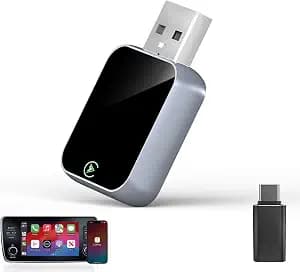
2026 Wireless CarPlay Adapter for iPhone - 5s Auto-Connect, No Audio Lag - Convert Factory Wired to Wireless CarPlay - Bluetooth 5.3 & 5GHz Wi-Fi - Plug & Play (Includes USB A/C)
商品説明
【Cable-Free Driving Experience】Transform your wired CarPlay into a fully wireless system with Enhanlife. Say goodbye to messy cables and keep your car dashboard neat while enjoying seamless access to navigation, music, and Siri.; 【Ultra-Fast 5-Second Auto Connection】Powered by an upgraded smart chip, this adapter detects your iPhone within 5 seconds after starting the engine. Once paired, it auto-connects every time, making sure your music and GPS are ready instantly.; 【Stable Connection with Bluetooth 5.3 & 5GHz Wi-Fi】Equipped with advanced Bluetooth 5.3 and dual-band Wi-Fi, the adapter ensures zero audio lag and uninterrupted connection. Perfect for clear calls and smooth navigation even in areas with high signal interference.; 【Wide Vehicle Compatibility】Works with over 98% of vehicles that have factory wired CarPlay (2016–2026). Supports iPhone 6 and later (iOS 10+). Note: A built-in wired CarPlay system is required for the adapter to function.; 【Compact Stealth Design & USB Versatility】Ultra-compact design fits discreetly without blocking ports. Includes both USB-A and USB-C cables for modern and classic car interiors. Easy plug & play setup—no extra drivers or apps needed.
トレードオフを比較
似た商品を並べて比較
同じカテゴリの分析済み商品から無作為に選んでいます。商品が異なれば、単純に置き換えられるとは限りません。

2in1 Wireless Carplay Adapter for iPhone Android,for Toyota/Honda/Cadillac/Ford/Chevrolet/Jeep Carplay,Plug Play Automatic Reconnect,Convert Wired to Wireless Bluetooth Carplay Dongle(USB A/C)06d

MINIX Wireless CarPlay Adapter for Apple Converts Cars Factory Wired CarPlay to Wireless CarPlay Compatible with iPhone iOS 10+ and 2016+ Cars, Slow Latency with USB C

in-Car USB 3.5mm Audio Male Jack for Galaxy & Tabs Android Phones, Aux Music Charging Interface Adapter Compatible with BMW Mini Cooper IDRIVE
調べる手間をひとつ減らす
購入前によくある質問
Will this adapter work with my specific car?
It's compatible with most factory-installed *wired* CarPlay systems from 2016 onward. The most common issue we see is with certain 2020-2021 Honda, Toyota, and Mazda models. Before purchasing, we strongly recommend checking the detailed compatibility list on the product page or searching "[Your Car Model] + this adapter name" on YouTube for real-user setups. Many TikTok users have posted quick compatibility checks that are very helpful.
Is there any audio lag, especially for navigation or videos?
For core functions like Apple Music, Podcasts, and turn-by-turn directions in Apple/Google Maps, virtually all users report no perceptible lag. A very small number of reviewers have noted a minor audio sync issue when watching video-based apps (like YouTube) while parked, but this does not affect the primary driving and navigation experience.
How reliable is the "auto-connect" feature in daily use?
This is the most praised feature! Most users report their iPhone connects to CarPlay automatically within 15-30 seconds of starting their car. The 5GHz Wi-Fi connection ensures a stable link. A small percentage of users in areas with dense wireless networks have noted occasional, brief dropouts, but the adapter typically reconnects on its own within moments.
Does using wireless CarPlay drain my iPhone battery quickly?
Yes, using wireless CarPlay will use more battery than having your phone plugged in. To solve this, the adapter includes both USB-A and USB-C cables. You can plug one end into your car's USB port (for data/power to the adapter) and the other into a separate fast-charger port or cigarette-lighter charger to keep your phone powered up independently. This is a common setup mentioned by rideshare drivers.
What if it doesn't work or I have issues with it?
We offer a standard return window if the product is incompatible or faulty. Based on user reports, most issues are resolved by a simple firmware update (instructions provided). The customer support team is active and typically responds with troubleshooting steps, such as ensuring your car's head unit software is up-to-date and guiding you through the update process for the adapter itself. Checking for a firmware update is always the recommended first step.
同カテゴリーのレビュー数が多い類似商品より: Wireless CarPlay Adapter for iPhone, Convert Wired to Wireless Apple CarPlay Adapter, Mini Size with Extension Cable USB & USB-C/Type-C, Stable Control & No Delay, Black
Does this adapter work with Android phones or Android Auto?
No. The manufacturer states this adapter is compatible only with CarPlay, not Android Auto, and it is designed for iPhone 6 and above.
How fast does it connect, and is there any delay during use?
The listing says the first connection takes about 10 seconds and auto-connect takes about 3 seconds with zero daily usage delay, and reviewers report connection times of no more than 5 seconds from starting the car with minimal delay.
Does it disconnect or cut out during use?
Experiences vary: some reviewers report stable, uninterrupted connectivity with no cutting out, while others report occasional cutouts, random disconnects, or needing to unplug and replug the adapter to resolve issues.
Is it easy to set up and use?
Reviewers describe setup as very easy and straightforward, connecting to the car's existing wired CarPlay system and pairing with an iPhone in minutes, with no external power source needed since it plugs directly into a USB data port.
What is included in the box and what warranty is offered?
The package includes USB-A and Type-C extension cables, and the manufacturer offers a 2-year warranty with a professional service team for assistance.
回答はメーカーの商品情報と分析対象のレビューの範囲に限られます。これらの情報源で裏付けられない質問には回答していません。
透明性のある設計