ユーザーが気に入っている点
Easy install, modern CR-V upgrade
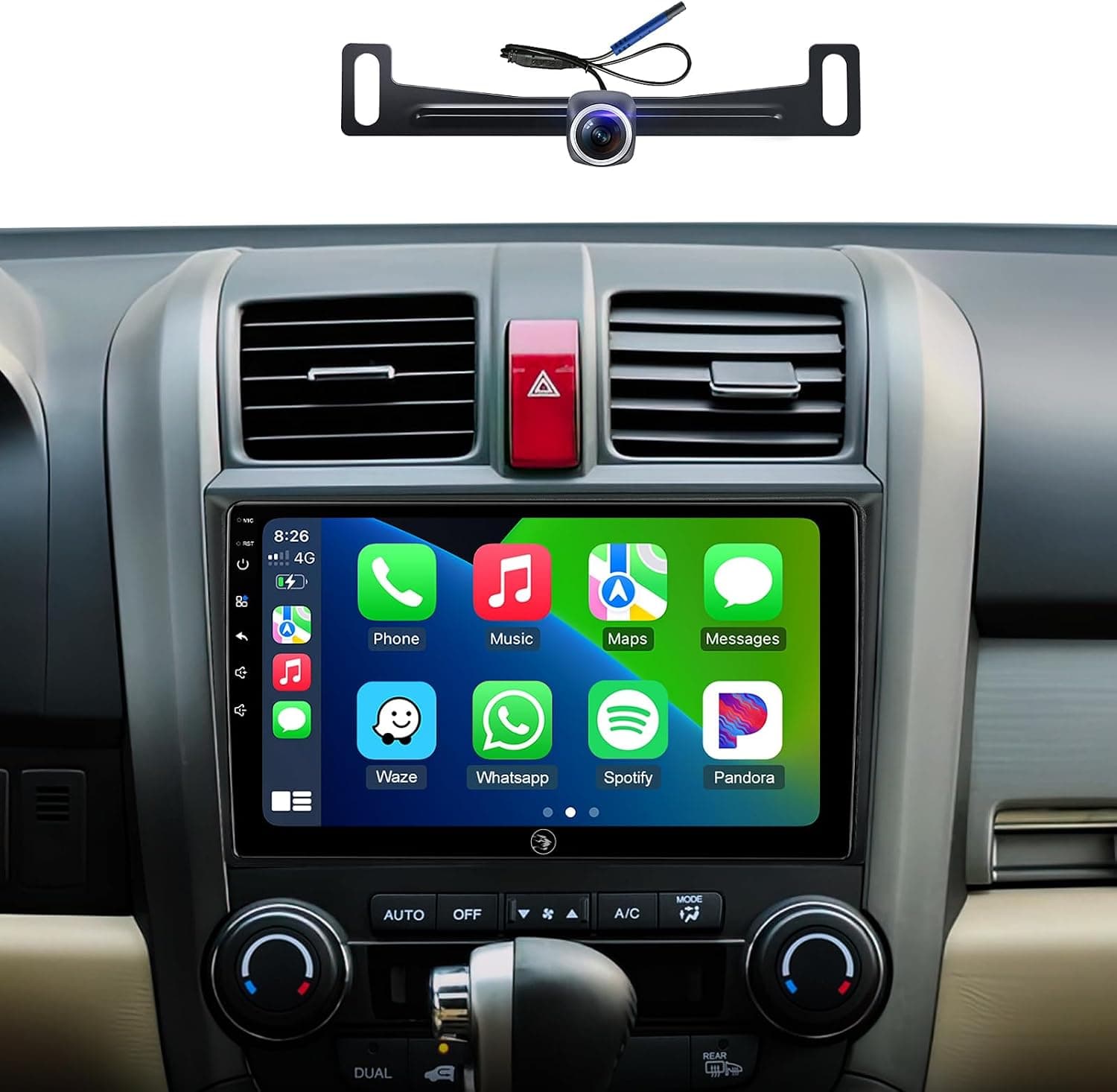
Several reviewers found installation straightforward and said the unit modernized their CR-V with wireless CarPlay, a clear responsive screen, and good sound.
購入に関する総合評価
Several reviewers report easy plug-and-play installation and working CarPlay, but instructions and support are weak.
CR-V owners who want wireless CarPlay and Android Auto and are comfortable installing with extra guidance or professional help.
Buyers who need detailed instructions, dependable customer support, or fully reliable touchscreen and radio controls.
30秒でわかる要点
ユーザーが気に入っている点
Several reviewers found installation straightforward and said the unit modernized their CR-V with wireless CarPlay, a clear responsive screen, and good sound.
主な注意点
Several reviewers reported missing or confusing instructions, with some needing professional help or extra wiring work; one said there were no real instructions at all.
選ぶ前に
Some reviewers chose not to install the backup camera or found its wiring a separate task, so camera setup may add effort beyond the radio itself.
同カテゴリーのレビュー数が多い類似商品より: 9.26" Wireless Portable Carplay Screen for Apple Car Play Android Auto OTA
ユーザーが気に入っている点
Reviewers repeatedly say the unit is plug-and-play, connects quickly to their phones, and works reliably for CarPlay and Android Auto. Many also praise the clear, bright screen and good value for the price.
主な注意点
A few reviewers note occasional lag in navigation apps like Waze and criticize the included instruction pamphlet as poor. One also wishes the backup camera had a wider angle.
選ぶ前に
Consider whether the 9.26-inch screen size and supplied mounts suit your car's dashboard, and confirm your phone works with the wireless CarPlay or Android Auto connection.
まずは利用シーンから
4件中16件の言及がネガティブな経験を示しています(25%)。
2件中12件の言及がネガティブな経験を示しています(17%)。
1件中7件の言及がネガティブな経験を示しています(14%)。
4件中12件の言及がネガティブな経験を示しています(33%)。
1件のレビューが複数のトピックに言及することがあります。割合は分析対象としたレビューについてのもので、全購入者や商品全体の故障率を表すものではありません。
同カテゴリーのレビュー数が多い類似商品より: 9.26" Wireless Portable Carplay Screen for Apple Car Play Android Auto OTA
96件中554件の言及がネガティブな経験を示しています(17%)。
17件中483件の言及がネガティブな経験を示しています(4%)。
111件中446件の言及がネガティブな経験を示しています(25%)。
37件中423件の言及がネガティブな経験を示しています(9%)。
72件中340件の言及がネガティブな経験を示しています(21%)。
25件中300件の言及がネガティブな経験を示しています(8%)。
21件中167件の言及がネガティブな経験を示しています(13%)。
41件中161件の言及がネガティブな経験を示しています(25%)。
トレードオフを比較
同じカテゴリの分析済み商品から無作為に選んでいます。商品が異なれば、単純に置き換えられるとは限りません。

Carplay Screen for Car,7" Portable Wireless Carplay & Android Auto - HD Touchscreen Car Play with Bluetooth, Mirror Link, Live Map,Voice Control, FM Transmit (Black)

Portable Wireless with Apple CarPlay and Android Auto Screen for Car, 7" HD Touch Screen Car Stereo with Mirror Link, Bluetooth 5.2, Backup Camera, AUX,FM Transmitter for All Vehicle
根拠を確認する
「分析対象」は真正性が確認されたことを意味しません。「フラグ付き」も捏造と証明されたことを意味しません。いずれも分析上の分類です。
参考として3件の抜粋を表示しています。レビュー全体ではありません。
Performs as expected and appears to be well-constructed
“TLDR - Good value for the price; expect it to take an afternoon to install. I installed this into my 2009 CRV over the weekend. Took around 5 hours to complete, including a trip to Home Depot for extra wire. Here's the good, the bad, and the meh: Good - Radio unit appears to be well built. The screen is easy to read, the backup camera (the only reason I bought this) picture quality is excellent, there were no missing components in the box, and the included programming instructions are very clear. Whoever did the Chinese to English translation did it well. Bad - All the instructions regarding wiring the camera are good until you get to the trunk area. There's a handwaving in the videos and paper documentation of what you need to do. Turns out there's a lot of interior paneling-removal that has to happen, and some rubber seals that need to be cut, both of which can lead to broken pins/clips inside the paneling (no matter how slow you go). Also, the installation documentation can be confusing as it is written for a Civic, which includes different connection configurations than my CRV. The really bad thing is that the included power line for the camera is about 4 feet too short, hence my trip to Home Depot for extra line (20–22-gauge line works fine). Meh - The radio startup time is longer than an OEM start. The backup camera also requires 3-5 seconds to start. Both feel longer than needed but are acceptable for this price range. The camera power connection instructions are harder than need to be (help below). Takeaway - I would rate this a 4.5 if I could due to the wire issue. Otherwise, everything else works well. This is an inexpensive kit so set your expectations accordingly and you'll be happy. I'd buy this again for another car if I needed to. Power connection help - You don't need a voltameter to determine which line to tap into for the reverse light; you just need another person, and all the wiring is in place in the head/radio unit. 1. Install the camera and run the line the way you want to (I taped mine to the rubber line for the existing gate wiring). 2. Strip the end of your power line and make a small loop with the exposed copper. 3. Remove the backup light and housing from the taillight lens. 4. Remove the bulb from the housing and set it aside. 5. Insert the copper loop from your power line into the light plug so that one the loop is touching one of the power connectors inside the housing. Each side of the plug has one copper connector that goes straight to the wire on the back side of the housing, so you may have to do this twice. 6. Start the car, put it in reverse, and see if the camera comes on. If it does, you've found the power line. Otherwise, move the copper loop to the other side of the plug and try again. If neither work, check your wiring at the head unit and the blue connector for the camera (you'll see what I mean). 7. Very gently, cut the insulation from the wire providing power to the backup light and push it to the side of the line. If you are not used to working with wiring, Go Very Slow. You do not want to have to repair a cut line here. It's doable but will be a pain. 8. Wrap the camera power line around the exposed copper on the backup light line you just opened and cover with electricians tape. 9. Replace the backup light bulb into the plug and attach the housing back into the lens. 10. Start the car with someone standing behind you, put the car into reverse, and your friend tell you if the reverse lights come on as expected. If not, check your wiring again and the bulb. Interior panel help (for 2009 CRV) - Run the line from the radio back to the trunk using the provided instructions. Once you reach the trunk area, you'll need to pull the left-hand bottom body panel out partially to run your line to the lens connection. Use the pry tool included in the box to help pull the panel away from the wall. The panel will not come away from the wall easily and will make a lot of scary popping sounds. Those should just be the pins being pulled out, though some of the pin holders may break. If you lose some pins, you can get replacements at Autozone or other parts stores. If the pin holders break, get some Gorilla glue and do the best you can. You can lose a few pin holders and still be good. The paneling in the trunk lid will need to be removed as well following the same process. There are four panel pieces that will need to come off. The largest panel will need to come off first and you'll need to remove the screws in the interior handle beforehand.”
検出されたシグナル:具体的な記述:process, scenario · 言及トピック:installation, value for money, functionality · 実体験に基づく自然な文章
A good system...a little slow, for me.
“Car Radio Stereo for Honda CRV 2006-2011, Wireless CarPlay Android Auto 9 Inch Linux Touch Screen GPS Navigation Head Unit WiFi Bluetooth FM/AM. AINAVI Great screen, decent audio, O.K. on-board storage for APPs and media files, real good GPS Navi system, real nice back-up camera. The audio DSP surround sound processing settings are pretty good. The screen is what Really transforms the interior of the CRV...makes it look soo modern and high-tech. It looks factory installed. When it comes on, you get to appreciate the 10 inch (9 inch viewable,) 1280*720, IPS, multi-touch-screen. From any spot in the CRV you will see a great size, crystal clear, bright, picture with vibrant colors and great contrast. You can even split the screen to display two APPs at the same time...GPS Maps and a movie/back-up camera and video call. The clarity of the image was plenty good enough to read texts and E-Mails. The touch navigation was, just a bit slow for me...no too bad, though. This performed very well, at the time of installation, for an Linux operating system. The quick startup (under two seconds) is nice, but there are huge tradeoffs. Linux is great for speed and dedicated functionality..it has a flaw that makes it not all that good for automotive use...the power management in Linux is substandard, when compared to the Android systems Linux kernel...Yes, if you didn't know, Android OS is Linux...just enhanced for mobile use, where excess heat is a huge problem. Also: You won't be able to add APPS (programs) to this unit...that function is unavailable...get an Android based unit If you want to have the option of more functionality. What this does at the time of installation, is exactly what you will always have. This part of my review is my opinion based on my knowledge of these units in general...Not a fact...take it as such: I suspect that this is not actually Linux, but something that is commonly mistaken for Linux : the Melis OS. What is Melis? It is Allwinner’s proprietary RTOS (Real-Time Operating System) based on an ecosystem often mistaken for Linux because it supports similar features (like a file system and basic multitasking). Keep in mind: The Linux and Melis operating systems CANNOT run the APPs, that you are used to, with Apple and Android devices. It also does not have the advanced power management features that the, highly modified, Linux 2.6 kernel, provides in the Android OS. Linux is much less power conscious. The Melis OS makes more sense on this system. True Linux would not ever start up in under two seconds. I usually add a powered USB-C hub, to the systems USB-A ports, to allow for better compatibility and charging, for newer devices. The Bluetooth 5.0 and 5GHz Wi-Fi perform well CarPlay & Android Auto, auto-connected within 5 seconds, or so, of powering on (once the initial set-up was completed.) They both can be connected wirelessly or through the USB ports. Screen mirroring worked flawlessly with my phone. FM radio Outfitted with a great EQ and RDS (displays station and program information.) The station reception was very good. With just a push of a button, the system will scan for stations and populate the presets for you...great for long distance trips. The AHD back-up camera, that they provide with this system, works and looks fantastic. A good wide viewing angle and night vision ensures that you can always see behind your CRV,; day or night. It automatically switched the screen as soon as the CRV was put in reverse. Of course, if you already have a back-up cam. it may work with this system...most do. You may add a front facing camera (dash cam)(not included) on this infotainment system. Everything just worked! All the steering wheel controls worked just as they should. I had to manually program them. Only took a few minutes to do. The installation is super easy...they did all the hard part for you...this IS plug and play...they even give you the plastic pry bar that you will need to remove the vents and bezel from the dash...they did not provide the...I think it was an 8mm nut driver (socket,) and a Phillips head screwdriver...#2 I think, that you need to remove the old radio. All-In-All: This is a good choice at the under 150 price point.”
検出されたシグナル:具体的な記述:entity · 言及トピック:functionality, enjoyment · 実体験に基づく自然な文章
Fast and reliable Linux based radio with instant startup and wireless CarPlay for the CRV
“I ordered the AINAVI car radio stereo for the Honda CRV 2006 through 2011 through Vine and tested it in my lab. The Linux based operating system is a refreshing change from traditional Android radios, and the performance reflects the advantages of this approach. The radio delivers fast boot times, reliable operation, and all the modern features a CRV owner could want. The Linux operating system is the standout feature of this radio. Unlike Android based units that can take thirty seconds or more to boot up, this Linux system starts almost instantly. I timed the boot process in my lab, and the screen was responsive within seconds of applying power. The interface remains snappy and lag free over time because Linux does not suffer from the same memory fragmentation and slowdown issues that plague many Android head units. If you want a radio that just works every time you start your car without waiting, this is an excellent choice. The wireless Apple CarPlay and Android Auto integration is seamless. The radio connects to your smartphone via Bluetooth and WiFi automatically once you have paired it, and the connection remains stable throughout use. I tested the wireless functionality extensively in my lab, and the system mirrored my phone screen to the 9 inch display without any lag or dropouts. You can access Google Maps, Waze, Spotify, messages, and calls directly from the touch screen, and the voice control support for Siri and Google Assistant keeps your hands on the wheel. The 9 inch QLED display is another strong point of this radio. The anti glare technology ensures that the screen remains readable even under bright lighting conditions, which is a common complaint with cheaper aftermarket radios. The QLED panel delivers superior brightness and rich color saturation, and the high definition resolution makes navigation maps and media artwork look sharp and clear. The display is specifically designed to fight glare, so CRV owners who drive in sunny conditions will appreciate this feature. The included 1080P AHD backup camera is a valuable addition to this package. The camera has a wide viewing angle and an IP68 waterproof rating, which means it can handle rain, snow, and even full immersion in water. The image quality is sharp and clear, and the camera performs well in low light conditions. The system automatically triggers the camera feed when you shift into reverse, which makes parking and maneuvering in tight spaces much safer and easier. The Bluetooth 5.0 provides stable hands free calling and high quality wireless music streaming. The built in AM and FM tuner delivers good signal reception, so you can stay connected to local news, traffic reports, and your favorite radio stations during long drives. The system also retains your factory steering wheel controls, which allows you to adjust volume, skip tracks, and answer phone calls without taking your hands off the wheel. The plug and play design of this radio is a significant benefit for CRV owners. The unit is custom engineered specifically for the Honda CRV from 2006 through 2011, so it fits the dashboard perfectly without any cutting or modifications. The wiring harness connects directly to the factory plugs, and the CANBUS adapter ensures that all vehicle functions like chimes and accessory power work correctly. The key specifications of this product are a 9 inch QLED anti glare touch screen, Linux operating system with instant startup, wireless Apple CarPlay and Android Auto, Bluetooth 5.0, AM and FM radio, steering wheel control support, an included 1080P AHD backup camera with IP68 waterproof rating, and a plug and play wiring kit custom designed for the Honda CRV 2006 through 2011. I recommend this radio for any owner of a Honda CRV from 2006 through 2011 who wants a reliable, fast booting, and feature rich head unit. The Linux system eliminates the lag and crashes that plague many Android radios, the wireless CarPlay works perfectly, the QLED screen fights glare effectively, and the included backup camera adds safety and convenience. This is a well designed product that delivers excellent performance at a very fair price.”
検出されたシグナル:具体的な記述:entity, comparison · 言及トピック:functionality, enjoyment · 実体験に基づく自然な文章
調べる手間をひとつ減らす
Yes. The listing states a plug-and-play design ensures a perfect fit for Honda CRV 2006–2011 with no wire cutting or dash modifications required, and multiple reviewers confirm it fit their CR-V (including 2006, 2008, 2009, 2010, and 2011 models) with straightforward installation.
Reviews are mixed: many call it easy or plug-and-play, but several note the instructions are not very detailed or the wiring is confusing, and one reviewer strongly warns it is not for DIY installation due to minimal instructions.
The listing says wireless CarPlay and Android Auto auto-connect via Bluetooth/Wi-Fi, and reviewers report CarPlay connecting quickly and working well, though a few mention connection times around 30 seconds and some Bluetooth/connection issues.
Yes. The listing states the system fully supports factory Steering Wheel Controls (SWC), and reviewers confirm it works with the steering wheel controls.
Yes. The listing says a 1080P AHD backup camera with wide viewing angle and IP68 waterproof rating is included and automatically triggers on reverse; reviewers who installed it describe it as a life saver and providing a crisp image, though some chose not to install it.
同カテゴリーのレビュー数が多い類似商品より: 9.26" Wireless Portable Carplay Screen for Apple Car Play Android Auto OTA
Multiple reviewers describe it as plug-and-play and say setup was straightforward and quick, with one noting it helps to watch YouTube videos first. The listing also states it simply plugs into your car's cigarette lighter with no dashboard modifications needed.
Reviewers report fast, easy Bluetooth pairing right out of the box, including with an iPhone 15 Pro Max, and one notes Bluetooth 5.0 lets you stay connected to both the CarPlay unit and your car's Bluetooth at once. The listing confirms wireless Apple CarPlay and Android Auto via 5G Wi-Fi and Bluetooth 5.0.
Reviewers call the screen clear, bright, and well-sized, with one saying the size is perfect—not too big or too small. The listing specifies a 550 cd/m² IPS touchscreen with 1600x600 resolution and 1000:1 contrast ratio.
Reviewers say the touchscreen is fast and responsive, though one notes scrolling isn't super smooth while GPS apps like Apple Maps run very smoothly, and another mentions occasional Waze direction lag. The listing claims 1.35x smoother performance and 25% faster touch response than competitors.
One reviewer who previously used a competitor's product costing three times as much said the Krunia is superior, booting faster and handling audio better, and another called it the best bang for the buck.
回答はメーカーの商品情報と分析対象のレビューの範囲に限られます。これらの情報源で裏付けられない質問には回答していません。
透明性のある設計