ユーザーが気に入っている点
Easy setup and portable design
Several reviewers found the extender easy to set up and convenient to carry for travel or remote work.
購入に関する総合評価
Easy setup and portability, but Mac dual-screen detection and wiring issues recur
Buyers who want a lightweight, easy-to-set-up second-screen extender for travel or remote work, particularly on Windows laptops.
Mac users who need both extended screens detected simultaneously, or buyers who require all necessary connection cables included.
30秒でわかる要点
ユーザーが気に入っている点
Several reviewers found the extender easy to set up and convenient to carry for travel or remote work.
主な注意点
Three reviewers reported that their Mac detected only one of the two screens, limiting the dual-screen function.
選ぶ前に
One reviewer noted you need two compatible USB-C ports that support video, so check your laptop's ports before buying.
同カテゴリーのレビュー数が多い類似商品より: KOORUI 24 Inch Gaming Monitor, 180Hz 1080P VA Display with 3000:1 Contrast
ユーザーが気に入っている点
Several reviewers describe the monitor as a strong budget purchase, citing impressive specs for the money and satisfaction with gaming use.
主な注意点
Several reviewers report the monitor failing or coming apart after months to a couple of years, including a dead screen and a failing power cord.
選ぶ前に
Two reviewers note that setup benefits from adjusting settings in your GPU software, including color, brightness, and VRR.
商品説明
Previous page Next page
トレードオフを比較
同じカテゴリの分析済み商品から無作為に選んでいます。商品が異なれば、単純に置き換えられるとは限りません。

Ygretyrjh Laptop Screen Extender, 24" Large Portable Monitor for Laptop, 1080P FHD 100HZ IPS Screen Extender Monitors for 13"-17", Travel Monitor for Mac/Windows/Chrome, Built-in Speakers

Laptop Screen Extender, 14” FHD 1080P Portable Monitor for Laptop with 100% sRGB, Dual Screen Extender for Laptop 13–17.3”, Plug & Play External Monitor, Business Travel & Home Office

8.8 Inch Mini Touchscreen Stretched Bar Monitor 1920 * 480, Metal Shell IPS Portable Touch Display, HDMI, USB-C, Small Screen for Raspberry Pi Laptop Aida64 GPU CPU RAM Monitoring PC Case
根拠を確認する
「分析対象」は真正性が確認されたことを意味しません。「フラグ付き」も捏造と証明されたことを意味しません。いずれも分析上の分類です。
参考として3件の抜粋を表示しています。レビュー全体ではありません。
ABSOLUTELY FANTASTIC Monitor Extender! Perfect for Remote Work and Travel!
“I absolutely LOVE this monitor extender! If you work remotely, travel frequently, or simply need additional screen space without investing in a bulky traditional monitor setup, this is a fantastic option! I've owned this monitor extender for several months now, and it is still working just as beautifully as it did when I first purchased it! I've had zero issues with functionality, display quality, or reliability, which is exactly what I want from something I depend on for work. First of all, the display quality is excellent! The colors are crisp and clear, and I've had absolutely no problems with visibility or viewing angles. Everything looks sharp, and it provides the additional screen space I need without feeling like I'm sacrificing display quality for portability. One of my favorite features is the flexibility in how you can connect and power it. You have two different options! You can connect it directly to your laptop and power the monitor through that connection, or you can use the display connection and supply power separately through USB-C. I absolutely appreciate having both options because different workstations and laptop setups have different needs. Being able to choose what works best for your particular setup is incredibly convenient. Setup was also ridiculously easy! The first time I connected it to my work laptop, the computer recognized it immediately. I didn't have to fight with settings, troubleshoot connection problems, or spend time trying to get the display to work. It was practically plug-and-play, which is exactly what I wanted. And the reliability has been fantastic! I've never had an issue with the monitor randomly shutting off, failing to connect, or taking forever to start up. It powers on immediately and has continued to work consistently throughout the months I've owned it. Another feature I absolutely LOVE is how versatile the physical setup is. You can change which side the stand is positioned on AND use the monitor vertically or horizontally! That flexibility is such a huge benefit, especially when you're working in different environments. Sometimes I want a traditional horizontal second screen, and other times having a vertical display makes more sense for what I'm doing. I love being able to adjust the configuration rather than being locked into one particular arrangement. But let me tell you what REALLY makes this monitor extender a winner for me. THE PORTABILITY! I travel regularly, and I don't want to haul around a bunch of bulky equipment just to maintain a productive workspace. This monitor is incredibly lightweight and wonderfully easy to pack. In fact, it fits right into the same compartment of my laptop bag that I use for my laptop! I didn't have to purchase a larger bag, rearrange everything, or dedicate additional luggage space to carrying a second monitor. That alone makes it an incredibly practical purchase for anyone who frequently works away from their usual desk. I can bring my dual-monitor setup with me without feeling like I'm carrying an entire office around. Whether I'm working from a different location or traveling, having that extra screen space available makes my setup much more functional. I also really appreciate that this isn't a product that worked wonderfully for the first week and then started developing problems. I've been using it for several months, and the performance has remained consistently excellent. No display failures. No random shutdowns. No connection headaches. No noticeable decline in screen quality. Just a reliable, lightweight second monitor that does exactly what I need it to do! Overall, I'm EXTREMELY happy with this purchase! Between the beautiful display, flexible connection and power options, adjustable stand positioning, vertical and horizontal orientation, effortless setup, and incredible portability, this monitor extender checks every single box for me. If you're a remote worker, frequent traveler, or someone who simply cannot stand working on one screen, I would absolutely recommend this! It's one of those purchases that genuinely makes my work setup more convenient without adding unnecessary bulk or complications. Several months later, and I STILL LOVE IT! Easily one of my favorite work-from-anywhere accessories!”
検出されたシグナル:具体的な記述:scenario, process · 実体験に基づく自然な文章
They’re thin, light, and easy to bring along for traveling or work trips
“They’re thin, light, and easy to bring along for traveling or work trips. Even if you work from home, they’re great for moving around when you need a change of scenery. I also like the carrying case. It keeps screens scratch free. Just check your laptop’s ports before buying. You’ll need two compatible USB-C ports that support video and power (Thunderbolt ports) to connect both screens directly. If you don’t have those, a compatible dock or Thunderbolt 3 adapter may work with your setup. Not every USB-C port or adapter supports screens, so definitely check that first! It does come with power adapter in case your usb c doesn’t support power. I use my laptop for work so I need a dock anyways for all my extra gadgets but yeah a thunderbolt adapter might be lighter if you want this more for travel. Having the extra screen space without being stuck at one desk is so convenient. Really happy with these!”
検出されたシグナル:具体的な記述:scenario, entity · 実体験に基づく自然な文章
The one I got is defective
“The one I got faulty flashes off and on while I’m in the middle of working. I didn’t use much before return window so I’m stuck with it. I bought a different brand though I wouldn’t recommend this the reviews had my hype I don’t know if mine is just defective or this is how they all are”
検出されたシグナル:具体的な記述:process, comparison · 実体験に基づく自然な文章
調べる手間をひとつ減らす
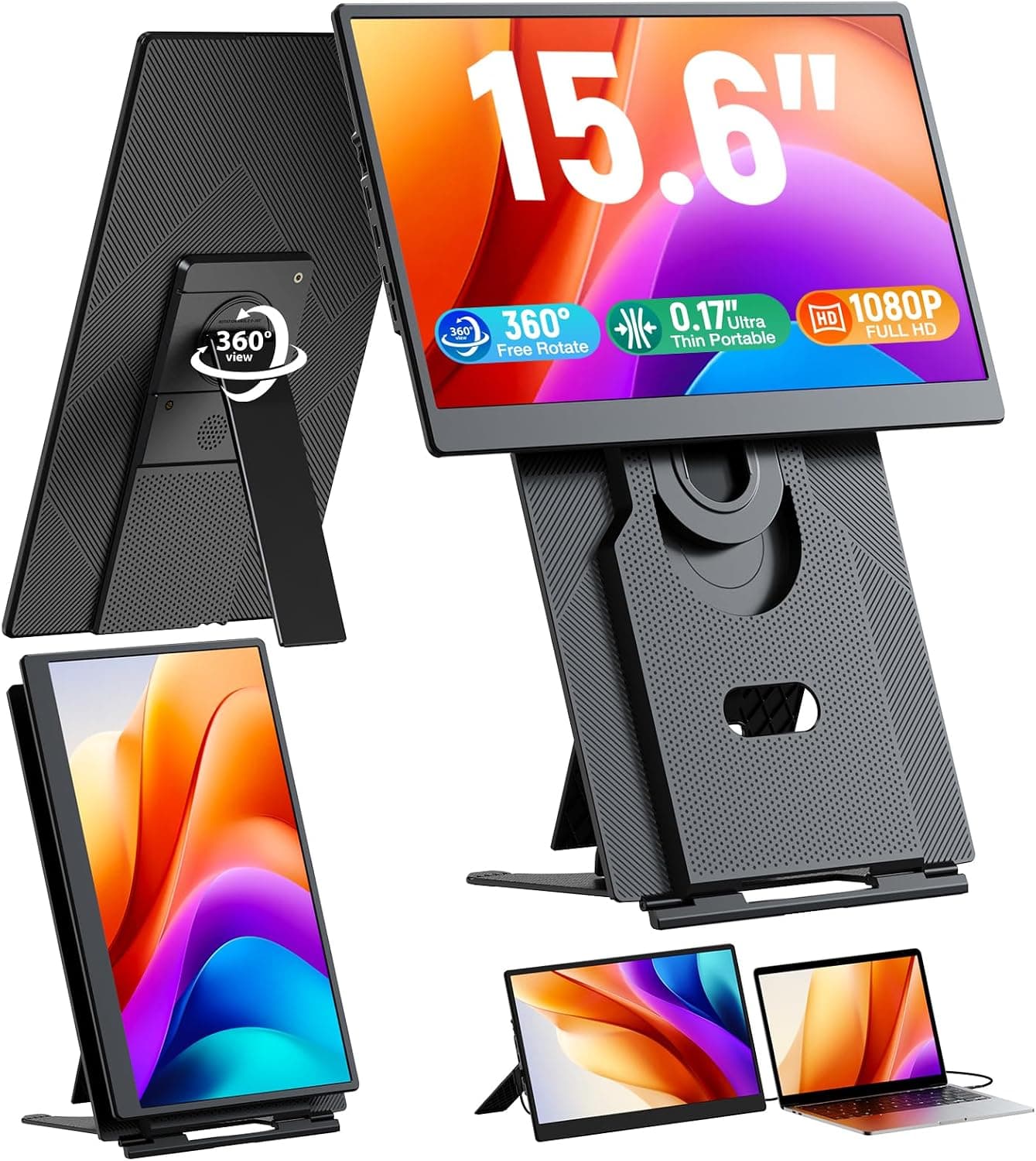
Yes—this is one of its biggest advantages. Unlike clamp-style extenders, the S13 uses a rear back-support design, so it places no pressure on your laptop lid and works with virtually any laptop size without width limits. Many Reddit and YouTube reviewers specifically called this out as the reason they chose it over clamp alternatives. Just note the full kit weighs about 3.85 lbs, so it's best suited to a bag you're already carrying rather than ultra-minimal travel.
On Windows it's genuinely plug-and-play via USB-C or HDMI—no drivers needed. Mac users should set expectations slightly: it works, but some TikTok and Reddit users mention the built-in Smart Display Software (brightness, color, Eye Care/Game modes) syncs more smoothly on Windows, and macOS may require adjusting display settings manually. It's also compatible with Linux, ChromeOS, Mini PCs, smartphones, Switch, PS5, and Xbox.
For the price, most reviewers describe it as solid and surprisingly premium-feeling, with a slim 0.16-inch profile. The detachable adjustable stands are the main durability question mark—they're sturdy in use but some users recommend a gentle setup/teardown routine if you're assembling daily. The upside is flexibility: you get landscape, portrait, stacked, mirror, and single-screen modes, plus VESA 75×75 mounting for a permanent desk setup.
The 15.6" 1920×1080 IPS panel with 330 cd/m² brightness and 178° viewing angles is crisp and vivid for indoor work—spreadsheets, coding, video calls, and streaming all look great. The one honest caveat: the glossy finish can struggle in direct sunlight or very bright cafés, so if you work outdoors often, plan for shade or consider a matte screen protector. Eye Care Mode and Flicker-Free tech help during long sessions.
It's ideal for remote workers, students, coders, traders, and travelers who want a genuine dual-screen boost (up to 200% productivity per the brand) without hauling a second monitor—and the VESA mount makes it a smart pick for desk-setup tinkerers too. It's less ideal for ultra-minimalist travelers or heavy outdoor users. The product carries a 2-year warranty, and standard retailer return windows apply, so if the weight or Mac software experience isn't for you, you're covered—just confirm the specific return policy on the listing before ordering.
同カテゴリーのレビュー数が多い類似商品より: KOORUI 24 Inch Gaming Monitor, 180Hz 1080P VA Display with 3000:1 Contrast
Yes — it's a native 180Hz panel, but you'll need to switch it on manually. Connect via the included HDMI cable (or a DisplayPort-capable setup), then set 180Hz in your GPU's display settings; it defaults to a lower refresh rate out of the box. Many Reddit and YouTube users note that enabling Adaptive Sync/FreeSync alongside it gives the smoothest experience, and it works with both AMD and NVIDIA cards.
The 3000:1 contrast gives noticeably deeper blacks than typical IPS budget monitors, which shines in dark game scenes and movies. For fast-paced competitive shooters, some TikTok and Reddit users mention mild ghosting/smearing in dark transitions — it's great for casual gaming, students, and office work, but color-critical creators or hardcore FPS players may prefer an IPS panel.
Correct, the included stand only tilts (-5° to 20°) and doesn't offer height, swivel, or pivot adjustment, and a few users find the base slightly wobbly. The good news: it's VESA 100×100mm compatible, so a monitor arm or desk mount solves ergonomics entirely — a popular fix among dual-monitor and dorm-room setups.
Budget monitors can vary unit to unit, and some buyers report stuck pixels or corner bleed — but KOORUI backs it with a 3-year manufacturer warranty. If your unit arrives defective, contact the seller for a replacement or refund promptly; most users who did so report a smooth resolution, so inspect the screen within the return window.
At around $120, it's widely praised as one of the best budget 180Hz options — ideal for students, casual gamers, home-office users, and compact or dual-monitor setups. Just set expectations: no built-in speakers, a single HDMI plus VGA, and basic ergonomics. If you need height adjustment, color accuracy, or built-in audio, consider spending more on an IPS alternative.
回答はメーカーの商品情報と分析対象のレビューの範囲に限られます。これらの情報源で裏付けられない質問には回答していません。
透明性のある設計