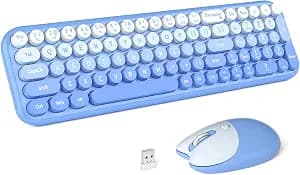
MOFII Wireless Keyboard and Mouse Combo, Full Size 2.4G Retro Round Computer Keyboard and Mouse Set, Plug and Play, for Windows, Computer, Desktop, PC, Notebook - (Blue Gradient)
商品説明
· Wide Compatibility: The colorful full-size keyboard with a number pad and mouse combo adds vibrancy to your desktop and boosts efficiency. Compatible with PCs, desktops, and laptops.; · Reliable 2.4G Wireless, Plug and Play: Enjoy stable, anti-interference wireless freedom up to 10 meters (33 feet) away. Just plug and play, with the USB receiver stored inside the mouse.; · Ergonomic Design: The keyboard features a folding holder and anti-slide pads for an optimal slope, reducing wrist strain during long typing sessions. The contoured mouse offers hours of comfort. Removable keycaps make cleaning easy.; · Auto-Sleep Feature: Powered by 1 AA battery each, the keyboard and mouse enter auto-sleep mode after 8-10 minutes of inactivity, extending battery life up to 18 months (varies by usage).; · Colorful & Ideal Gift: MOFII offers high-quality, colorful wireless keyboard and mouse combos, perfect for office or home use. Great as a gift for birthdays, Christmas, or New Year. Enjoy a 30-day money-back guarantee and a 12-month warranty.
トレードオフを比較
似た商品を並べて比較
同じカテゴリの分析済み商品から無作為に選んでいます。商品が異なれば、単純に置き換えられるとは限りません。

Wireless Keyboard and Mouse Combo, 2.4G Full Size Wave Keys Ergonomic Keyboard with Wrist Rest, Phone Holder, 3-Level DPI Wireless Silent Mouse with 6-Buttons, for Windows, Mac OS, Laptop, PC (Black)

MOFii Wireless Keyboard and Mouse Combo, Retro Typewriter Keyboard with Multi-Media Function Keys and Number Pad Compared for PC Computer Windows (Pink Colorful)

MOFII Wireless Keyboard and Mouse Combo,2.4GHz Retro Full-Size Keyboard with Number Pad and Cute Wireless Mouse for Computer PC Desktops Laptop WindowsxP/7/8/10(Milk Tea Colorful-B)
調べる手間をひとつ減らす
購入前によくある質問
Is this keyboard and mouse combo compatible with my MacBook, or is it strictly for Windows PCs?
While the listing primarily markets this for Windows, the 2.4G receiver works on any device with a USB-A port, including Macs and Chromebooks—it will function as a standard HID device without needing extra drivers. Just note that the "Windows" key will act as the "Command" key on macOS. If your laptop only has USB-C ports, you’ll need a simple USB-A to USB-C adapter, as the receiver itself is not USB-C. Many users on Reddit have confirmed it works flawlessly with their MacBook Air and Pro models using this workaround.
How loud is the keyboard, and is the mouse click too noisy for an open office or library?
The keyboard uses membrane scissor switches, so it produces a soft "thock" sound that is generally quieter than a mechanical keyboard—you won’t be the loudest person in the room. However, the mouse is a different story. Several TikTok reviewers have pointed out that the left and right clicks are distinctly "clicky" and audible, which might annoy a neighbor in a completely silent library. If you're taking calls or working in a shared space, you'll likely want to use headphones or be prepared for a slightly louder click on the mouse.
I’ve seen comments about the keycaps popping off. How durable is the build quality really?
The keycaps are made of a lightweight ABS plastic and are attached to the scissor mechanism with a friction fit, so they can pop off if you aggressively pull or type at an angle. Many users who experienced this mentioned it happened within the first few weeks, usually while cleaning or moving the keyboard. That said, they are easy to snap back on (just align and press down firmly). For the price point, the overall frame is rigid and shows no flex; just treat the keycaps gently and you should be fine. If you're a heavy-handed typist, you may want to consider a more robust mechanical option.
What is the actual battery life, and does it ship with batteries included?
The combo does include a starter set of AAA batteries in the box, so you can use it immediately. Based on user feedback, the keyboard typically lasts around 4–5 months with moderate daily use (6–8 hours a day), while the mouse lasts about 3–4 months. The mouse battery drains slightly faster because it uses an optical sensor and an auto-sleep mode that only activates after about 10 minutes of inactivity. If you leave the mouse on and don't use the power switch on the bottom, you'll notice a faster drain. For reference, most users replace the mouse battery roughly every 3 months.
I have larger hands. Is the mouse comfortable for extended use, or is it on the smaller side?
This is the most common hesitation among buyers, and honestly, the mouse is on the smaller side—it’s designed for medium to small hands. If you have larger palms, you’ll likely find yourself claw-gripping it rather than resting your whole palm on it, which can cause fatigue after a few hours of work or browsing. Many users on Reddit have suggested that if ergonomics are your priority, you should buy the keyboard alone and pair it with a larger, more contoured mouse, such as the Logitech MX Master or even a basic full-size office mouse. The keyboard itself is full-size and comfortable, but the mouse is definitely the weaker link for bigger hands.
同カテゴリーのレビュー数が多い類似商品より: SABLUTE Wireless Keyboard and Mouse Combo, Ergonomic Wave, 30dB Quiet, MA41
Is the keyboard actually quiet when typing?
Yes. Reviewers describe the keys as whisper-quiet, silent, and not loud when typing, and the listing states typing and mouse clicks are reduced by up to 90% (30dB quiet).
How do I connect the keyboard and mouse, and what's included?
It uses a single 2.4GHz USB-A receiver that connects both devices, and a USB-C adapter is included. Reviewers report plug-and-play setup working in a couple of minutes with clear instructions, and one noted it worked immediately with a Linux machine.
What batteries does it take, and how long do they last?
The keyboard requires 2 AAA batteries and the mouse requires 1 AA battery, neither included. The listing states auto sleep technology extends battery life to 6–12 months of daily use, and reviewers report the batteries lasting a long time.
Is the wrist rest comfortable, and how is its quality?
The listing describes a 3-layer memory foam leather palm rest that provides soft cushioning and is durable and easy to clean. One reviewer found the wrist pad foam very thin and cheap-feeling, though still comfortable for the wrists, while others called the wrist rest comfy.
Is the keyboard comfortable for long typing sessions?
Yes. The listing cites an ergonomic wave design with 2 adjustable tilt angles to support natural posture and reduce fatigue, and reviewers say the wave styling is much better to type on and easier on hands and wrists.
回答はメーカーの商品情報と分析対象のレビューの範囲に限られます。これらの情報源で裏付けられない質問には回答していません。
透明性のある設計