ユーザーが気に入っている点
Great sound and easy install
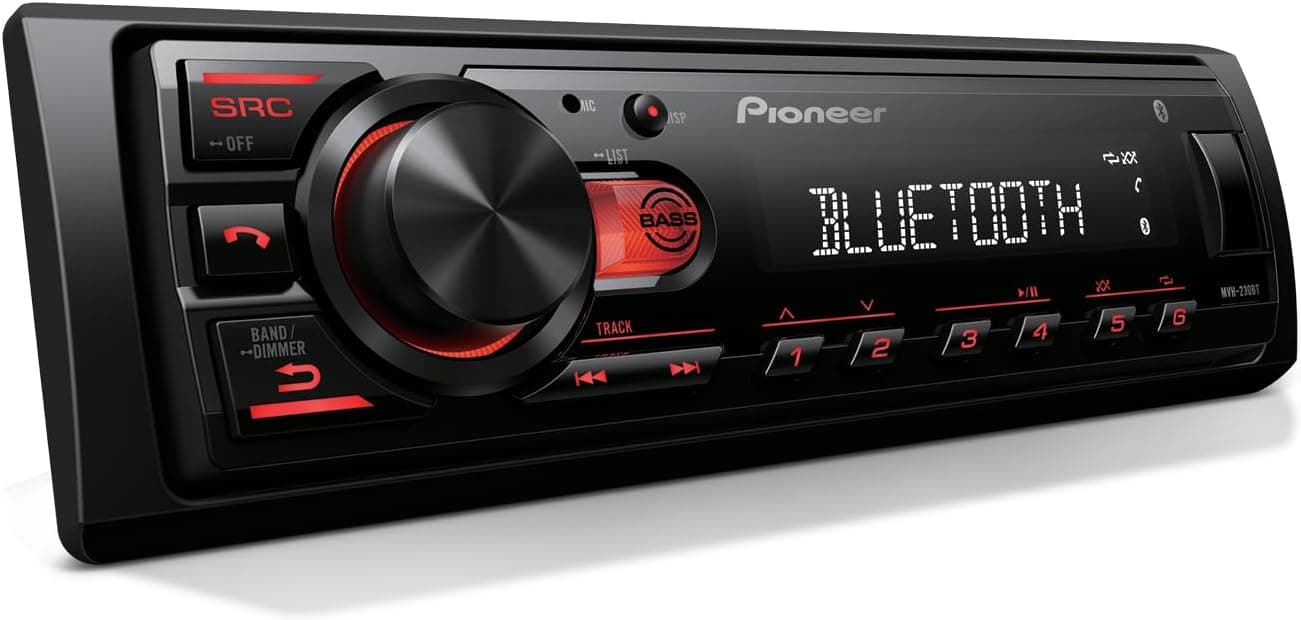
Reviewers consistently praise the sound quality and simple installation, often noting it works well as a budget-friendly upgrade. Bluetooth also connects immediately and reliably.
30秒でわかる要点
ユーザーが気に入っている点
Reviewers consistently praise the sound quality and simple installation, often noting it works well as a budget-friendly upgrade. Bluetooth also connects immediately and reliably.
主な注意点
One reviewer found the display distractingly bright even on its lowest setting, requiring them to cover it during night driving. Another mentioned the companion app is clunky and some settings require the phone.
選ぶ前に
It is a full-sized single DIN unit, so confirm your dash opening and wiring harness compatibility. Some settings are only available through the phone app, and USB playback may not resume where you left off.
同カテゴリーのレビュー数が多い類似商品より: 9.26" Wireless Portable Carplay Screen for Apple Car Play Android Auto OTA
ユーザーが気に入っている点
Reviewers repeatedly say the unit is plug-and-play, connects quickly to their phones, and works reliably for CarPlay and Android Auto. Many also praise the clear, bright screen and good value for the price.
主な注意点
A few reviewers note occasional lag in navigation apps like Waze and criticize the included instruction pamphlet as poor. One also wishes the backup camera had a wider angle.
選ぶ前に
Consider whether the 9.26-inch screen size and supplied mounts suit your car's dashboard, and confirm your phone works with the wireless CarPlay or Android Auto connection.
まずは利用シーンから
10件中36件の言及がネガティブな経験を示しています(28%)。
2件中19件の言及がネガティブな経験を示しています(11%)。
21件中65件の言及がネガティブな経験を示しています(32%)。
14件中39件の言及がネガティブな経験を示しています(36%)。
13件中27件の言及がネガティブな経験を示しています(48%)。
5件中10件の言及がネガティブな経験を示しています(50%)。
4件中6件の言及がネガティブな経験を示しています(67%)。
5件中7件の言及がネガティブな経験を示しています(71%)。
1件のレビューが複数のトピックに言及することがあります。割合は分析対象としたレビューについてのもので、全購入者や商品全体の故障率を表すものではありません。
同カテゴリーのレビュー数が多い類似商品より: 9.26" Wireless Portable Carplay Screen for Apple Car Play Android Auto OTA
96件中554件の言及がネガティブな経験を示しています(17%)。
17件中483件の言及がネガティブな経験を示しています(4%)。
111件中446件の言及がネガティブな経験を示しています(25%)。
37件中423件の言及がネガティブな経験を示しています(9%)。
72件中340件の言及がネガティブな経験を示しています(21%)。
25件中300件の言及がネガティブな経験を示しています(8%)。
21件中167件の言及がネガティブな経験を示しています(13%)。
41件中161件の言及がネガティブな経験を示しています(25%)。
トレードオフを比較
同じカテゴリの分析済み商品から無作為に選んでいます。商品が異なれば、単純に置き換えられるとは限りません。

Car Radio Bluetooth with Type-C Port, Wistrue Car Stereo with 2 USB/AUX/SD

Topexplore Carplay Screen for Car, 9'' Wireless CarPlay & Android Auto- Upgrade Portable Touchscreen with Bluetooth, Mirror Link, Voice Control, Hands-Free Calling,Plug & Play Car Play Screen

10.26'' Wireless Carplay Screen for Car with 4K Dash Cam & 1080P Backup Camera, Portable Car Audio Receivers with Carplay & Android Auto, GPS Navigation, Airplay, Mirror Link
根拠を確認する
「分析対象」は真正性が確認されたことを意味しません。「フラグ付き」も捏造と証明されたことを意味しません。いずれも分析上の分類です。
参考として3件の抜粋を表示しています。レビュー全体ではありません。
5.0 out of 5 stars
“In the last few months I re-riped my entire CD collection to a home database in the FLAC format. A number of years ago I had done the same thing but to the AAC format. Well, comparing the AAC to FLAC on several systems at home it was clear to me that FLAC is the way to go now. Much improved sound quality. Cant tell it from CD, which is the point. Trouble is the older Sony multimedia player in my Van only supported lossey formats like AAC. Looking around for something very similar to it, but with FLAC support I came across the S720. I picked this particular model over the other Pioneer choices with FLAC because it also has the other features I had come to need with my Sony (DSX-310BTX), had a couple more, and it fit into the same 1 DIN standard depth slot in the van. Installation was typical. While the wire harness color code is standard so in theory a straight swap in should be possible, the actual connectors are different, so i cut out the old harness and wired in the pigtail (minus the speaker wires) that came with the Pioneer. I use an Alpine 4x45W amp for the JL Audio midrange and tweeters and a Sony 300W sub amp for a Pioneer subwoofer so do I used the pre-outs from the S720. I also took advantage of the of the Pioneer internal 3 way crossover not in my Sony to eliminate the JL Audio passive crossovers. Funny thing about the S720 pre-outs...The Front/Hi out is the middle pair, the Rear/Mid is on top, and the sub on the bottom. While the chassis is labeled with stampings to this effect, it is nowhere in the user manual and pretty hard to read when the head unit is half installed. I initially put the tweeters into the top set and mids into the middle (which is logical to me, and in fact the way most similar units including a Pioneer or two do it). It was pretty obvious to me when the tweeters were trying to play midrange. Playing FLAC files is not as straight forward as one would think. First issue is that the CD ripper/FLAC converter I used didnt produce files that the S720 recognized as music. I used EAC with the XPIS FLAC plugin, which works great everywhere except in the S720. Eventually I found that by "re-converting" my existing FLAC files to FLAC using the dBpoweramp app, I was able to fix whatever the Pioneer doesnt like about the XPIS conversion. It was probably related to file info and not the actual compression. Once that was solved I next found there is some upper limit to either the number of files or the size of the end package of files the S720 will support. I know that when I put the entire reconverted set of files (72GB and 3800 files on a 128G flashdrive) I get an Error 19 when plugging the flashdrive into the S720. When I deleted a number of folders and was below 64GB (not sure what the final file count is, but still on the same 128G flashdrive), it worked fine. Next I went thru the S720 driver time alignment, then a leveling and EQ process using an Android based app with white noise, spectrum analyzer and calibrated mic as a reference to get a relatively flat frequency response. Time consuming, but worth the trouble. The best part is how great it sounds. Not just because of the FLAC format, but even AAC and analog sound better. I am sure the ability to time align and fine tune the eq contribute a lot but it also looks like Pioneer did a nice job of implementing the digital and analog in the head unit. Complaints? I cant believe head units havent begun using non-volatile memory for configurations. Pull the power and you get to start over. This sucks if you sent a lot of time setting it up. There is literally no installation manual. You get a quick start guide with the unit, but it doesnt even have a picture of the I/O on the back. There are a bunch of videos on the Pioneer product page for the unit, but they only cover the connector wiring color meanings and a bunch of how-to's on various functions once you get it up and running. By the way, these videos are way better than the user manual explaining how to set up and use features. Finally, who needs a really, really large BASS button? Its the second largest function on the units face next to the rotary encoder. So far the Smart Sync app is a mixed blessing. It makes it possible to find my way thru the FLAC files in short order, where the front panel interface is hopeless (all the music files are presented on the S720 as though in a single folder and in alphabetical order by file name). My biggest complaint with it is that it seems to want to take over all functions on the phone and it puts itself on top of all other apps. I found a way to prevent it from automatically starting up when the phone connects to the head unit, but then it wont even connect after the bluetooth connection is established. I cant seem to locate the 31 band EQ that some of the literature touts is available thru Smart Sync, and when Smart Sync is connected I cant change the contents of my custom EQ. I hope this app is a work in progress and not what Pioneer considers THE app. It needs lots of work.”
検出されたシグナル:具体的な記述:entity, comparison, process · 言及トピック:sound quality, compatibility · 実体験に基づく自然な文章
4.0 out of 5 stars
“I love everything about this stereo, except one thing- It's way too bright. Sound, 10/10, style 10/10, function 10/10, features 10/10. I just really wish it would dim about 3-4 more notches. I drive a lot at night and even on the lowest setting, its distractingly bright. Sometimes on long trips I will put a sweater over the dash to cover it up. I drive a 2000 Tundra, so the dash has that 90s/2000s green/yellow backlighting. I tried my best to get the colors to match and it's just too bright. I could go with a red and it wouldnt be as bad, but then it wouldnt match my factory interior at all. The take away? This stereo checks every box. It sounds good, it looks good, tons of features, the color palette is pretty much endless. If you dont mind it being so bright, 100% a good buy. If you want a stereo that looks almost stock, no blinding lights, maybe look at another unit. If this stereo just had a screen shut off button, or night mode, it would be the full 5 stars.”
検出されたシグナル:具体的な記述:quantity, scenario, entity · 言及トピック:sound quality, quality · 実体験に基づく自然な文章
5.0 out of 5 stars
“Chose this unit to replace a faulty jvc with volume knob issues( was 10 years old) I chose this unit, as it is the same layout as my s320bt in my 4runner. I love this radio and the amount of tuning you can do for this price point is great, i also love that it auto connects to my phone when i start the vehicle and automatically starts my pandora. I also love that you can set the illumination to dim at a certain time of day, as long as you set the clock on it. Awesome unit, and the bluetooth microphone is clear and people can understand me, which is also rare for this price point. Excellent unit, easy install. BTW my older S320BT is almost 7 years old, and it still is working great, the reason i chose to stay with this series.”
検出されたシグナル:具体的な記述:entity, comparison, process · 言及トピック:bluetooth connectivity, value for money, compatibility · 実体験に基づく自然な文章
調べる手間をひとつ減らす
Yes. The manufacturer's listing states it has built-in Bluetooth for hands-free calls, wireless music streaming, and playlist control from your device.
The listing says it supports MP3, WMA, AAC, and WAV formats via USB and auxiliary inputs.
Yes. Multiple reviewers describe it as easy to install, and the listing notes the mechless single-DIN chassis is less than 4 inches deep for a wide variety of applications.
Reviewers consistently rate the sound quality highly, describing it as great, clear, and a solid improvement over the units they replaced.
Yes. Reviewers report that it auto-connects to their phone when starting the vehicle and that Bluetooth connects immediately every time.
同カテゴリーのレビュー数が多い類似商品より: 9.26" Wireless Portable Carplay Screen for Apple Car Play Android Auto OTA
Multiple reviewers describe it as plug-and-play and say setup was straightforward and quick, with one noting it helps to watch YouTube videos first. The listing also states it simply plugs into your car's cigarette lighter with no dashboard modifications needed.
Reviewers report fast, easy Bluetooth pairing right out of the box, including with an iPhone 15 Pro Max, and one notes Bluetooth 5.0 lets you stay connected to both the CarPlay unit and your car's Bluetooth at once. The listing confirms wireless Apple CarPlay and Android Auto via 5G Wi-Fi and Bluetooth 5.0.
Reviewers call the screen clear, bright, and well-sized, with one saying the size is perfect—not too big or too small. The listing specifies a 550 cd/m² IPS touchscreen with 1600x600 resolution and 1000:1 contrast ratio.
Reviewers say the touchscreen is fast and responsive, though one notes scrolling isn't super smooth while GPS apps like Apple Maps run very smoothly, and another mentions occasional Waze direction lag. The listing claims 1.35x smoother performance and 25% faster touch response than competitors.
One reviewer who previously used a competitor's product costing three times as much said the Krunia is superior, booting faster and handling audio better, and another called it the best bang for the buck.
回答はメーカーの商品情報と分析対象のレビューの範囲に限られます。これらの情報源で裏付けられない質問には回答していません。
透明性のある設計