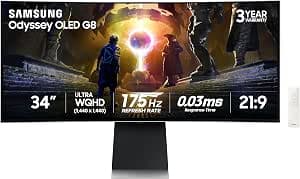
Samsung 34" Odyssey OLED G8 (G85SD) Ultra-QWHD QD-OLED G-Sync Compatible Curved Gaming Monitor, 175Hz, 0.03ms, Glare-Free Display, AMD FreeSync Premium Pro, 3 Yr Warranty,LS34DG856SNXZA,2024
商品説明
Samsung's 34" Odyssey OLED G8 Ultra-WQHD Gaming Monitor features OLED technology for a wider color spectrum and vibrant images. 175Hz refresh rate, 0.03ms response time (GtG), G-Sync compatible, and AMD FreeSync™ Premium Pro allows for faster, exhilarating gameplay without image tearing. 34" 21:9 Ultra-WQHD display with 110 pixels per inch for stunning detail and clarity. Glare Free technology significantly reduces glare from external light sources, so the OLED screen’s perfect black and color experience are presented without distractions. OLED Safeguard includes Thermal Modulation System, Logo and Taskbar Detection & Screen Saver to help prevent burn-in. A Slim Metal Design and Ergonomic Stand provide unparalleled style and comfort, with connectivity that enables access to a variety of input options. Gaming Hub offers instant access to streaming with Smart TV Apps for access to must-see shows and free live content. ¹Based on GtG measured under internal test conditions. Results may vary by content and monitor settings. GtG (Gray to Gray) measures the time taken for a monitor pixel to change from one gray value to another. Refresh rate and response time may vary based on the performance of the input source. ²Images simulated for illustrative purposes. ³Based on internal test results. ⁴When "Adjust Logo Brightness" setting is on "Off" or "Low," Thermal Modulation is active in preset picture modes only. When "Adjust Logo Brightness" setting is on "High," Thermal Modulation is always active. ⁵Logo detection is not available in PC mode. ⁶Screen images simulated for illustrative purposes. 7Screen images simulated for illustrative purposes. The application of the G-Sync logo on the package and product may vary depending on the time of purchase. 8Screen images simulated for illustrative purposes. To use the Dynamic Black Equalizer, Game Mode must be activated in settings.
トレードオフを比較
似た商品を並べて比較
同じカテゴリの分析済み商品から無作為に選んでいます。商品が異なれば、単純に置き換えられるとは限りません。

QQH Laptop Screen Extender, 15.6" Triple Portable Monitor with Ultra-Slim FHD IPS Display, One Cable USB-C Monitor Extender Compatible with MacOS, Windows, Android for 12-16" Laptop (Driver Need)

Dell S2725HS 27 Inch Monitor, FHD (1920x1080) Display, 100Hz Refresh Rate, 1500:1 Contrast Ratio, TÜV Rheinland Eye Comfort 4 Star, Integrated 2x5W Speaker, Height/Tilt/Swivel/Pivot- Ash White Color

ARZOPA Portable Monitor, 15.6'' 1080P FHD Laptop Monitor USB C HDMI Computer Display HDR Eye Care External Screen w/Smart Cover for Mac Phone Xbox Switch PS5-S1 Table
調べる手間をひとつ減らす
購入前によくある質問
Ich mache mir Sorgen über OLED-Einbrenneffekte durch Spiel-HUDs oder Desktop-Symbole. Wie geht die Samsung-Garantie damit um und welche Funktionen schützen den Bildschirm?
Ihre Sorge ist unter OLED-Käufern sehr verbreitet. Samsung bietet eine starke 3-Jahres-Garantie, die Einbrenneffekte bei diesem Monitor ausdrücklich abdeckt – ein wichtiges Vertrauensargument. Der Monitor selbst verfügt über integrierten Schutz: Ein Pixel-Refresh-Zyklus läuft, wenn der Monitor nach 4+ Stunden Nutzung ausgeschaltet wird, und eine "Logo Dimming"-Funktion reduziert automatisch die Helligkeit in statischen Bereichen. Viele Reddit-Nutzer in der OLED-Gaming-Community berichten, dass sie diese Funktionen problemlos nutzen.
Ist der mitgelieferte Stand wackelig oder eingeschränkt, und kann ich diesen Monitor an einem Arm montieren?
Das Feedback zum Standfuß ist gemischt. Obwohl er schlank ist und zum Design passt, stellen einige Benutzer fest, dass er ein leichtes Wackeln hat und eine große Standfläche benötigt. Die gute Nachricht ist, dass er vollständig mit Standard-100x100mm-VESA-Montagen kompatibel ist. Wenn Sie maximalen Schreibtischplatz und Stabilität wünschen, ist die Verwendung eines hochwertigen Monitorarms (den wir ohnehin für Ultrawide-Monitore empfehlen würden) eine beliebte Lösung, die von vielen Setup-Enthusiasten auf YouTube gelobt wird.
Wie wirkt sich die "blendfreie" matte Beschichtung auf die Bildqualität aus? Ich habe gehört, dass sie körnig aussehen kann.
Dies ist ein zentraler Diskussionspunkt. Die matte Beschichtung eliminiert effektiv Reflexionen in hellen Räumen, was ihr Zweck ist. Wie jedoch einige detaillierte Rezensenten auf TikTok und YouTube angemerkt haben, kann bei einfachen, hellen Farben (wie einer weißen Browser-Seite) im Vergleich zu einem glänzenden Fernseher aus nächster Nähe ein sehr leichter strukturierter oder "funkelnder" Effekt wahrnehmbar sein. Bei den meisten Spielinhalten und Medien sind der unglaubliche Kontrast und die Farben die herausragenden Merkmale, und die Beschichtung ist für viele ein lohnender Kompromiss, um Reflexionen zu vermeiden.
Meine Hauptnutzung ist Gaming, aber ich muss auch arbeiten/coden/surfen. Ist die Textschärfe für die Produktivität ausreichend?
Für gemischte Nutzung ist er ausgezeichnet, aber mit einem Hinweis. Das QD-OLED-Panel und die Windows-Cleartype-Abstimmung bieten für ein OLED eine sehr gute Textschärfe. Sie erhalten ein fantastisches, immersives Erlebnis für Gaming und Medien. Bei langen Coding- oder Dokumentensitzungen von 8+ Stunden bemerken einige Benutzer mit scharfem Augenlicht aufgrund des Subpixel-Layouts leichte Farbsäume am Text. Dies wird oft als geringfügige Anpassung beschrieben, nicht als Ausschlusskriterium, aber reine Produktivitätsnutzer könnten ein IPS-Panel in Betracht ziehen.
Ist dieser Monitor preiswert und wie schneidet er im Vergleich zu Alternativen wie dem Alienware AW3423DWF ab?
Die Wertwahrnehmung ist sehr subjektiv. Der Odyssey G8 wird für seine erstklassige Bildqualität, das elegante Design und die robuste 175Hz-Bildwiederholrate gelobt. Man zahlt einen Aufpreis für die Samsung-Marke und ihr minimalistisches Design. Die häufig erwähnte Alienware-Alternative bietet ein sehr ähnliches Panel, oft zu einem niedrigeren Preis, mit einem spielerorientierteren Design und Standfuß. Die Wahl hängt oft von Designpräferenzen, spezifischen Funktionsanforderungen (wie dem Smart Hub) und dem aktuellen Preis ab. Beide gelten als erstklassige Ultrawide-OLED-Monitore.
同カテゴリーのレビュー数が多い類似商品より: KOORUI 24 Inch Gaming Monitor, 180Hz 1080P VA Display with 3000:1 Contrast
Does this monitor really run at 180Hz, and what do I need to enable it?
Yes — it's a native 180Hz panel, but you'll need to switch it on manually. Connect via the included HDMI cable (or a DisplayPort-capable setup), then set 180Hz in your GPU's display settings; it defaults to a lower refresh rate out of the box. Many Reddit and YouTube users note that enabling Adaptive Sync/FreeSync alongside it gives the smoothest experience, and it works with both AMD and NVIDIA cards.
How does the VA panel perform for gaming and everyday work?
The 3000:1 contrast gives noticeably deeper blacks than typical IPS budget monitors, which shines in dark game scenes and movies. For fast-paced competitive shooters, some TikTok and Reddit users mention mild ghosting/smearing in dark transitions — it's great for casual gaming, students, and office work, but color-critical creators or hardcore FPS players may prefer an IPS panel.
The stand looks basic — can I adjust the height or mount it?
Correct, the included stand only tilts (-5° to 20°) and doesn't offer height, swivel, or pivot adjustment, and a few users find the base slightly wobbly. The good news: it's VESA 100×100mm compatible, so a monitor arm or desk mount solves ergonomics entirely — a popular fix among dual-monitor and dorm-room setups.
What if I receive a unit with a dead pixel or backlight bleed?
Budget monitors can vary unit to unit, and some buyers report stuck pixels or corner bleed — but KOORUI backs it with a 3-year manufacturer warranty. If your unit arrives defective, contact the seller for a replacement or refund promptly; most users who did so report a smooth resolution, so inspect the screen within the return window.
Is it good value, and who is it best suited for?
At around $120, it's widely praised as one of the best budget 180Hz options — ideal for students, casual gamers, home-office users, and compact or dual-monitor setups. Just set expectations: no built-in speakers, a single HDMI plus VGA, and basic ergonomics. If you need height adjustment, color accuracy, or built-in audio, consider spending more on an IPS alternative.
回答はメーカーの商品情報と分析対象のレビューの範囲に限られます。これらの情報源で裏付けられない質問には回答していません。
透明性のある設計