ユーザーが気に入っている点
Easy setup with sharp, bright screens
Reviewers repeatedly call setup quick and plug-and-play, and praise clear, bright 1080p displays for multitasking.
購入に関する総合評価
A solid pick for portable multitasking, though it sits on a desk rather than attaching
People who travel or work from home and want easy, portable extra screen space for email, documents, spreadsheets and multitasking on a desk.
Buyers who need a second screen attached to the laptop itself for use away from a desk or table.
30秒でわかる要点
ユーザーが気に入っている点
Reviewers repeatedly call setup quick and plug-and-play, and praise clear, bright 1080p displays for multitasking.
主な注意点
One reviewer says it must sit on a desk or table rather than attach to the laptop, and wished for a laptop mount option.
選ぶ前に
Confirm it fits your laptop and use case: one reviewer says it fits their setup well, while another needed a desk-based setup.
同カテゴリーのレビュー数が多い類似商品より: KOORUI 24 Inch Gaming Monitor, 180Hz 1080P VA Display with 3000:1 Contrast
ユーザーが気に入っている点
Several reviewers describe the monitor as a strong budget purchase, citing impressive specs for the money and satisfaction with gaming use.
主な注意点
Several reviewers report the monitor failing or coming apart after months to a couple of years, including a dead screen and a failing power cord.
選ぶ前に
Two reviewers note that setup benefits from adjusting settings in your GPU software, including color, brightness, and VRR.
まずは利用シーンから
4件中71件の言及がネガティブな経験を示しています(6%)。
0件中48件の言及がネガティブな経験を示しています(0%)。
1件中44件の言及がネガティブな経験を示しています(2%)。
0件中35件の言及がネガティブな経験を示しています(0%)。
4件中34件の言及がネガティブな経験を示しています(12%)。
3件中34件の言及がネガティブな経験を示しています(9%)。
2件中26件の言及がネガティブな経験を示しています(8%)。
0件中22件の言及がネガティブな経験を示しています(0%)。
1件のレビューが複数のトピックに言及することがあります。割合は分析対象としたレビューについてのもので、全購入者や商品全体の故障率を表すものではありません。
トレードオフを比較
同じカテゴリの分析済み商品から無作為に選んでいます。商品が異なれば、単純に置き換えられるとは限りません。

acer Nitro 27” 4K UHD 3840 x 2160 Gaming IPS Monitor | AMD FreeSync Premium | Up to 160Hz Refresh Rate with DFR to FHD 320Hz| Up to 0.5ms | 1 x Display Port 1.4 & 2 x HDMI 2.1 Ports | VG270K V4bmiipx

Intehill 15.6" FHD 1080P Portable Monitor, Premium IPS External Display with Dual Speakers, Ultra-Slim Aluminum Alloy Design, Magnetic Folio Stand, USB-C & HDMI Second Screen for Laptop, F15ZA

ASUS ROG Swift 32” 4K OLED Gaming Monitor (PG32UCDM) - UHD (3840 x 2160), QD-OLED, 240Hz, 0.03ms, G-SYNC Compatible, Custom Heatsink, Graphene Film, 99% DCI-P3, True 10-bit, 90W USB-C
根拠を確認する
「分析対象」は真正性が確認されたことを意味しません。「フラグ付き」も捏造と証明されたことを意味しません。いずれも分析上の分類です。
参考として3件の抜粋を表示しています。レビュー全体ではありません。
Great portable second screen, way better than I expected
“Been using this for about more than a week now and fell in love with it. So glad I made the purchase. Display: The picture is a lot sharper than I thought it'd be. Text looks crisp, colors look good, and 1080p is plenty at this size. It gets nice and bright too, so I'm not squinting or maxing everything out, even in a bright room. Ease of use: Honestly couldn't be easier. Plug it in and the screen just shows up. No drivers, no software, no digging through settings. It also runs off USB-C power alone, so no extra adapter to carry around and fewer cables on my desk. That was the main thing I wanted, and it does it well. Responsiveness: I haven't noticed any lag. Dragging windows, scrolling, and typing all feel instant, and I haven't seen any flickering or dropouts. It feels just like a regular second monitor. Compatibility: Worked right away with my laptop, no setup at all. It says it works with Windows, macOS, and Chrome OS, so it should be fine for most people. Just double check that your laptop's USB-C port supports video output. Size: 15.6" turned out to be the sweet spot for me. It's big enough to actually get work done with a doc or browser open next to my main screen, but it doesn't feel huge. It sits next to my laptop without taking over the whole desk. Portability and storage: It's super thin and light. I toss it in my backpack next to my laptop and barely notice it's there. It folds up flat too, so it takes up almost no room when I'm not using it. Really nice if you work from different spots or travel a lot. Durability: Feels solid for something this thin. No creaking or flexing, and the ports feel snug. It's been in and out of my bag a bunch this week with no scratches or problems. It's only been a week, so I can't say how it holds up long term, but no complaints so far. In general: Convenient, easy to set up, feels sturdy, and the screen looks better than I expected. It's made multitasking way easier at home and on the go. Would definitely recommend!”
検出されたシグナル:具体的な記述:quantity, comparison · 言及トピック:display quality, easy setup · 実体験に基づく自然な文章
Second screen not functional, at all -- awful product.
“EDIT: Updating my review to 3 stars. Don't know what I did (I wish I knew) but the second screen works now. Not totally convinced it will continue to work, but I've unplugged/plugged it back in several times and it seems to be okay. The only thing I don't like is when you power everything off, and turn it all back on, all the color settings default, and you have to adjust them again, every time. Other than that, now that it works, it's great! I bought this Synnov Laptop Screen Extender a few months back, and have been trying ever since to get the second screen to connect. I really, really wanted to try to avoid leaving a bad review, because it appears to be a great product based on most of the other customer reviews. But unfortunately, here I am. Super frustrated. I have a single screen extender and have been pretty happy with it, so I decided to upgrade to this triple monitor one, thinking I'd LOVE it, and the increased productivity that was sure to come with it. No such luck. Of course, I very carefully checked the compatibility of my laptop first, before buying. I have a Dell Intel(R) Core(TM) Ultra 5 235U (2.00 GHz), and that is NOT shown in the list of devices that are incompatible. I figured I was good to go. I have tried a vast array of cables and cable configurations, and even different power outlets at home, and for the life of me, I CANNOT get the second screen to work. It appears to be getting enough power (it should, since my laptop appears to meet all the specs) and always reverts to "no signal" and then "power save" mode. No matter what I do. On top of this, I can't seem to find a way to contact the company to troubleshoot. So I guess I'm stuck. I feel like this is a hit-or-miss product, and with that being the case, you may want to consider an alternative before purchasing this.”
検出されたシグナル:具体的な記述:process · 言及トピック:quality · 実体験に基づく自然な文章
Lightweight and Super Handy for Work
“Whether I’m working from home or traveling, this laptop screen extender is really convenient. It’s easy to set up, and it comes with multiple ports and all the necessary cables, so I could just take it out and plug it in right away. The screen quality is very good — clear and smooth. It makes split-screen work super easy and really helps improve productivity. It also comes with a carrying bag, which makes it much more convenient to take with me when I’m out. I’ve been using it for a while now, and the connection has been very stable. No lag or disconnection issues at all, everything runs smoothly. The best part is that it’s not heavy, so it doesn’t add much weight when carrying it around. Overall, it’s a very useful and reliable work tool that I would definitely recommend.”
検出されたシグナル:具体的な記述:scenario, entity · 言及トピック:easy setup, display quality, lightweight, multiscreen · 実体験に基づく自然な文章
調べる手間をひとつ減らす
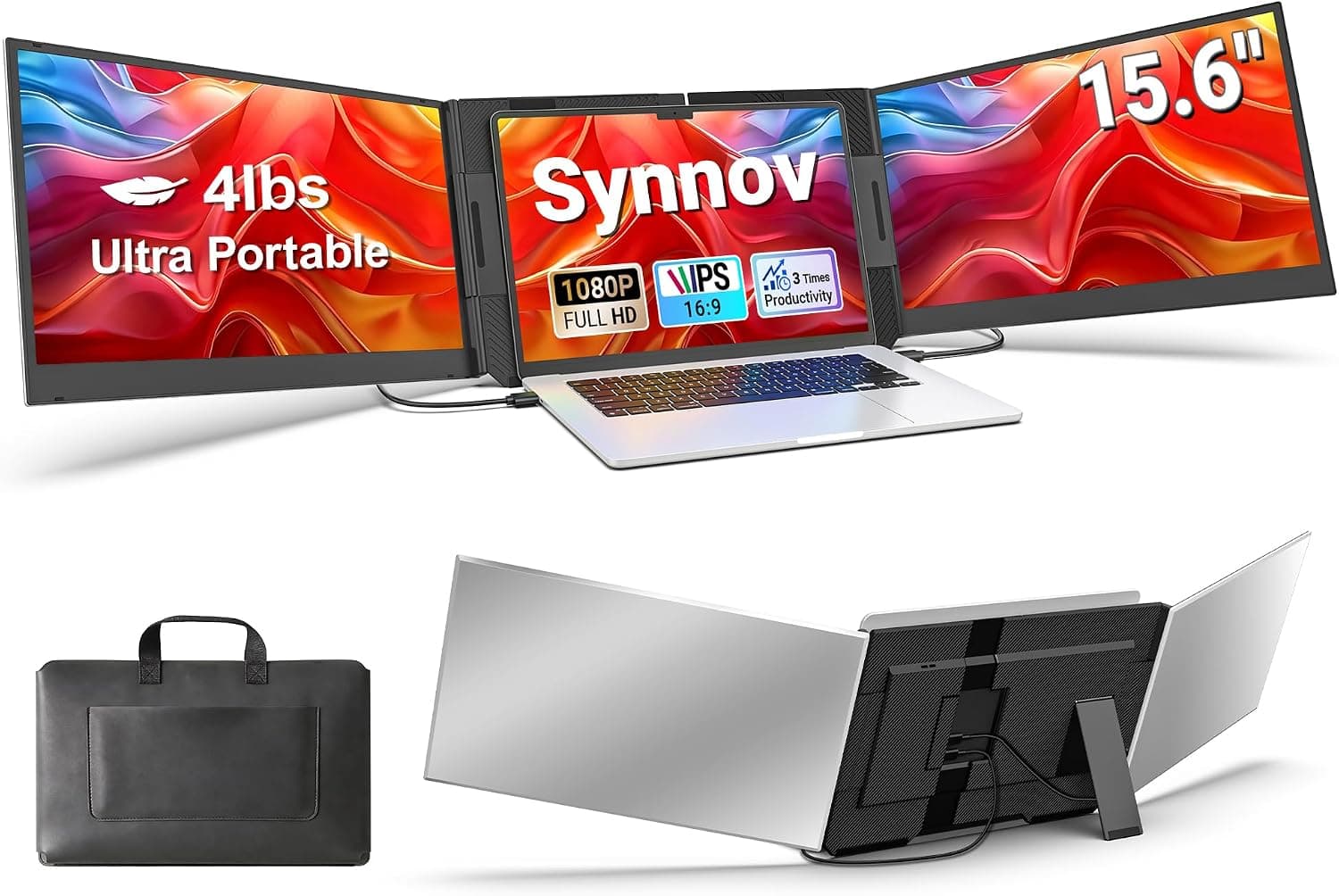
The listing says it fits 12"-17.3" laptops and supports Windows, MacOS, Chrome, Linux, and Android. It requires at least one full-featured USB-C port and is not compatible with MacBooks with M1/M2/M3 chips due to chip limitations.
Reviews report setup was simple and plug-and-play with no drivers needed. The listing also states it is plug-and-play with no driver required and connects via 2x full-featured USB-C or 1x full-featured USB-C plus 1x HDMI.
Customers report the 1080p picture is clear and sharp, text looks crisp, colors look good, and the screens get bright enough even in a bright room. The listing specifies 15.6" FHD 1080P IPS screens with a 178° viewing angle.
The listing says it weighs 4 lbs and is 0.19" thin, with an aluminum alloy body and a
同カテゴリーのレビュー数が多い類似商品より: KOORUI 24 Inch Gaming Monitor, 180Hz 1080P VA Display with 3000:1 Contrast
Yes — it's a native 180Hz panel, but you'll need to switch it on manually. Connect via the included HDMI cable (or a DisplayPort-capable setup), then set 180Hz in your GPU's display settings; it defaults to a lower refresh rate out of the box. Many Reddit and YouTube users note that enabling Adaptive Sync/FreeSync alongside it gives the smoothest experience, and it works with both AMD and NVIDIA cards.
The 3000:1 contrast gives noticeably deeper blacks than typical IPS budget monitors, which shines in dark game scenes and movies. For fast-paced competitive shooters, some TikTok and Reddit users mention mild ghosting/smearing in dark transitions — it's great for casual gaming, students, and office work, but color-critical creators or hardcore FPS players may prefer an IPS panel.
Correct, the included stand only tilts (-5° to 20°) and doesn't offer height, swivel, or pivot adjustment, and a few users find the base slightly wobbly. The good news: it's VESA 100×100mm compatible, so a monitor arm or desk mount solves ergonomics entirely — a popular fix among dual-monitor and dorm-room setups.
Budget monitors can vary unit to unit, and some buyers report stuck pixels or corner bleed — but KOORUI backs it with a 3-year manufacturer warranty. If your unit arrives defective, contact the seller for a replacement or refund promptly; most users who did so report a smooth resolution, so inspect the screen within the return window.
At around $120, it's widely praised as one of the best budget 180Hz options — ideal for students, casual gamers, home-office users, and compact or dual-monitor setups. Just set expectations: no built-in speakers, a single HDMI plus VGA, and basic ergonomics. If you need height adjustment, color accuracy, or built-in audio, consider spending more on an IPS alternative.
回答はメーカーの商品情報と分析対象のレビューの範囲に限られます。これらの情報源で裏付けられない質問には回答していません。
透明性のある設計