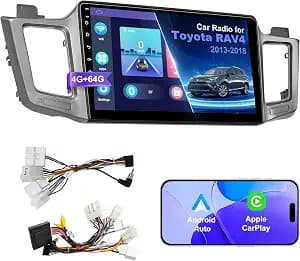
4G+64G Car Radio Stereo for Toyota RAV4 2013-2018, Wireless Carplay&Android Auto with Android 13 Support Bluetooth/Voice Control/GPS/WiFi/Back-up Camera/SWC/FM, 10.1 Inch IPS Touch Screen
Description
【Applicable Models】The car stereo is compatible with Car radio For Toyota RAV4 2013 2014 2015 2016 2017 2018. The package includes 2 power cables can support original car with J-B-L sound system & amplifier. If you are not sure our car radio can fit your car, you can send messages or picture to us, we will give you advice; 【Android 13 System and 4GB+64GB】Our Android 13.0 car audio receivers with 10.2 inch IPS Touch Screen built-in 4G RAM + 64G ROM system, ensures smooth operation and faster response, 64 GB ROM for more apps installed. WiFI, Network, On-line surfing Available. After connected to WiFi or personal Hotspot, this Car Stereo allows you install android Apps from Application Store. You are driving with a smart Car stereo like a ipad.; 【Wireless Carplay and Android Auto】This Toyota RAV4 Upgrade Replacement is compatible with wireless/wire apple CarPlay and Android Auto, you can make calls hands-free with the help of Siri or Goo-gle assistance, easy to get phone contacts, emails, notifications, map navigation, music, videos and more. It means that you can focus more on road safety while driving!; 【Bluetooth Function& Steering Wheel Control】This Bluetooth5.2 radio supports answering/ making Bluetooth phone calls with hands-free. The built-in microphone picks up your voice and your car speaker can help you hear the person on the other side clearly. Use the steering wheel buttons to control the car audio, which is more convenient for operation and safer for driving.; 【GPS Navigation & WIFI】The GPS Navigation Head Unit built-in GPS module and external GPS antenna for online or offline map navigation. Offline map data preloaded, ready to use after installation,includes voice and visual turn-by- directions 11 million+ POI library, 2D & 3D routes, fuel tracker. this car radio also supports WIFI Hot-spot connection, you can easily access and download online navigation APPs, Instagram, Facebook, TikTok, etc on Play store.; 【Rear-view Camera Input】For this RAV4 car audio with backup camera,ready to offer 170°viewing angle backup, allowing you to see hazards such as pets, children, or mailboxes that behind your car. When you put on reverse gear, the screen of the RAV4 stereo will automatically switch to the reverse interface.Very safe and convenient when you are reversing even in a bad weather.Front View available but camera not included.; 【Support Full RCA Output & Split Screen】Double Din Android 13 Car Radio comes with video output and Supports split-screen function.Supports car headrest video output, your family or friends could enjoy videos in the backseat. Support split-screen function, you can enjoy different interfaces on the same screen at the same time, bringing you a pleasant driving journey.
Compare the trade-offs
Similar products, side by side
A random selection of analyzed products from the same category. Different products are not necessarily interchangeable.

Garmin DriveSmart 66, 6-inch Car GPS Navigator with Bright, Crisp High-Resolution Maps and Garmin Voice Assist

Double Din Car Radio for Chevrolet Colorado 2015 2016 2017, 9 inch Touchscreen Stereo for Chevrolet Colorado with Wireless Carplay Android Auto Bluetooth GPS Navi WiFi FM RDS AHD Backup Camera 2+32G

Suitable for Chevrolet Colorado 2018-2024 Android 12 car Stereo WiFi 4 core GPS Navigation Radio player9.7 '' high-Definition Touch Screen Audio Backup Camera (4+64G)
One less thing to search
Before you buy: quick questions
Will this stereo fit my specific Toyota RAV4 model, and is the installation truly plug-and-play?
Yes, it's designed specifically for the 2013-2018 RAV4 dashboard and fits like a factory part. The wiring harness is generally plug-and-play for power and speakers. However, based on user feedback, connecting features like the backup camera or steering wheel controls may require additional adapters or careful programming. We recommend reviewing your vehicle's factory setup (e.g., JBL audio system) and being prepared for some light troubleshooting to integrate all functions fully.
How reliable are the Wireless CarPlay and Android Auto connections? I've heard about dropouts.
Most users find the wireless smartphone projection works well, offering fantastic convenience. It's a frequently praised feature. That said, a common note in reviews is that the connection can occasionally be inconsistent upon starting the car or in areas with heavy wireless interference. Many TikTok and Reddit users suggest ensuring your phone's OS is updated and that you're using a quality USB cable for the initial setup to improve stability. For the most rock-solid connection, you can always use the wired connection option.
What's the real-world experience with the Android 13 system and screen visibility?
The 10.1-inch IPS touchscreen is widely praised for its large, clear display and responsive touch controls. In daylight, brightness is generally good, though like most screens, direct, harsh sunlight can cause some glare. The Android 13 OS allows for great app flexibility (like Spotify, Waze). Some users report the interface can feel a bit less polished than top-tier brands, with occasional minor lag or app quirks, but regular restarts keep it running smoothly for most.
What should I know about after-sales support and the warranty?
This is an important consideration. The product typically comes with a standard 1-year warranty. However, a frequent point of feedback from DIY forums is that while the hardware is reliable for most, reaching prompt after-sales support for technical issues can be challenging. We strongly advise testing all functions immediately upon installation. For peace of mind, consider purchasing through a platform or seller known for responsive customer service, and keep all your purchase documentation.
Who is this head unit best suited for, and who might want to consider an alternative?
This unit is a fantastic value-driven upgrade for RAV4 owners who want modern features (large touchscreen, wireless CarPlay/Android Auto) on a budget and don't mind a bit of DIY setup and the occasional software quirk. If you prioritize absolute reliability, seamless OEM-like integration, and readily available professional support, investing in a premium brand from a dedicated automotive electronics retailer might be a better fit for your needs and expectations.
From a similar, more-reviewed product in this category: Car Radio Stereo for Chevrolet Silverado GMC Sierra 2019-2023 Touch Screen
Is this radio plug-and-play for a 2022 GMC Sierra?
One reviewer installed it on a 2022 GMC Sierra Elevation and described it as 100% plug-and-play, taking about 30 minutes. Another reviewer noted that on a Sierra Denali you need to use code 666888 in the instructions, choose a vehicle, and select Chevy new 7 inch or 8 inch 2020.
Does the screen look good and modern in the truck?
Reviewers describe the screen quality as impressive with sharp resolution and vivid colors, and the Tesla-type design as giving the interior a modern and elegant look. One reviewer rated the appearance 5/5.
How is the customer support if I have trouble with the install?
Reviewers report that support responds quickly, communicates via text, WhatsApp, and FaceTime, and walks you through setup step by step. One reviewer noted the 12-hour time difference and suggested reaching them after 8PM CST.
What features does the head unit support?
The listing states it supports CarPlay and Android Auto, GPS navigation (online and offline), Bluetooth 5.0, WiFi and 4G SIM cards, steering wheel control, and HD backup camera display. It also retains the original car system so functions like the original B&O system, camera, steering wheel buttons, and air condition controls can be used normally.
What should I do if the OEM system display is tilted, black, or only half showing?
The listing instructs going to Settings, selecting the car model from the four options under system-setting guide-car model/AC-666888, then saving and rebooting. If the OEM display works but touch does not, turn the car off for 20 minutes and back on.
Answers are limited to the manufacturer's listing and the reviews we analysed. Questions those sources cannot support are not answered here.
Transparent by design