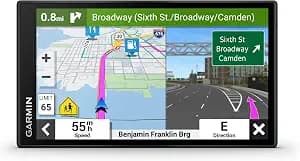
Garmin DriveSmart 66, 6-inch Car GPS Navigator with Bright, Crisp High-Resolution Maps and Garmin Voice Assist
Description
Simplify your drive with the Garmin DriveSmart™ 66 GPS navigator. Use Garmin voice assist to easily find and navigate where you want to go. The crisp 6” display and map updates of North America show you the way, providing alerts for speed changes and potential hazards ahead. Make the most of road trips with Tripadvisor® traveler ratings, a directory of U.S. national parks and the HISTORY® database of notable sites. Pair with the Garmin Drive™ app running on your compatible smartphone for on-screen access to live traffic, fuel prices, parking, weather and traffic cams to help avoid delays and keep you on your way. With Alexa Built-in (Drivers should focus on driving and only use this function when safe to do so. Must pair with the Garmin Drive™ app running on your compatible phone), you can ask to play music, listen to audiobooks, hear the news and more — all while you keep your hands on the wheel and eyes on the road.
Compare the trade-offs
Similar products, side by side
A random selection of analyzed products from the same category. Different products are not necessarily interchangeable.

14.4 Inch Car Radio for Chevrolet Colorado GMC Canyon 2014 2015 2016 2017 2018 Touch Screen Upgrade Android Head Unit Wireless Carplay Car GPS Navigation Multimedia Player (OEM 8 Inch)

4G+64G Android Stereo for Chevy Colorado GMC Canyon 2015-2019 Radio Upgrade 9 Inch Touch Screen Head Unit, Driauto Car Stereo with Wireless Carplay Android Auto, GPS WiFi DSP Bluetooth FM RDS Camera

Inefala 9" Radio for Chevrolet Chevy Trax 2014-2016 CarPlay Stereo Screen
One less thing to search
Before you buy: quick questions
How does the Garmin DriveSmart 66 handle map accuracy, especially for rural or newly built roads?
The device comes preloaded with detailed North American maps, and most users report excellent accuracy on major highways and suburban streets. However, we’ve seen feedback—particularly from rural drivers and those in rapidly developing areas—mentioning occasional outdated road data. Garmin provides map updates (some free, some via subscription), so we recommend checking for updates right after setup. For cross-border travel, note that this model focuses on US and Canada maps; if you’re planning European or global trips, consider a worldwide version.
I’ve read a few reviews about missing or wrong accessories in the box. Is that common?
It’s not widespread, but it has happened. A handful of buyers received a mount or cable meant for a different Garmin model. The good news is that Garmin’s customer support is responsive—most users who reported the issue got a correct replacement within a few days. To be safe, inspect the contents as soon as your unit arrives, and if anything’s off, contact support directly. The vast majority of shipments are complete and ready to install.
Does the voice assist work well for everyone, or are there limitations?
The voice assist is a favorite feature for hands-free navigation, and it handles standard American English accents very well. That said, a few users with stronger regional accents (like Scottish or deep Southern drawls) or non-native English speakers noted occasional misinterpretations. It’s not a dealbreaker for most, but if you rely heavily on voice commands, you might need to speak a bit more deliberately. For routine “navigate to” or “find gas” commands, it’s remarkably accurate.
Can this GPS work completely offline, or does it need a smartphone connection?
Yes, the DriveSmart 66 is fully functional offline for core navigation—maps, routing, and points of interest are stored on the device itself. You do not need a smartphone or data plan to get from A to B. However, features like live traffic updates, weather, and smart notifications require a Bluetooth connection to your phone. Many users appreciate this hybrid approach: reliable offline guidance with optional real-time data when paired.
Is this GPS suitable for a large truck, RV, or commercial vehicle?
The 6-inch screen is crisp and bright, but the DriveSmart 66 is primarily designed for cars and smaller SUVs. Truck drivers and RV owners often mention that the unit doesn’t include truck-specific routing (like avoiding low bridges or weight-restricted roads). For commercial use, Garmin offers the dezl series which is purpose-built for larger vehicles. For everyday family trips, commuting, and road trips in a standard vehicle, the DriveSmart 66 is an excellent choice.
From a similar, more-reviewed product in this category: Car Radio Stereo for Chevrolet Silverado GMC Sierra 2019-2023 Touch Screen
Is this radio plug-and-play for a 2022 GMC Sierra?
One reviewer installed it on a 2022 GMC Sierra Elevation and described it as 100% plug-and-play, taking about 30 minutes. Another reviewer noted that on a Sierra Denali you need to use code 666888 in the instructions, choose a vehicle, and select Chevy new 7 inch or 8 inch 2020.
Does the screen look good and modern in the truck?
Reviewers describe the screen quality as impressive with sharp resolution and vivid colors, and the Tesla-type design as giving the interior a modern and elegant look. One reviewer rated the appearance 5/5.
How is the customer support if I have trouble with the install?
Reviewers report that support responds quickly, communicates via text, WhatsApp, and FaceTime, and walks you through setup step by step. One reviewer noted the 12-hour time difference and suggested reaching them after 8PM CST.
What features does the head unit support?
The listing states it supports CarPlay and Android Auto, GPS navigation (online and offline), Bluetooth 5.0, WiFi and 4G SIM cards, steering wheel control, and HD backup camera display. It also retains the original car system so functions like the original B&O system, camera, steering wheel buttons, and air condition controls can be used normally.
What should I do if the OEM system display is tilted, black, or only half showing?
The listing instructs going to Settings, selecting the car model from the four options under system-setting guide-car model/AC-666888, then saving and rebooting. If the OEM display works but touch does not, turn the car off for 20 minutes and back on.
Answers are limited to the manufacturer's listing and the reviews we analysed. Questions those sources cannot support are not answered here.
Transparent by design