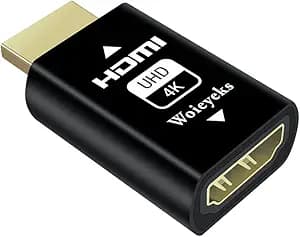
4K HDMI EDID Emulator Passthrough Adapter,Bidirectional mutual conversion | for Extender/KVM Switch/AV Receiver/Video Splitters Support 3840x2160@60HZ,1080@60/120HZ(1 pack)
Description
Product Description: 1. The HDMI EDID emulator maximizes the communication between the video source and the HDMI display through the EDID emulator, and can pass the video signal losslessly, up to HDMI 2.0 (3840x2160@60HZ), compatible with RGB and YCbCr, not compatible with HDCP. 2. Can fix signal connection issues between video source and monitor (Display/Switcher/KVM), headless function to keep HDMI connection always active, prevent desktop rearrangement when monitor is turned off, and can fix other states EDID missing or confusing issues. Supported resolutions: 3840 x 2160@60Hz (with HDMI2.0) 2560x1440@60Hz 1920x1200@60Hz 1920x1080@60Hz (default) 1680x1050@60Hz 1600x1200@60Hz 1600x900@60Hz 1440 x 900@60Hz 1366 x768@60Hz 1280x800@60Hz 1280x720@60Hz 1024x768@60Hz 800x600@60Hz Notice:4K resolution simulation requires HDMI 2.0 ports, RX460, GTX1050 or above (only supports single-computer graphics cards, not integrated graphics computers), and the resolution exceeding the GPU cannot be simulated. Quantity: HDMI EDID Emulator Passthrough Adapter (1 pack)
Compare the trade-offs
Similar products, side by side
A random selection of analyzed products from the same category. Different products are not necessarily interchangeable.

HDMI Switch Splitter 4K@60hz, Aluminum HDMI 2.0 Switcher 2 in 1 Out, HDMI Splitter 1 in 2 Out, Bi-Directional Switch Support 4K 3D HDR for Xbox PS5/4/3 Blu-Ray Player Fire Stick Roku HDTV

CORSAHD 4K@60Hz HDMI Splitter 1x2 4:4:4,18 Gbps,Supports Soundbar,HDCP Bypass,EDID,Duplicate/Mirror/Copy,Downscale, HDR,Dolby Vision Atmos,4K HDMI Splitter 1 in 2 Out for Dual Monitors

HDMI Switch 3 in 1 Out 4K UHD HDMI Switcher Splitter, Automatic Switch with Remote Metal HDMI Switch Box Hub Support 4K 3D 1080P HDCP2.2 for PS5 PS4 Xbox DVD Player Fire Stick Apple TV PC
One less thing to search
Before you buy: quick questions
Does this adapter actually convert 4K to 1080p, or just fix the HDMI signal?
It doesn't convert or scale video signals. Think of it as a "trick" device—it forces your source device (like a PS5 or laptop) to recognize the display's specific capabilities (EDID). It's designed to eliminate the "no signal" black screen or handshake errors between your source and a TV/monitor, not to change the resolution of the content itself.
I have a long run of HDMI cable. Will this help with my KVM switch or splitter issue?
Yes, but with a caveat. Many users on AV forums find this works well to "lock" the EDID on a splitter so the signal doesn't drop out when the TV is off. However, if your KVM switch or receiver is already failing to negotiate the signal, this may only work if the source is powered on *after* the adapter is connected. For dynamic switching between sources, you might need a powered adapter instead to maintain a steady signal.
Is this safe to use with an AV receiver, or will it cause audio delays or video blur?
It is generally safe for audio and video passthrough; users do not report audio lag or picture quality degradation. The main concern isn't quality—it’s physical durability. Because it's a small plastic dongle that protrudes from the back of a device, the weight of the cable can pull it loose over time. It's recommended to secure it with a short, flexible cable or a support bracket if your receiver is in a tight cabinet.
I see it supports 3840x2160@60HZ and 1080@120HZ. Can I force my laptop to output 120Hz to a TV?
Only if your laptop and the TV both support 120Hz over HDMI natively. The adapter simply reads the TV's EDID and passes it to the laptop. If your TV only accepts a 120Hz signal at 4:2:0 color subsampling, the adapter will pass that "incorrect" file to the laptop, which can cause a black screen. Reddit users have found that this works best if your TV is set to "PC mode" or where "Enhanced Format" can be enabled manually on the TV first.
Is this worth buying, or should I look for a more expensive EDID emulator?
If you have a static setup—like a media server (GPU) hidden in a closet or a single projector in a classroom—this is an excellent, low-cost fix. But if you are a heavy switcher (changing between multiple consoles and a PC at 4K/120Hz), users report limitations with this cheap unit. For that, consider spending more on a powered unit with user-editable EDID profiles to avoid the hassle of unplugging and resetting this adapter when you change sources.
From a similar, more-reviewed product in this category: HDMI Switch 4k@60hz Splitter, GANA Aluminum Bidirectional HDMI Switcher 2 in 1 Out, Manual HDMI Hub Supports HD Compatible with Xbox PS5/4/3 Blu-Ray Player Fire Stick Roku
Can I use this to connect two devices to one TV and switch between them?
Yes. In Switch mode it offers 2 HDMI inputs to connect with 1 HDMI display, and you switch between them by pressing the "select" button manually. Reviewers confirm using it to switch between two devices on one TV or monitor.
Does it switch automatically between inputs?
No. The manufacturer states this HDMI switch cannot switch automatically and works ONLY by manually pressing the SELECT button.
Does it support 4K at 60Hz?
Yes, it supports up to 4K@60Hz and is backward compatible with lower resolutions. The listing notes you should use a standard HDMI 2.0 cable with total cable length no more than 3M for vivid 4K video, and some 4K@120Hz input devices need the resolution lowered to 4K@60Hz.
Does it require external power?
No. It is plug and play with no external power needed; you simply press the button on the switch box to change the input or output source.
Can I connect one source to two displays and show them at the same time?
No. In Splitter mode it offers 1 HDMI device with 2 external HDMI displays, but only 1 display can be displayed at a time.
Answers are limited to the manufacturer's listing and the reviews we analysed. Questions those sources cannot support are not answered here.
Transparent by design