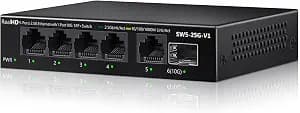
5 Port 2.5Gb Ethernet Switch Unmanaged Network Switch Splitter | Metal Casing | 5 x 2.5 Gigabit | 1 x 10G SFP+ | Multigig Switch 10-100-1000Mbps | 45G Bandwidth | Fanless Internet Switch
Description
【2.5G Super-Fast】This 2.5 gigabit switch features 5 x 2.5G RJ45 ports and 1 x 10G SFP+ port, providing higher-speed connectivity for your devices and allowing you to easily upgrade your network to support the latest 2.5G ethernet standard. NOTE: To get 2.5GB high network speed please use CAT6 or higher level pure copper ethernet cable. Please make sure other network products come with 2.5GB network cards to get whole network 2.5GB speed, otherwise the network speed will be determined by the lowest speed network device.; 【Metal Housing, Excellent Cooling and Fanless】Compact & sturdy metal housing with 6KV lightning protection design make this 2.5 gigabit network switch safe to use in various environments. The fan-less design quietly integrates with your office environment and featured good heat dissipation, safe to use in temperatures from -20 to 50℃.; 【Application】The muti-gigabit switch can work with a wide range of ethernet devices, including 4K Video, Laptops with 2.5G Ethernet Adapter, Wifi 6 Router, Wifi 6 AP, 2.5G Gaming PC,2.5G NAS computers. To achieve better performance, it's better to upgrade all your devices to 2.5g to get a better experience.; 【Plug and Play】Easy setup with no software installation or configuration needed for this 2.5g ethernet switch.; 【US Local Tech Support】Chicago-based seller, tech support hour 9 am-5 pm CST. Please contact the seller for tech support. This 5 Port Ethernet Switch 2.5Gb is worth your while!; 【Device Connection Requirements and Notes】 Before purchasing, ensure that the existing devices(such as routers, computer network cards, and hubs) you are going to connect to our switch support a 2.5Gb network speed, and make sure that the brands of your connected devices including APs, DACs and SFPs are compatible with our switches, our switches are compatible with Cisco, Tp-Link.
Compare the trade-offs
Similar products, side by side
A random selection of analyzed products from the same category. Different products are not necessarily interchangeable.
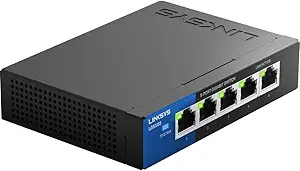
Linksys LGS105: 5-Port Business Desktop Gigabit Ethernet Unmanaged Switch, Computer Network, Wired Connection Speed up to 1,000 Mbps (Black, Blue)

TP-Link 5-Port Gigabit Ethernet Easy Smart Switch| Plug and Play | Desktop | Sturdy Metal w/Shielded Ports | Limited Lifetime Replacement (TL-SG105E), Black…

TP-Link TL-SG1005P, 5 Port Gigabit PoE Switch, 4 PoE+ Ports @65W, Desktop, Plug & Play, Sturdy Metal w/ Shielded Ports, Fanless, QoS & IGMP Snooping
One less thing to search
Before you buy: quick questions
Will this switch give me 2.5Gbps on all five ports at the same time?
In most real-world home setups, you can expect full 2.5Gbps speed on one or two active ports, but simultaneous heavy traffic on all five may saturate the 45Gbps bandwidth capacity. Many users on YouTube have noted that performance dips slightly under maximum load, so it’s best for light-to-moderate multi-device use rather than a full data center workload.
I’m using a fiber internet connection. Does the 10G SFP+ port work with any module?
Not all SFP+ modules are compatible out of the box. Users on Reddit frequently report needing to buy specific modules (often from the same brand) or adjust settings to get the port to link. For best results, check customer comments for module recommendations before purchasing.
I’ve seen complaints about the switch getting very hot. Is that normal?
Yes, the fanless design keeps it silent, but the metal casing does absorb and dissipate heat, so it can feel hot to the touch after extended use. This is typical for unmanaged metal switches and usually within safe operating limits. Just ensure it has good airflow in your setup and isn’t stacked directly on top of other hot electronics.
Can I manage this switch or set up VLANs for my home lab?
No, this is an unmanaged switch, meaning it operates purely on a plug-and-play basis with no web interface or configuration options. If you need VLANs, QoS, or advanced management, you’ll want to look at a managed switch instead, even though it may cost more.
I’m a gamer with a NAS and PC on 2.5Gb. Is this a good upgrade from a 1Gb switch?
Absolutely. For a direct connection between a 2.5Gb NAS and a gaming PC, this switch offers a massive speed upgrade with zero configuration. Gamers on TikTok and forums often mention that large file transfers and game downloads become noticeably faster. Just remember it’s best for two to three high-bandwidth devices rather than a full office of heavy users.
From a similar, more-reviewed product in this category: TP-Link Deco X55 AX3000 WiFi 6 Mesh System, Deco X55(3-Pack)
How easy is the Deco X55 to set up?
Reviewers consistently describe setup as easy and quick, using the free Deco app on a phone with clear visual guidance. One novice noted that coordinating reboots of the ISP modem and first router was a bit confusing.
How much area does the 3-pack cover?
The manufacturer states the Deco X55 3-pack covers up to 6,500 square feet and eliminates dead zones. Reviewers report strong coverage in a 1,600-square-foot home, a two-story villa with thick precast walls, and a 240m2 two-floor house with concrete walls.
How many devices can the Deco X55 3-pack connect?
According to the manufacturer's listing, the Deco X55 3-pack is strong enough to connect up to 150 devices with strong and reliable Wi-Fi.
Does it support wired Ethernet connections?
The listing states each Deco X55 has 3 Gigabit Ethernet ports (6 in total for a 2-pack) and supports Wired Ethernet Backhaul for better speeds, and any unit can work as a Wi-Fi router.
How reliable is the connection over time?
One long-term reviewer reported a year of flawless performance with a single network throughout the house and low ping in games. Another reviewer, however, experienced the pods losing connection to the main router every couple of days, which increased to 2-3 times a day until the issue was resolved.
Answers are limited to the manufacturer's listing and the reviews we analysed. Questions those sources cannot support are not answered here.
Transparent by design