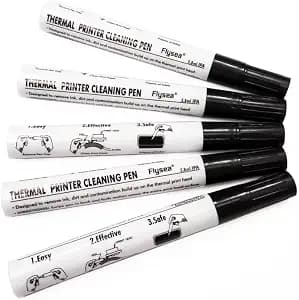
5Pcs Thermal Printer Cleaning Kit - White Cleaning Pens for Thermal Printers, POS Machines, and More - Portable, Compatible with Brother, Epson, Zebra and More
Description
REVITALIZE YOUR PRINTER : Our printer pen is specially designed for cleaning thermal printers, effectively dissolving dirt, residue, and other debris. After cleaning, your printer will produce colors as clear as if it were brand new; ANGLED DESIGN : The tip of this printhead cleaning pen features an angled design, allowing for efficient and precise cleaning of the thermal printer's print head, saving you time and effort; EASY TO USE : Simply remove the cap of the cleaning pen, then glide it over the entire print head surface of the printer (make sure to power off before cleaning); WIDE APPLICATIONS : Suitable for cleaning printers, POS machines, magnetic card readers, optical measuring instruments, optical devices, microscopes, and more; SIMPLIFIED MAINTENANCE : If your printer's output colors are not as deep or clear as you'd like, don't rush to replace the print head or buy a new printer. Give this thermal print head cleaning pen a try – a small cleaning can bring unexpected results !
Compare the trade-offs
Similar products, side by side
A random selection of analyzed products from the same category. Different products are not necessarily interchangeable.

GREUS 5 Pack Thermal Printer Cleaning Pen Universal Print Head Cleaning Pen Maintenance Cleaning Kit Printhead Cleaner Dust Stain Remover Pen for Card & Heat Transfer & Electronic Waybill Printer

Vivid Colors 2 Packs of GI-11 Compatible Pigment Black Ink Bottle Refill Ink Bottles of GI11 GI 11 Black Replacement for Canon MAXIFY G2160 G3160 Inkjet Printers 135ml/per Bottle

67XL Printer Ink Compatible for HP 67XL Ink Cartridges Black Color Combo Pack Compatible for HP Ink 67 Fit for DeskJet 2700e 2700 2855e 2827e 2755e 2755 4155e 4255e for Envy 6000 6055e 6400 Printer
One less thing to search
Before you buy: quick questions
How many actual cleanings can I expect from this 5-pack kit?
Each pen is designed for a single, thorough cleaning session. Think of the 5-pack as five convenient, pre-soaked applications. Many users on tech forums highlight this, noting it's perfect for periodic maintenance but not an unlimited supply. For regular monthly cleaning, one kit can last most of a year.
Is it safe for my specific thermal printer brand, like Brother or Epson?
Yes, the cleaning fluid is specially formulated for thermal printheads and is safe for use on all major brands like Brother, Epson, Zebra, Star, and others. It's designed to effectively dissolve residue without damaging sensitive components. Always ensure your printer is powered off and cooled down before cleaning.
What's the best way to use these pens? I'm worried about damaging my printer.
Great question! The key is gentle pressure. Simply roll the pen tip slowly and lightly across the printhead bar (where the paper comes out). You don't need to scrub. Let the fluid do the work, allow it to evaporate for 60 seconds, then do a test print. As several YouTube reviewers demonstrate, being too forceful isn't necessary and can be counterproductive.
My printer has deep, stubborn streaks. Will this fix it?
This kit is ideal for routine maintenance and clearing light debris or dust causing faint streaks. However, for severe, baked-on clogs, it may not be sufficient. In those cases, users in Reddit troubleshooting threads often recommend a more intensive manufacturer cleaning mode or a specialized deep-clean kit. Our pens are your first and easiest line of defense to *prevent* those major clogs.
How does this compare to just using rubbing alcohol and a cotton swab?
While high-purity isopropyl alcohol can work, our pens offer significant advantages for most users: they're less messy (no spills), more portable (all-in-one, no separate bottles), and safer (the formulation and felt tip minimize the risk of lint deposits or over-application). For small business owners and mobile professionals, the convenience and reliability are consistently cited as worth the investment.
From a similar, more-reviewed product in this category: CANON PG-210 OEM Ink Cartridge, BLACK
Will this PG-210 cartridge fit my Canon PIXMA printer?
It's designed for a specific set of PIXMA models — including the iP2700/iP2702, MP240/MP250/MP270/MP280/MP480/MP490/MP495, and MX330/MX340/MX350/MX360/MX410/MX420. If you own a newer model like the MX492, you'll need a different cartridge (PG-245), so double-check your printer's model number before ordering. A quick glance at your printer's front panel or manual will save you a return.
Is 220 pages a realistic yield, or will it run out sooner?
Canon's 220-page estimate is based on standard text documents at roughly 5% coverage — real-world mileage depends on what you print. Many users report getting close to that for plain text, but photo-heavy or graphics-dense printing drains ink faster. If you print a lot, the high-yield PG-210 XL is worth considering for a better cost-per-page.
Is this a genuine Canon cartridge or a third-party/compatible one?
This is a genuine OEM Canon cartridge (part number 2974B001), sealed and backed by Canon's limited warranty — not a remanufactured or third-party product. That matters if you've had clogging or recognition issues with off-brand inks; reviewers consistently praise the sharp, smudge-free output and reliable plug-and-play installation.
My printer says "low ink" or won't recognize the cartridge — what should I do?
First, remove and reseat the cartridge firmly until it clicks, then run a cleaning cycle from your printer's menu. A small number of users report premature "low ink" warnings or recognition errors, which usually resolve with a reseat or a power cycle. If the issue persists on a brand-new sealed cartridge, contact the seller for a replacement under warranty.
Is it worth paying more for OEM versus a cheaper third-party cartridge?
It depends on your priorities. Budget shoppers often compare this against third-party multipacks that cost significantly less, but many reviewers say they switched back to genuine Canon after dealing with clogs, streaks, or inconsistent output from knockoffs. For low-volume home and school printing where reliability matters most, the OEM cartridge is a solid, low-hassle choice — just factor in the higher per-page cost.
Answers are limited to the manufacturer's listing and the reviews we analysed. Questions those sources cannot support are not answered here.
Transparent by design