What people like
Easy switching and tidy desk setup
Reviewers repeatedly praise quick, simple switching between two computers and how it keeps their workspace organized, with easy plug-and-play setup and a handy front USB hub.
The 30-second read
What people like
Reviewers repeatedly praise quick, simple switching between two computers and how it keeps their workspace organized, with easy plug-and-play setup and a handy front USB hub.
The main watch-out
A 1-star reviewer says 4K wasn't even an option, getting only 2K at 144Hz versus 4K at 165Hz when connecting monitors directly to the graphics card.
Before you choose
Confirm the resolution and refresh rate you need will pass through, and consider use case: one reviewer says it's perfect for business but wouldn't use it for gaming.
From a similar, more-reviewed product in this category: Unitek HDMI KVM Switch 1 Monitor 2 Computers with Power Adapter
What people like
Reviewers appreciate how easily this KVM lets two computers share one monitor, keyboard, and mouse, with several praising its compact design, solid build quality, and included cables.
The main watch-out
Multiple reviewers report that switching between computers is inconvenient because there is no working hotkey or dedicated switch, forcing them to reach the unit or use software.
Before you choose
Before buying, confirm the port layout and peripheral support fit your setup, note that switching is not hotkey-based, and consider that some find the price high unless on sale.
Your use case first
5 of 27 mentions describe a negative experience (19%).
0 of 14 mentions describe a negative experience (0%).
2 of 13 mentions describe a negative experience (15%).
0 of 12 mentions describe a negative experience (0%).
2 of 9 mentions describe a negative experience (22%).
3 of 9 mentions describe a negative experience (33%).
5 of 7 mentions describe a negative experience (71%).
One review can mention several topics. Percentages describe the reviews we analysed, not all buyers or the product's overall failure rate.
Compare the trade-offs
A random selection of analyzed products from the same category. Different products are not necessarily interchangeable.

Unitek HDMI KVM Switch 1 Monitor 2 Computers with Power Adapter

BENFEI USB 3.0 Switch, USB Switch 2 Computers Share 4 USB for PC, Mouse, Keyboard, Printer, Scanner, USB KVM Switch Selector Compatible with Windows, Mac, Linux

USB 3.0 Switch Selector for 2 Computers, USB Switcher Sharing 4 USB Devices Peripheral Hub for Mouse, Keyboard, Scanner, Printer; for Mac/Windows/Linux; 2 Pack USB Cables Included
Check the evidence
Included does not mean verified authentic. Flagged does not mean proven fake. These are analytical classifications.
Showing 3 illustrative excerpts, not the complete review set.
Convenient and Easy to Use
“This KVM HDMI switch is a practical solution for connecting multiple computers to one monitor. It helps keep my workspace organized and reduces the need to constantly unplug and reconnect cables. The design is convenient, and switching between devices is simple. A useful accessory for anyone looking to save space and make their setup more efficient.”
Signals matched: Specific detail: process · Mentions: convenience, ease of use, switching speed
“Easy switching, clear 8K video, and reliable performance.”
“This KVM switch is a great solution for managing two computers with two monitors. The 8K HDMI support provides sharp, clear video, and switching between systems is quick and convenient. It keeps my desk setup organized and makes multitasking much easier. Excellent performance and a very useful setup!”
Signals matched: Specific detail: quantity, entity · Mentions: quality, switching speed, display quality, convenience
Not 4K
“Doesn’t even offer 4K as an option. If I run from my graphics card direct to my monitors I can get 4K at 165hz with 3-4 monitors, but when using this I get 2k at 144hz and not even the option for 4K. I would like my work and gaming setup on the same monitors but this won’t cut it.”
Signals matched: Specific detail: quantity, entity, scenario, comparison · Mentions: display quality, compatibility · Reads as an authentic voice
One less thing to search
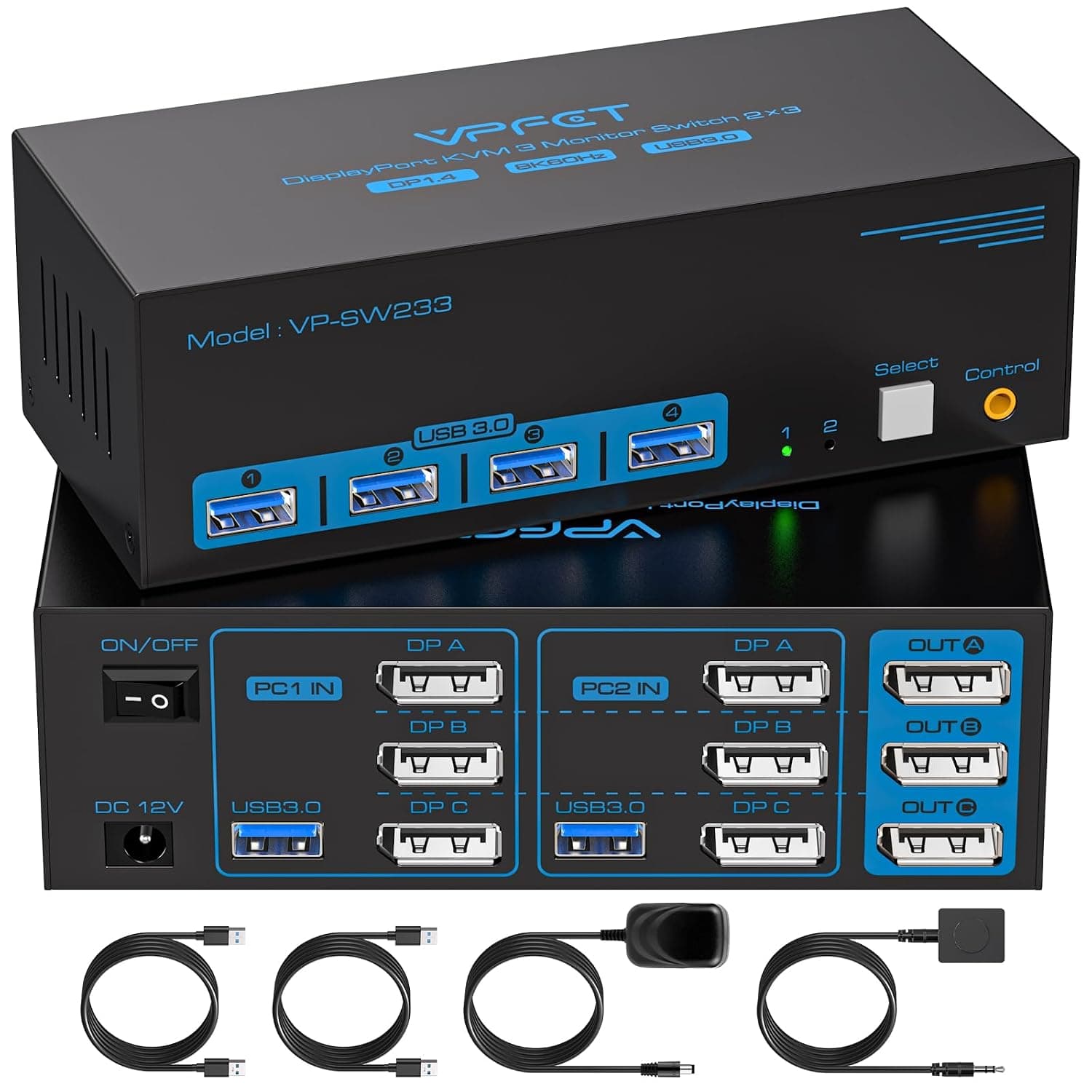
The listing says the DP 1.4 KVM supports up to 8K@60Hz and 4K@120Hz, and notes that 8K requires the source, monitor, and DP cable to all support 8K. One reviewer reported not getting a 4K option through the switch and receiving 2K at 144Hz instead.
The listing says the KVM allows two computers to share triple monitors and four USB 3.0 ports. It also notes that your computer must have 3 DP ports and support multiple monitors.
The listing says there are two switching methods: a built-in switch button on the main panel, or a wired controller that can be extended to the desktop.
The listing says it has four USB 3.0 ports with up to 5Gbps transfer speed for devices such as keyboards, mice, printers, USB sticks, hard disks, scanners, and webcams. One reviewer also mentions that a shared USB hub on the front is convenient.
One reviewer says it worked on Linux with an RTX 3060 and had no actual issues with the switch. That reviewer would not use it for gaming but considered it perfect for business, with longevity determining the final star.
From a similar, more-reviewed product in this category: Unitek HDMI KVM Switch 1 Monitor 2 Computers with Power Adapter
This model uses a physical button on the unit — there's no hotkey switching. That's the most common complaint in reviews, so if keyboard shortcuts are a must-have for your workflow, you'll want to look at a hotkey-capable KVM instead. If you're fine reaching for a button (or placing the switch within arm's reach), it works reliably.
Use the adapter. While some users have tried bus-powering it, the most stable experience — especially with wireless peripherals — comes from plugging in the included DC adapter. Several reviewers noted mouse dropouts when running unpowered, so treat the adapter as required, not optional.
Yes, mixed Mac/Windows setups are one of its most common use cases, and it's plug-and-play for both. For resolution, check your monitor's specs against the switch's rated maximum before buying — some users with high-refresh or 4K@60Hz displays ran into EDID handshake issues (blank screen after sleep), which is the second-most-cited complaint. Standard 1080p and 4K@30Hz setups report smooth sailing.
Yes — HDMI and USB cables are in the box, which reviewers consistently call a nice bonus. That said, they're on the short side (roughly 3 ft), so they're ideal for laptop docks or monitors sitting close to both computers. If your tower lives under the desk, plan on buying longer cables.
It's a great fit for remote workers, students, or anyone sharing one monitor, keyboard, and mouse between two computers on a budget, especially if you value compact size, included cables, and simple setup. Skip it if you need hotkey switching, dual-monitor output, DisplayPort, or rock-solid EDID behavior with a fussy high-refresh display — in those cases, a TESmart or Cable Matters alternative will save you the return shipping.
Answers are limited to the manufacturer's listing and the reviews we analysed. Questions those sources cannot support are not answered here.
Transparent by design