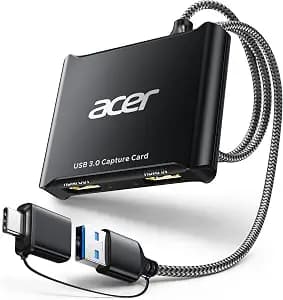
acer USB 3.0 Video Capture Card, HDMI Capture Card for Streaming with 4K Loop-Out & USB A/C | 1080P 60Hz HD | Video Audio Game Capture for PS5/PS4/Switch2/Xbox/Camera/PC/Mac
Description
【4K Clarity, 1080P Performance】Enjoy stunning clarity with our USB 3.0 Video Capture Card—featuring 4K input and smooth 1080P@60Hz output. Featuring YUY2 technology, it delivers richer colors than MJPEG for lifelike live streaming and recording. Plus, it delivers high-quality video with minimal latency, making it perfect for gamers and content creators.; 【Mic-in for Easy Commentary】Plug in a headset or mic directly to stream/record voice easily—no extra adapters. Great for real-time gaming commentary, online classes, or vlog dubbing. Paired with its low-latency tech, it keeps voice synced perfectly with video, eliminating post-editing hassle from mismatched audio-visuals. Fits most 3.5mm devices—ideal for gamers, teachers, creators.; 【Plug and Play, no Extra-Drivers】No extra drivers or external power—just plug in and start capturing instantly. Small and lightweight, it fits easily in your bag for outdoor live streams, on-the-go recordings, or emergencies. Ideal for game capture, video conferences, and online teaching, it saves hassle while delivering smooth results.; 【Wide Compatibility: Apps & Devices】No extra adapters—works flawlessly with your go-to platforms and gear. It pairs with streaming/recording apps like Twitter, YouTube, Facebook, OBS, XSplit, and VLC, plus devices including Switch/Switch2, PS5/PS4, Xbox, DSLR cameras, PC, macOS, and Android. Whether gaming, streaming, or hosting video calls, it keeps HD quality intact, eliminating "compatibility headaches".; 【Worry-Free After-Sales Support】We are committed to delivering exceptional quality products that combine sophisticated design with affordable pricing, offering you the best solutions for seamlessly connecting your work and life. Whether you're a newcomer or a seasoned user, feel free to reach out anytime with any questions—your satisfaction is our top priority.
Compare the trade-offs
Similar products, side by side
A random selection of analyzed products from the same category. Different products are not necessarily interchangeable.

One less thing to search
Before you buy: quick questions
Does this capture card record in 4K, or is the 4K feature only for pass-through?
The 4K feature is for pass-through only. This means your gaming console or camera can output a 4K signal to your monitor/TV with virtually no lag, while the card itself captures a clean, reliable 1080p resolution at 60 frames per second. This is a common and cost-effective setup for most streamers.
I use a Mac. Is this truly plug-and-play, or will I need extra software?
While the card is hardware-compatible with Macs, many users report that the included software may not work optimally on newer macOS versions. The consistent solution from the community is to use free, third-party software like OBS Studio, which recognizes the card immediately and works flawlessly. It's a minor extra step for Mac users.
How is the build quality, and is the USB cable reliable?
The device itself is lightweight and functional. Some users note it feels less premium than higher-priced brands, but it reliably gets the job done. The included USB-C to USB-A cable, however, is a common point of feedback; it's on the shorter, thinner side. For a permanent setup, many streamers on Reddit suggest investing in a high-quality, longer USB 3.0 cable for a more stable connection.
Who is this capture card best suited for, and who might want to look elsewhere?
This is an excellent choice for beginners, casual streamers, and budget-conscious gamers on Windows who need solid 1080p60 capture. It's perfect for PS5, Switch, or DSLR streaming. If your primary need is seamless Mac integration without any setup, you record in 4K, or you require absolute professional-grade audio sync for multi-hour sessions, you may want to consider more specialized (and expensive) alternatives.
I've heard about audio sync issues. Is this a common problem?
For the vast majority of users capturing typical gaming sessions (1-2 hours), audio sync is stable. A small number of users doing very long, continuous recordings (like multi-hour podcasts) have reported minor audio drift over time. This can usually be corrected in editing software. For standard streaming and clip recording, the audio performance is consistently praised as being in sync and clear.
From a similar, more-reviewed product in this category: ASUS GeForce GTX 1080 8GB ROG Strix Graphics Card (STRIX-GTX1080-A8G-GAMING)
What games and resolutions can this card handle?
Reviewers report it plays games at 1080p and 1440p at high frame rates, with one noting it handles 4K gaming and another saying 4K at maximum quality is difficult and runs hot. Multiple reviewers describe it as a beast that runs games on ultra settings without stuttering.
Is this card quiet during gaming?
Reviewers consistently describe it as quiet, with one noting low fan speeds and quiet operation at Full HD and WQHD, though the same reviewer says fan noise becomes quite loud at 4K maximum quality. The listing states Direct CU III cools efficiently and quietly.
Does this card have RGB lighting?
Yes, the listing states it has Aura RGB Lighting on the shroud and back plate, and reviewers mention the RGB features and controllable LEDs via Aura.
What power connectors does this card require?
The listing specifies 1 x 6-pin and 1 x 8-pin power connectors, and one reviewer notes they had to buy a new power supply because they lacked an 8-pin connector.
Is this card worth the price?
Reviewers widely consider it well worth the price, with several calling it worth every penny and one recommending buying it during sales, though another suggests going for the 1080 Ti if not on sale.
Answers are limited to the manufacturer's listing and the reviews we analysed. Questions those sources cannot support are not answered here.
Transparent by design