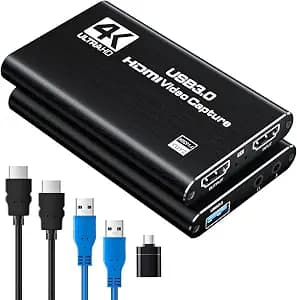
Newhope HDMI Capture Card for Streaming, Full HD 1080P 60FPS Capture USB 3.0 Game Audio Video Capture Card,for Streaming Camera/Xbox/PS4/PS5/Switch/PC
Description
【1080P 60FPS Smooth Capture】Record and stream crystal-clear HDMI video at full HD 1080p 60fps with low latency. Perfect for live gaming, video conferencing, and online teaching; 【Real-Time HDMI Loop-Out】Play without delay thanks to the HDMI loop-out port, allowing you to enjoy your gameplay on an external display while capturing simultaneously; 【Support Mic-in for Commentary】Audio capture card has microphone input and you can use it to add external commentary when playing a game. Please note: it only accepts 3.5mm TRS standard microphone headset; 【Easy to Use & Plug and Play】No need to install any drivers, no need to provide external power, the usb capture card is plug and play, easy to use. You can use any third-party software(OBS) to capture or stream your HD gameplay, or other HD video source; 【Wide Compatibility】Works with Windows, macOS, and Linux. Compatible with OBS, VLC, Zoom, and more. Compatible with PS4, PS5, Xbox, Switch, DSLR cameras, and set-top boxes
Compare the trade-offs
Similar products, side by side
A random selection of analyzed products from the same category. Different products are not necessarily interchangeable.

One less thing to search
Before you buy: quick questions
Is this capture card truly "plug and play," or is there a setup process?
While it's designed for simplicity, most users report a quick but necessary setup. You'll likely need to install the correct driver from the included card (or manufacturer's site) and configure your streaming software (like OBS). Once set up, it's very reliable. Many TikTok and YouTube creators have great 5-minute setup guides if you run into any hiccups!
I keep hearing about audio sync issues with consoles. Is this a common problem?
Some users, especially with PlayStation and Xbox, experience a slight audio delay. This is a common challenge with many capture cards, not unique to this one. The good news is it's usually fixable by adjusting the "audio offset" or "sync offset" settings within OBS or Streamlabs. A quick search for "[Your Software] audio sync fix" will lead you to an easy solution.
How does the build quality and durability hold up over time?
Based on reviews, the card is praised for its performance and value, but some note the external casing feels lightweight. To ensure longevity, we recommend handling the USB-C port gently when connecting/disconnecting. For casual streamers who set it up and leave it, it proves very durable. If you plan on constantly moving it, extra care is advised.
Is this compatible with Mac computers, and what about the Nintendo Switch?
For Mac users, please note that official driver support is limited. It often works as a video source in OBS using the "OBS Camera" plugin, but seamless plug-and-play isn't guaranteed. For the Nintendo Switch (and PS5/Xbox), compatibility is excellent! You will need to use the included HDMI cable and connect your console's HDMI out to the card's "IN" port. Remember, the Switch requires an external power source when docked for capture to work.
What if it doesn't work with my setup? What's the return policy and are there better alternatives?
We recommend checking your system specs against the product requirements first. If you encounter issues, the seller typically offers a return window—check the specific policy on the product page. Many reviewers say this card offers the best video quality for its price. If you have a larger budget and want a more polished, out-of-box experience with dedicated software, users often suggest looking at the Elgato HD60 S+ as a premium alternative.
From a similar, more-reviewed product in this category: ASUS GeForce GTX 1080 8GB ROG Strix Graphics Card (STRIX-GTX1080-A8G-GAMING)
What games and resolutions can this card handle?
Reviewers report it plays games at 1080p and 1440p at high frame rates, with one noting it handles 4K gaming and another saying 4K at maximum quality is difficult and runs hot. Multiple reviewers describe it as a beast that runs games on ultra settings without stuttering.
Is this card quiet during gaming?
Reviewers consistently describe it as quiet, with one noting low fan speeds and quiet operation at Full HD and WQHD, though the same reviewer says fan noise becomes quite loud at 4K maximum quality. The listing states Direct CU III cools efficiently and quietly.
Does this card have RGB lighting?
Yes, the listing states it has Aura RGB Lighting on the shroud and back plate, and reviewers mention the RGB features and controllable LEDs via Aura.
What power connectors does this card require?
The listing specifies 1 x 6-pin and 1 x 8-pin power connectors, and one reviewer notes they had to buy a new power supply because they lacked an 8-pin connector.
Is this card worth the price?
Reviewers widely consider it well worth the price, with several calling it worth every penny and one recommending buying it during sales, though another suggests going for the 1080 Ti if not on sale.
Answers are limited to the manufacturer's listing and the reviews we analysed. Questions those sources cannot support are not answered here.
Transparent by design