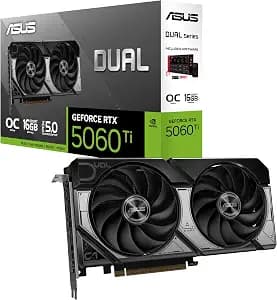
ASUS Dual GeForce RTX™ 5060 Ti 16GB GDDR7 OC Edition Graphics Card, NVIDIA, Desktop (PCIe 5.0, DLSS 4, HDMI 2.1b, DisplayPort 2.1b, 2.5-Slot, Axial-tech Fan, 0dB Technology)
Description
ASUS Dual GeForce RTX™ 5060 Ti combines powerful thermal performance with broad compatibility. Advanced cooling solutions from flagship graphics cards — including two Axial-tech fans for optimizing airflow to the heatsink. Designed in a compact 2.5-slot form factor, delivering more power in less space. ASUS Dual is a perfect choice for gamers who want heavyweight graphics performance in a compact build.
Compare the trade-offs
Similar products, side by side
A random selection of analyzed products from the same category. Different products are not necessarily interchangeable.

Graphics Card GPU Brace Support, Video Card Sag Holder Bracket, GPU Stand (L, 74-120mm)

GIGABYTE GeForce RTX 5060 AERO OC 8G Graphics Card, 8GB 128-bit GDDR7, PCIe 5.0, WINDFORCE Cooling System, Made by NVIDIA, DisplayPort & HDMI - Video Output Interface, GV-N5060AERO OC-8GD Video Card

GIGABYTE GeForce RTX 5060 WINDFORCE MAX OC 8G Graphics Card, Cooling System, 8GB 128-bit GDDR7, PCIe 5.0, by NVIDIA, DisplayPort & HDMI - Video Output Interface, GV-N5060WF2MAX OC-8GD Video Card
One less thing to search
Before you buy: quick questions
Is the ASUS Dual RTX 5060 Ti overkill for 1080p gaming, or is it a good future-proofing choice?
For current 1080p gaming at max settings, this card is extremely powerful and may be more than you need. Many Reddit users suggest a last-gen card could save you money for similar 1080p performance. However, if you plan to upgrade to a 1440p monitor soon, want to maximize frame rates in competitive titles, or value features like DLSS 4 for future games, it becomes an excellent "future-proof" investment. It's a top-tier 1440p card that happens to excel at 1080p.
I have a smaller PC case. How does the 2.5-slot, compact design actually fit?
The "compact" design is a major highlight for mid-tower builders, but the 2.5-slot width requires attention. While shorter in length than many high-end cards, it is thicker. We recommend double-checking your motherboard's PCIe slot spacing, as some users on tech forums noted it can block access to a bottom M.2 slot or crowd other PCIe cards. Please measure your available clearance for both length and width before purchasing.
The specs mention "0dB Technology." Does this mean the card is completely silent?
Great question! The 0dB Technology means the fans stop spinning entirely when the GPU is under very light load (like web browsing or desktop work), making it silent. During gaming or heavier tasks, the fans will activate to provide the excellent cooling many reviewers praise. Some TikTok users clarified that for light gaming, fans may spin at a low, quiet speed. It's designed for efficient cooling, not absolute silence under all conditions.
What's the real-world benefit of PCIe 5.0 and DLSS 4 on this card right now?
Honestly, the immediate benefits are limited but point toward the future. Current games don't saturate PCIe 4.0, so PCIe 5.0 is more about next-gen readiness. DLSS 4 is NVIDIA's latest AI upscaling/ frame generation tech and is supported in a growing list of new AAA titles, offering significant performance boosts. The main draws today are its stellar native 1440p performance, efficient cooling, and support for the latest display standards like HDMI 2.1b.
I've heard about coil whine with some GPUs. Is that a common issue with this model?
Coil whine (a high-pitched electronic noise under load) is a potential issue with any high-performance graphics card and is often down to individual unit variance and power supply interaction. Based on aggregated user reports, it's not a *common* defect with this model, but a small percentage of buyers do experience it. If you encounter persistent, loud coil whine, it's covered under ASUS's standard warranty, and you can contact their support for guidance on a possible replacement.
From a similar, more-reviewed product in this category: ASUS GeForce GTX 1080 8GB ROG Strix Graphics Card (STRIX-GTX1080-A8G-GAMING)
What games and resolutions can this card handle?
Reviewers report it plays games at 1080p and 1440p at high frame rates, with one noting it handles 4K gaming and another saying 4K at maximum quality is difficult and runs hot. Multiple reviewers describe it as a beast that runs games on ultra settings without stuttering.
Is this card quiet during gaming?
Reviewers consistently describe it as quiet, with one noting low fan speeds and quiet operation at Full HD and WQHD, though the same reviewer says fan noise becomes quite loud at 4K maximum quality. The listing states Direct CU III cools efficiently and quietly.
Does this card have RGB lighting?
Yes, the listing states it has Aura RGB Lighting on the shroud and back plate, and reviewers mention the RGB features and controllable LEDs via Aura.
What power connectors does this card require?
The listing specifies 1 x 6-pin and 1 x 8-pin power connectors, and one reviewer notes they had to buy a new power supply because they lacked an 8-pin connector.
Is this card worth the price?
Reviewers widely consider it well worth the price, with several calling it worth every penny and one recommending buying it during sales, though another suggests going for the 1080 Ti if not on sale.
Answers are limited to the manufacturer's listing and the reviews we analysed. Questions those sources cannot support are not answered here.
Transparent by design