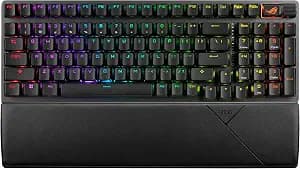
ASUS ROG Strix Scope II 96 Wireless Mechanical Gaming Keyboard – 96% Full-Size, Tri-Mode Connectivity, Hot Swappable Pre-lubed ROG NX Snow Linear Switches, PBT Keycaps, RGB, PC/Mac Support-Black
Description
TKL Size with Full-Size Functionality and Num Pad: Experience a compact, space-saving design that's only 1 cm wider than a standard 80 percent keyboard, while still retaining the keys and number pad you would have in a 96 percent keyboard.; Versatile Tri-Mode Connectivity: Seamlessly connect via Bluetooth (supporting up to 3 devices), low-latency 2.4GHz wireless with ROG SpeedNova technology, or a reliable USB wired connection. Compatible with both PC and Mac, and boasts an exceptional battery life of up to 1,500 hours in 2.4GHz wireless mode.; Enhanced Acoustics: Integrated sound-dampening foam and switch-dampening pads effectively absorb pinging noises and echoes, resulting in improved keystroke acoustics.; Hot Swappable, Pre-Lubed Mechanical Switches: Customize your typing experience with your choice of ROG NX Snow linear switches (for smooth, thocky keystrokes) or ROG NX Storm clicky switches (for crisp, tactile keystrokes). Both switch types are factory-lubricated for enhanced stability and optimized acoustics. Features per-key RGB lighting.; Optimized for Gaming, Streaming, and Daily Work: Pre-programmed hotkeys (F1-F5) provide convenient control over the Xbox Game Bar and recording functions. A multi-function wheel allows for intuitive media and lighting adjustments. All keys are fully macro-programmable for advanced customization.; Ergonomic Comfort: Enjoy comfortable extended use with three adjustable tilt positions and a detachable wrist rest.; Included Accessories: Detachable wrist rest, 2-in-1 ROG keycap & switch puller, wireless receiver, USB extender, ROG-themed spacebar keycap, USB cable, and ROG sticker.
Compare the trade-offs
Similar products, side by side
A random selection of analyzed products from the same category. Different products are not necessarily interchangeable.

RisoPhy Mechanical Gaming Keyboard, Blue Switch USB Wired Keyboard, 20 RGB Light up Backlit Modes, 104 Key Full Size Clicky Keyboards, Anti-Ghosting/Spill-Resistant Rainbow LEDKeyboards for PC(Black)

RK ROYAL KLUDGE RKS70 Ergonomic Split Keyboard, Wireless PC Gaming Keyboard with Bluetooth/2.4G/Wired, Hot Swappable Mechanical Keyboards w/Fixed Wrist Rest, PBT Keycaps, Linear Switches, White

RK ROYAL KLUDGE S98 Mechanical Keyboard w/Smart Display & Knob, Top Mount 96% Wireless Mechanical Keyboard BT/2.4G/USB-C, Hot Swappable, Software Support, Massive Battery, 98 Keys
One less thing to search
Before you buy: quick questions
I use a Mac. Is the 'Mac support' fully functional, or will I miss key features?
While the keyboard works for basic typing on Mac, advanced features require adjustment. The media keys (play, volume) don't work natively—you'll need third-party software like Karabiner-Elements to remap them. ASUS's Armoury Crate configuration software is Windows-only. Many Reddit users love the keyboard's build for Mac setups but advise being ready for some DIY key mapping to get the most out of it.
How difficult is it to get used to the 96% layout, especially finding keys like Delete or the arrow keys?
Most users adapt within a day or two. The layout condenses the nav cluster but keeps all essential keys. The slightly shrunken numpad and the placement of the arrow keys (directly under Shift) are the main adjustments. YouTube reviewers often highlight that the space savings are worth the short learning curve, especially if you need a numpad but have limited desk space.
Is the Armoury Crate software as problematic as some reviews say? Can I just not install it?
You can use the keyboard fully without any software for basic typing, gaming, and RGB (it has built-in effects). However, to customize RGB profiles, reassign keys, or create macros, Armoury Crate is required. Feedback is mixed: some find it powerful, while others call it bloated. A common tip from TikTok setups is to set your lighting and profiles once, then close the software, as the settings save to the keyboard's onboard memory.
How is the real-world battery life with the RGB lighting on?
With the vibrant RGB at a moderate brightness, expect roughly 1-2 weeks of regular use on a single charge using the 2.4GHz dongle, and longer on Bluetooth. The advertised 1,500 hours assumes lighting is off. Many detailed reviews confirm that while the extreme claims are for minimal use, the actual battery life is still excellent for a feature-packed wireless keyboard. A full charge takes about 2-3 hours via USB-C.
This is a premium keyboard. Who is it really best suited for, and are there simpler alternatives?
It's ideal for gamers and professionals who want a top-tier, versatile wireless keyboard with a luxurious typing feel and compact design. If you value out-of-the-box smooth switches, tri-mode reliability, and a metal-built chassis, it's a fantastic choice. If you prioritize ultra-simple software, are a dedicated Mac user wanting native key support, or are on a tighter budget, users often suggest looking at brands like Keychron for equally solid builds with more straightforward Mac compatibility.
From a similar, more-reviewed product in this category: MechLands AJAZZ AK980 V2 Mechanical Gaming Keyboard with Display Screen, 10000mAh Battery, 98% Wireless Keyboard with BT/USB-C/2.4GHz, Hot Swappable, Linear Switch, Knob, RGB for Win/Mac (Black)
How long does the battery last on the AK980 V2?
The manufacturer states the 10000mAh battery provides about 35 hours with RGB on and 138 hours with RGB off. A customer also noted that it keeps a charge well.
Is the AK980 V2 compatible with Mac?
Yes, the listing says it supports BT/2.4GHz/USB wired connections and works with Windows, Mac, iOS, and Android. However, one reviewer noted the screen-customization software is not compatible with MacOS.
How does the keyboard sound and feel when typing?
Reviewers describe the typing as smooth and comfortable with a satisfying, creamy, "clacky" sound, and one noted there is no bounce in the keys.
What is the polling rate of this keyboard?
The listing states the polling rate is 1000Hz for USB wired and 2.4G wireless, and 125Hz for Bluetooth.
Does the keyboard have RGB backlighting and is it customizable?
Yes, the listing mentions 16.8M RGB backlights, and reviewers praise the many RGB backlight options. One reviewer recommends shine-through, side-print, or clear keycaps for better lighting visibility.
Answers are limited to the manufacturer's listing and the reviews we analysed. Questions those sources cannot support are not answered here.
Transparent by design