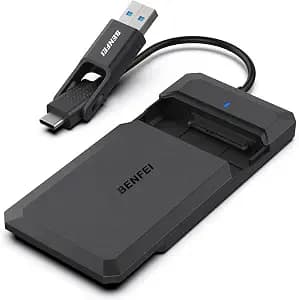
BENFEI 2.5 Inch SATA to USB Tool Free External Hard Drive Enclosure, USB Type-C/Type-A to Sata Compatible for 2.5 Inch SSD(Optimized for SSD, Support UASP)
Description
Feature - BENFEI Type-C/Type-A 2.5 inch Hard Drive Enclosure easily hook up your 2.5 inch SATA I/II/III hard drive to transfer files from one PC to another PC, laptop, PS4 or as a USB external hard drive.; Speed - Up to 5 Gbps data transfer rate with supports UASP SATA III transmission protocol, which is 70% faster than traditional USB3.0. Backward compatible with USB 2.0 or 1.1 ports.; Design - With USB Type-C/Type-A plug design, provide a easy connection option to laptop/phone/pad. Tool free installation, Plug & Play, No driver needed for this SATA enclosure. Just push out the cover, plug in the drive, close the cover and go. Hot-Swappable.; Compatibility - BENFEI Hard Drive Enclosure supports Windows, LINUX, MacOS 8.0, and above. Specifically designed for 7/9.5mm thick, 2.5 inches, 6TB HDD & SSD. Compatible with Western Digital, Seagate, Toshiba, Samsung, Kingston, Crucial, Hitachi, and more.; Warranty - Exclusive BENFEI Unconditional 18-month Warranty ensures long-time protection of your purchase; Friendly and easy-to-reach customer service to solve your problems timely.
Compare the trade-offs
Similar products, side by side
A random selection of analyzed products from the same category. Different products are not necessarily interchangeable.

CENMATE Aluminum 4 Bay Hard Drive RAID Enclosure with Cooling Fan for 2.5/3.5" SATA HDD/SSD with USB A/C 3.0+eSATA Cable, 3.5 Hard Drive Reader Supports 80TB Capacity, 8 RAID Modes, DAS(NO NAS)

Aluminum Dual Bay 10Gbps Hard Drive Enclosure with Cooling Fan for 2.5“/3.5" SATA HDD/SSD with USB A/C 3.2 Gen 2, Support Hot Swappable, Daisy Chain Expansion, Tool-Free, DAS(NO RAID/NAS)

CENMATE Aluminum 2 Bay Hard Drive RAID Enclosure with Cooling Fan for 2.5“/3.5" SATA HDD/SSD with USB A/C 3.0, Tool-Free HDD Enclosure, 4 Modes
One less thing to search
Before you buy: quick questions
Mon SSD ou disque dur 2,5 pouces spécifique s'adaptera-t-il à ce boîtier ?
Ce boîtier est conçu pour les disques SATA 2,5 pouces d'épaisseur standard de 7 mm / 9,5 mm. La plupart des SSD 2,5" modernes et de nombreux disques durs pour ordinateurs portables s'adapteront parfaitement. Cependant, nous avons reçu des retours d'utilisateurs possédant des disques plus anciens ou spécifiques de 15 mm d'épaisseur (certains disques durs de grande capacité) qui les ont trouvés trop épais pour tenir. Veuillez vérifier les spécifications d'épaisseur de votre disque avant d'acheter.
Est-il vraiment "optimisé pour SSD" et à quelles vitesses puis-je m'attendre ?
L'étiquette "optimisé" fait référence à sa prise en charge du protocole UASP, qui peut offrir des vitesses de transfert plus rapides et une utilisation du processeur réduite par rapport aux anciennes normes, particulièrement notable avec les SSD. En utilisation réelle, vous obtiendrez les vitesses standard SATA III (jusqu'à ~6 Gbit/s). Comme indiqué dans certaines discussions techniques, il s'agit d'un pont économique fiable mais pas d'un dispositif d'amélioration des performances—votre vitesse sera limitée par les capacités de votre propre disque et la connexion USB 3.0/3.1 Gen 1.
Quels câbles sont inclus, et est-il compatible avec mon appareil ?
Le boîtier est généralement fourni avec un câble USB-C vers USB-A court. Cela le rend compatible avec pratiquement tous les ordinateurs disposant d'un port USB-A standard ou d'un port USB-C (en utilisant l'extrémité C du câble). Un retour fréquent est qu'un câble USB-C vers C n'est *pas* inclus. Ainsi, si votre appareil ne possède que des ports USB-C, vous devrez peut-être fournir votre propre câble C vers C.
Quelle est la durabilité de la conception sans outils pour un usage portable régulier ?
La conception à clips instantanés sans outils est saluée pour son incroyable commodité d'installation et d'échange de disques. Pour un voyage léger occasionnel et une utilisation sur bureau, la plupart des utilisateurs la trouvent suffisamment résistante. Cependant, si vous prévoyez de la transporter quotidiennement dans un sac bien rempli ou si vous avez besoin d'une robustesse maximale, sachez que certains utilisateurs signalent que les clips en plastique peuvent sembler moins sûrs avec le temps par rapport à un boîtier métallique assemblé par vis.
Le boîtier chauffe-t-il et dois-je m'en inquiéter ?
Lors de transferts de fichiers volumineux et prolongés, le boîtier en plastique peut devenir chaud au toucher, ce qui est une observation courante parmi les utilisateurs. Ceci est normal pour les appareils électroniques sous charge et n'est généralement pas préoccupant pour les tâches typiques de sauvegarde ou d'accès aux fichiers. Pour des opérations de lecture/écriture intensives et continues, il est recommandé de garantir une bonne circulation d'air autour du boîtier. Si la gestion de la chaleur est une priorité absolue, vous pourriez envisager un boîtier avec un corps en métal pour une meilleure dissipation thermique.
From a similar, more-reviewed product in this category: CENMATE Aluminum 4 Bay Hard Drive RAID Enclosure with Cooling Fan for 2.5/3.5" SATA HDD/SSD with USB A/C 3.0+eSATA Cable, 3.5 Hard Drive Reader Supports 80TB Capacity, 8 RAID Modes, DAS(NO NAS)
How many drives can this enclosure hold and what is the maximum total capacity?
It supports up to 4 drives (2.5/3.5" HDD or SSD) with a maximum capacity of 80TB, which is 20TB per drive.
Is the fan noisy?
The manufacturer states fan noise is around 40-50 decibels and does not recommend it if you are very sensitive to noise, though some reviewers found it quiet enough for a home theater room while others noted it is a little loud.
How do I switch between RAID modes?
Disconnect the power, use a screwdriver to toggle the paddle to the corresponding mode, press and hold the reset button, turn on the power, and hold reset for ten seconds; note that when replacing RAID you must go back to NORMAL first, and designing RAID may result in data loss.
Is it easy to set up and is it compatible with my drives?
Reviewers report it is easy to set up and plug and play, with one noting it worked immediately after moving drives from another enclosure and setting the dip switches to RAID 10, and another confirming compatibility with shucked 20TB WD Easystore drives.
Does the eSATA port support hot-swapping or a SATA-to-eSATA adapter?
No, the eSATA port does not support a computer's SATA-to-eSATA adapter and hot-swapping is not supported; the computer's eSATA port must support RAID functionality to access multiple drive bays, otherwise only one bay can be accessed.
Answers are limited to the manufacturer's listing and the reviews we analysed. Questions those sources cannot support are not answered here.
Transparent by design