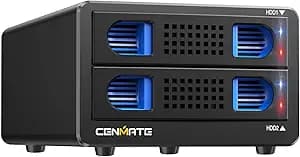
CENMATE Aluminum 2 Bay Hard Drive RAID Enclosure with Cooling Fan for 2.5“/3.5" SATA HDD/SSD with USB A/C 3.0, Tool-Free HDD Enclosure, 4 Modes
Description
【Reliable External Storage System for Individuals and business】The 3.5 hard drive enclosure supports 2.5/3.5 inches HDD and SSD, max capacity up to 20TB for each hard drive, it's a ideal external hard drive enclosure for personal or enterprise using.Save space on your desktop or laptop.; 【4 Raid Modes】!!!NOTE:Press and hold the "Reset" button for 5 seconds after reset the RAID array!!!This raid enclosure supports 4 RAID Modes(RAID 0, RAID 1, Normal, JBOD).Designing RAID may result in data loss.MAC OS no Raid software.; 【No heat】The 2 bay hard drive reader built in Aluminum-Alloy materials and 2 inch Fan.Maximize the security of your data.NOTE:Fan noise is around 40-50 decibels, not recommended if you are very sensitive to noise.; 【Up to 5Gbps】This dual bay raid enclosure equips with JMS561 chip and USB 3.0 output interface, Max 5Gbps under UASP control.; 【Wide Compatibility, Plug and Play】Equipped with USB A/C 3.0 Cable.Compatible with Windows 7 and above, Mac 9.1 and above, Linux.Plug and play, no fuss, no muss.; 【Quality Assurance】Cenmate provides technical support.If you have any questions about the product, please don't hesitate to contact us, reply and solve your problem within 24 hours.
Compare the trade-offs
Similar products, side by side
A random selection of analyzed products from the same category. Different products are not necessarily interchangeable.

CENMATE Aluminum 3 Bay Hard Drive Enclosure with Cooling Fan for 2.5“/3.5" SATA HDD/SSD with USB A/C 3.0, Support Hot Swappable, Tool-Free HDD Enclosure, DAS(NO RAID/NAS)

USB 3.0 to SATA IDE Adapter Hard Drive Reader, USB + Type C to External Hard Drive Disk HDD Converter Kit for Universal 2.5" 3.5" IDE HDD, 2.5" SSD, with 12V/2A Power Adapter

CENMATE Aluminum 4 Bay Hard Drive RAID Enclosure with Cooling Fan for 2.5/3.5" SATA HDD/SSD with USB A/C 3.0+eSATA Cable, 3.5 Hard Drive Reader Supports 80TB Capacity, 8 RAID Modes, DAS(NO NAS)
One less thing to search
Before you buy: quick questions
Is the fan really loud, and can it be replaced or turned off?
Many users on forums like Reddit mention the cooling fan is audible, comparing it to a standard PC case fan. It's always-on to ensure your drives stay cool, which is great for longevity but something to consider for very quiet environments. The fan is a standard size and can be replaced by a technically inclined user, but doing so would void the warranty.
How easy is it to set up the different RAID modes? Is it truly "tool-free"?
The drive bays are 100% tool-free—you just slide your 2.5" or 3.5" SATA drives in and lock the clips. Setting up RAID modes (JBOD, RAID 0, RAID 1, etc.) is done via a physical switch on the back. Crucially, switching modes will require reformatting your drives, erasing all data. We recommend backing up first and consulting the manual for the mode that best fits your need for speed or redundancy.
What are the most common uses for this enclosure? Is it good for a Plex server?
It's a hit with media enthusiasts and DIYers! The most popular uses are: 1) Creating a large, fast storage pool for video editing projects (RAID 0), 2) Setting up an automatic backup mirror (RAID 1), and 3) Building a high-capacity, directly-attached storage for media servers like Plex or Emby. Its cooling performance makes it reliable for 24/7 operation in these scenarios.
I'm concerned about reliability. What's your experience with the power supply and build quality?
The vast majority of users report solid, reliable performance. The aluminum body aids in heat dissipation. The included power supply is adequate for standard operation, though a small number of tech reviewers suggest it can feel warm. For absolute peace of mind during continuous use, some power users opt for a higher-wattage branded adapter. Our warranty covers any defects in materials or workmanship.
Should I buy this, or spend more on a 2-bay NAS like Synology?
It depends on your needs! This CENMATE enclosure is a fantastic direct-attached storage (DAS) device—it plugs directly into one computer via USB. It's simpler and more cost-effective for expanding local storage. A NAS (like Synology) is a network device, letting multiple users/devices access files over your Wi-Fi/Ethernet, and includes extra software for apps, cloud sync, and more. Choose this if you want fast, simple storage for one primary computer.
From a similar, more-reviewed product in this category: CENMATE Aluminum 4 Bay Hard Drive RAID Enclosure with Cooling Fan for 2.5/3.5" SATA HDD/SSD with USB A/C 3.0+eSATA Cable, 3.5 Hard Drive Reader Supports 80TB Capacity, 8 RAID Modes, DAS(NO NAS)
How many drives can this enclosure hold and what is the maximum total capacity?
It supports up to 4 drives (2.5/3.5" HDD or SSD) with a maximum capacity of 80TB, which is 20TB per drive.
Is the fan noisy?
The manufacturer states fan noise is around 40-50 decibels and does not recommend it if you are very sensitive to noise, though some reviewers found it quiet enough for a home theater room while others noted it is a little loud.
How do I switch between RAID modes?
Disconnect the power, use a screwdriver to toggle the paddle to the corresponding mode, press and hold the reset button, turn on the power, and hold reset for ten seconds; note that when replacing RAID you must go back to NORMAL first, and designing RAID may result in data loss.
Is it easy to set up and is it compatible with my drives?
Reviewers report it is easy to set up and plug and play, with one noting it worked immediately after moving drives from another enclosure and setting the dip switches to RAID 10, and another confirming compatibility with shucked 20TB WD Easystore drives.
Does the eSATA port support hot-swapping or a SATA-to-eSATA adapter?
No, the eSATA port does not support a computer's SATA-to-eSATA adapter and hot-swapping is not supported; the computer's eSATA port must support RAID functionality to access multiple drive bays, otherwise only one bay can be accessed.
Answers are limited to the manufacturer's listing and the reviews we analysed. Questions those sources cannot support are not answered here.
Transparent by design